Ecommerce code freeze: retail sites lock just before holiday shoppers start searching
Part of: Product feed optimization

The timing is the problem. When the retail teams we speak with tell us their freeze dates, the start usually falls between mid-October and the first week of November. A few lock up in September or early October, and almost all of them thaw in January. Shopper demand runs the other way. In 2025, 89% of the September to December US searches for “christmas gift ideas” came in November and December, and across eight common gift and holiday terms that share ran from 83% to 97% (Ahrefs monthly volume estimates, US, pulled 20 October 2026). So the site stops changing just before most of the season’s searching starts.
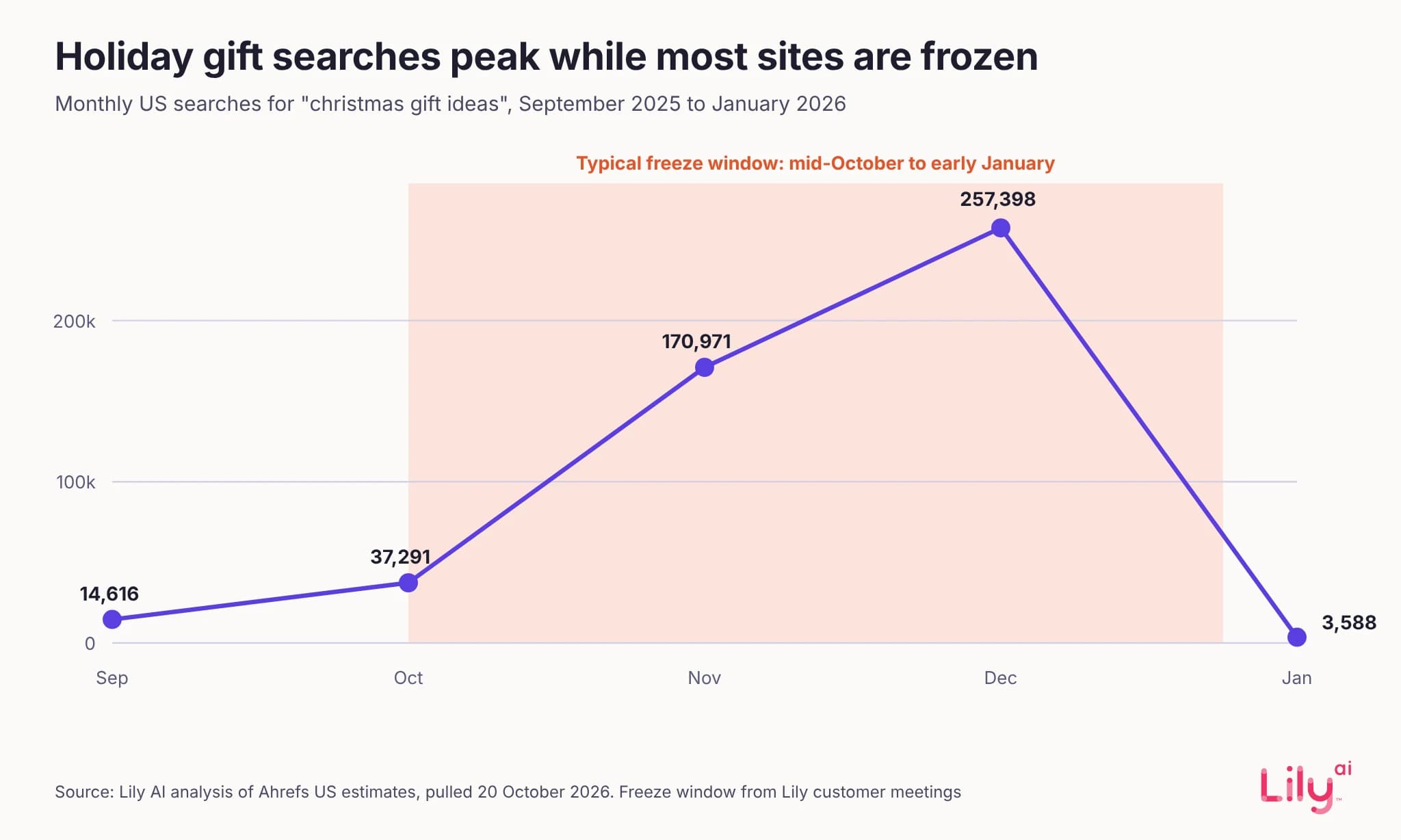
If your freeze has already started, you’re not too late. Every route in this guide works while the site is locked.
What does a code freeze lock?
A freeze is risk management. During peak trading a broken page costs more than most improvements earn, so nothing ships to the site unless it has to. The details vary by retailer, but a freeze usually covers:
- Site code and templates, including the product page layout and the structured data on it
- Checkout, tracking tags and analytics changes
- Site search and merchandising changes that run through a vendor’s implementation team
- Integrations and apps that need new code
One platform date has already landed inside most freezes. Shopify’s Global Catalog REST API stopped serving traffic on 2 November 2026, and any app or agent integration still calling it has to move to Global Catalog MCP, which is a code change (Shopify developer changelog, 9 October 2026). If one of yours hasn’t moved, it needs an exception to your freeze, because it isn’t getting answers today.
What can still change without a deploy?
Shopping platforms read your products through feeds and catalogs that sit outside the site’s release pipeline. Among the retail teams we speak with, offsite feed work usually carries on through the freeze while product page and SEO work stops. Some freeze feeds as well, so check your own policy before you rely on anything below. Every platform detail here comes from the platforms’ own help pages, read on 16 November 2026.
Google Merchant Center
Supplemental data sources add or update attributes on products that already exist in your primary data source. They can’t add or remove products. You create one under Data sources, on the Supplemental sources tab, from a file, a Google Sheets template or the API, and the tab only appears once the Advanced data source management add-on is switched on. Product IDs must match the primary source exactly (Google). Google recommends this route for conversational attributes such as question_and_answer (Google).
Attribute rules transform values inside Merchant Center, for example adding a brand to the start of a title that’s missing one. You can try a draft with Test rules before it’s applied, then reprocess the data source (Google).
Many primary feeds are generated by the commerce platform, so changing how the primary feed is built can be a code change in its own right. Supplemental sources and rules sit on top of the primary feed and avoid that. For why the feed is the one input automation hasn’t commoditized, see our CEO Purva Gupta’s essay Automation commoditized everything except your feed.
Timing still applies. Google asks for new product data 3 to 5 business days before a sale event and no earlier than 30 days ahead, and for promotions at least 24 hours before they start, with review that can take up to 72 hours (Google). For Black Friday on 27 November, Google’s guidance puts new product data at roughly 20 to 24 November and a promotion’s submission no later than 24 November.
Meta catalog
Meta’s supplementary feeds modify existing catalog data without changing the underlying data source, and they can’t create or delete items. Scheduled feeds run no more often than once an hour, as replace or update schedules, and the Batch API handles near real-time changes, mostly to stock. Uploads run asynchronously, so an item can fail without anyone noticing. Check Diagnostics in Commerce Manager after each upload (Meta catalog overview; Meta product feeds).
Shopify
Editing a product’s title, description or other fields in the Shopify admin needs no deploy. But Shopify says the details you add to a product affect how it’s displayed to customers (Shopify). Those fields are your storefront, so a content freeze usually covers them.
Metafields work differently. A metafield reaches the storefront only once it’s connected to your theme, through the theme editor or theme code (Shopify). Shopify Catalog Mapping, under Sales channels then Agentic, lets you choose the source, including a product metafield, for the title and description that Shopify Catalog sends to AI channels. Category can’t be mapped (Shopify). Those channels include ChatGPT, Google AI Mode and Gemini, Microsoft Copilot and Meta (Shopify). So a description written for agents, held in a metafield and mapped there, can change what those channels read while the product page stays as it is, as long as it describes the same product the page shows. Shopify says mapping changes are processed with a delay, and that its preview isn’t an exact indicator of what AI channels will show.
The freeze table: what you can still change
| Change | Where | Needs a deploy? | How to check it worked |
|---|---|---|---|
| Product page layout, templates, theme code or on-page structured data | Site or theme | Yes | Hold it for January |
| Product highlights, product details or Q&A for Google | Merchant Center supplemental data source | No | Products, All products: open the item and check the value and its source; processing can take up to 15 minutes |
| Additions to titles for Google | Merchant Center attribute rules | No | Test rules first, then check the item after the data source reprocesses |
| Price or sale price | Feed and site together | Only if your site needs one to change a price | Needs attention tab; a feed price that differs from the landing page or checkout gets the product disapproved |
| Holiday promotion | Merchant Center promotions | No | Submit at least 24 hours ahead; review can take up to 72 hours |
| Descriptive fields in the Meta catalog | Commerce Manager supplementary feed | No | Diagnostics after each upload, then spot-check the items |
| Stock and availability on Meta | Batch API or an update schedule | No | Diagnostics and the upload session’s errors |
| What AI channels read on Shopify | Product metafield mapped in Catalog Mapping (title and description) | No | Catalog Mapping’s Preview tab and the search preview under Agentic, both directional |
| Product title or description on Shopify | Shopify admin | No, but the live page changes | The live product page |
| Apps or agent integrations on Shopify’s Global Catalog REST API | Code | Yes | The old API stopped serving traffic on 2 November; move to Global Catalog MCP |
Sources: Google Merchant Center help on product status (Google) and price (Google); Meta and Shopify pages as linked above; Shopify’s agentic storefronts home (Shopify). All read 16 November 2026.
Feed changes skip release review, so set rules for them
Most freeze policies were written for code, and feeds often fall outside them simply because they never pass through a release. That cuts both ways. The changes that matter most in November can still ship, and nobody reviews them the way a release gets reviewed. We’d settle three questions before anyone touches product data during the freeze.
Will the feed still match the page?
Google disapproves a product when the price or availability in your feed doesn’t match the landing page and checkout (Google price; Google availability). If changing a price on your site needs a deploy, changing it only in the feed creates exactly that mismatch. So price and availability changes stay tied to whatever your site can do during the freeze. Our misrepresentation checklist covers where repeated mismatches can lead.
Does it describe the product the page shows?
A highlight or product detail added during the freeze should describe the same product the page shows, in words the page wouldn’t contradict. Shoppers and ad platforms see both, and a catalog that says more than the frozen page invites a mismatch.
Who can change what, and where is it recorded?
A release goes through review. A supplemental source takes effect once Merchant Center processes the update, which Google says can take up to 15 minutes. Agree who may change product data during the freeze, which fields stay open (descriptive attributes and Q&A) and which stay closed (price and availability without a matching site change), the last date for anything Google must review, and where each change is logged. We keep freeze-season changes in one dedicated supplemental source, because it makes them easy to audit and easy to roll back in January. To see where your product data falls short, our free feed audit shows the gaps in a sample of up to 20 products from your Merchant Center feed.
What this does not show
- “The retail teams we speak with” describes our own recorded meetings with retail teams, not a survey. Freeze rules differ by retailer and by year.
- Ahrefs volumes are modeled estimates, and 2026 may not follow 2025 exactly.
- Platform help pages carry no update dates and can change. Some commerce setups build feeds from site code, so check how yours is built before assuming a change needs no deploy.
Where Lily Max fits
Lily Max delivers its changes through the routes this guide describes, as supplemental data in Merchant Center and as updates to the Meta catalog, and a person approves every change before it ships. That means enrichment can carry on while the site is frozen, without a release, and each change can be checked with the platform tools in the table above. Changes that need a stable season to measure can be prepared now and tested against a control group of products once trading settles in January. See how Lily Max works.
[Book a demo](https://www.lily.ai/book-a-demo) to map what your catalog can still change during your freeze.
Frequently asked questions
What is a code freeze in ecommerce?
A code freeze is a period when a retailer stops deploying changes to its website to protect peak trading, usually from mid-October or early November into January. It covers site code, templates and integrations, and often product page content.
Can I update my Google Shopping feed during a code freeze?
Usually, yes. Merchant Center supplemental data sources and attribute rules change product data without a site deploy, but price and availability must still match the live landing page.
Does a Meta catalog update need a code deploy?
Usually not. Supplementary feeds, scheduled feed updates and the Batch API all change catalog data inside Meta, and Meta says supplementary feeds leave the underlying data source unchanged.
Do Shopify metafield changes show on my store?
Only once the metafield is connected to your theme. A metafield mapped through Shopify Catalog Mapping can change the title or description AI channels read while the product page stays the same.
When should holiday product data reach Google Merchant Center?
Google asks for new product data 3 to 5 business days before a sale event and no earlier than 30 days ahead. Promotions should go in at least 24 hours before they start, because review can take up to 72 hours.

See Lily in action
Book a personalized demo and see how Lily can grow your retail revenue.
Related Blogs
Meta Commerce Manager in 2026: the catalog fields Meta's AI reads
Meta paused the terms that would let it crawl the sites behind your catalog. The Commerce Manager fields that matter, where they drift, what to check.
By Lily AI
Meta Muse holiday checklist: 10 fixes before Black Friday
Ten fixes retailers can make before Black Friday so Meta Muse can find, read and recommend their products, from gift facts to checkout and order tracking.
By Lily AI
How Meta Muse finds and picks products: a guide for retailers
Meta Muse finds products in three stages. See what it reads, why found is not the same as picked, and what retailers should fix before the holiday rush.
By Lily AI
Product feed management: when a feed tool is enough and when it isn’t
Product feed management explained: what feed tools do well, where the product content itself is the problem, and how to decide what your catalog needs.
By Lily AI
Google AI Max writes your ads from your site and your product feed
Google AI Max picks searches, writes ad text and chooses landing pages from your site and Merchant Center feed. What it reads and what to check first.
By Lily AI
ChatGPT product feed optimization: the fields that decide what gets shown
ChatGPT product feed optimization, field by field: what OpenAI requires, which optional fields match shopper questions, and what to write in each one.
By Lily AI