Google AI Max writes your ads from your site and your product feed
Part of: Product feed optimization
For most of the history of search ads, the advertiser chose the keywords, wrote the ad and picked the page. With AI Max on, Google makes those calls, and an AI Max experiment can even be set to switch the feature on by itself if results look favorable. What stays with you is the material Google reads. We took every Google fact below from Google’s own help pages and blog, read on 16 November 2026.
What is Google AI Max?
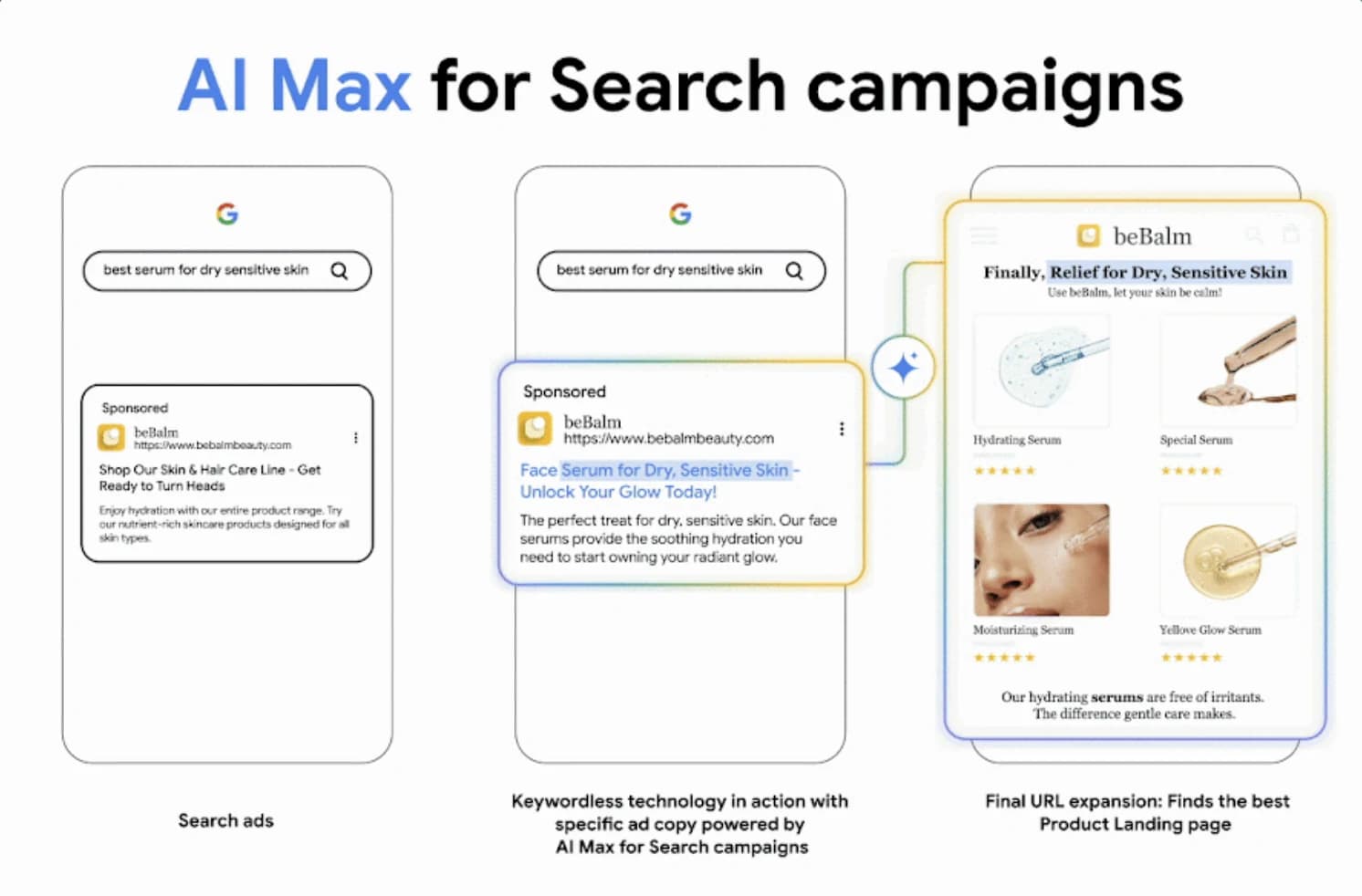
AI Max is an optimization layer that sits inside an existing Search campaign. Google calls it a suite of targeting and creative features, and switching it on turns on three of them by default (About AI Max for Search campaigns; How AI Max works):
- Search term matching reaches searches beyond your keyword list. It uses broad match plus asset-based and landing page-based matching, and it can enter searches with no keyword behind them, which Google calls keywordless.
- Text customization writes headlines and descriptions with generative AI, working from your existing ads, your landing page copy and your assets.
- Final URL expansion sends the click to whichever page on your domain Google predicts will perform best, limited to pages relevant to the search and to the ad group’s theme. It only works when text customization is switched on.
Google’s setup page says the features need a conversion-based Smart Bidding strategy to work well, and its FAQ says search term matching won’t run with Manual CPC (Set up AI Max; AI Max FAQ).
AI Max for Shopping campaigns
Google announced AI Max for Shopping on 30 April 2026 (Google), and its help page still calls it “a beta suite of features”. In Shopping, text customization treats your Merchant Center feed as a product database. It pulls out attributes such as “waterproof” and rewrites product titles to fit the search. Final URL expansion crawls your site for other commercial pages, such as category, new arrivals and editorial pages, and can serve text ads that carry product images from the feed. For now, text customization works only on English feeds, and final URL expansion needs a target ROAS bid strategy (About AI Max for Shopping campaigns).
| AI Max feature | What it reads in Search campaigns | What it reads in Shopping campaigns (beta) | What it decides |
|---|---|---|---|
| Search term matching | Your keywords, ads and landing pages | Not detailed by Google; expanded searches are labeled AI Max in the search terms report | Which searches your ads enter |
| Text customization | Existing ads, landing page copy, assets, keywords and content from your domain | Merchant Center feed content and the attributes it extracts, plus website content | What the headline, description or product title says |
| Final URL expansion | Pages on your domain relevant to the search and the ad group | Category, new arrivals and editorial pages found by crawling your site | Where the shopper lands |
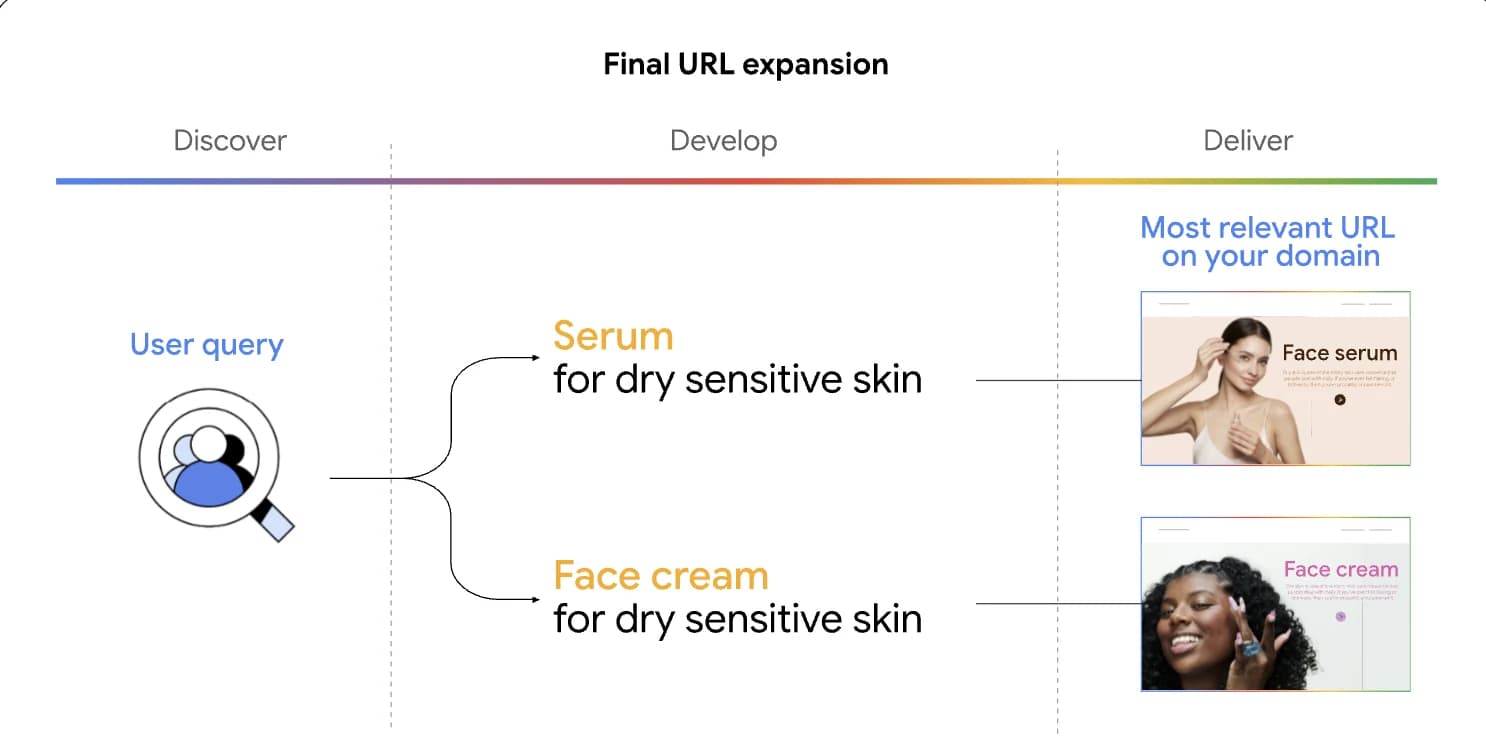
Google’s page on text customization lists its inputs as “your domain, landing page, existing ads, and keywords in your ad group” (About text customization).
What AI Max reads from your website and product information
Every feature in that table works from material you’ve already published, and it reads that material literally.
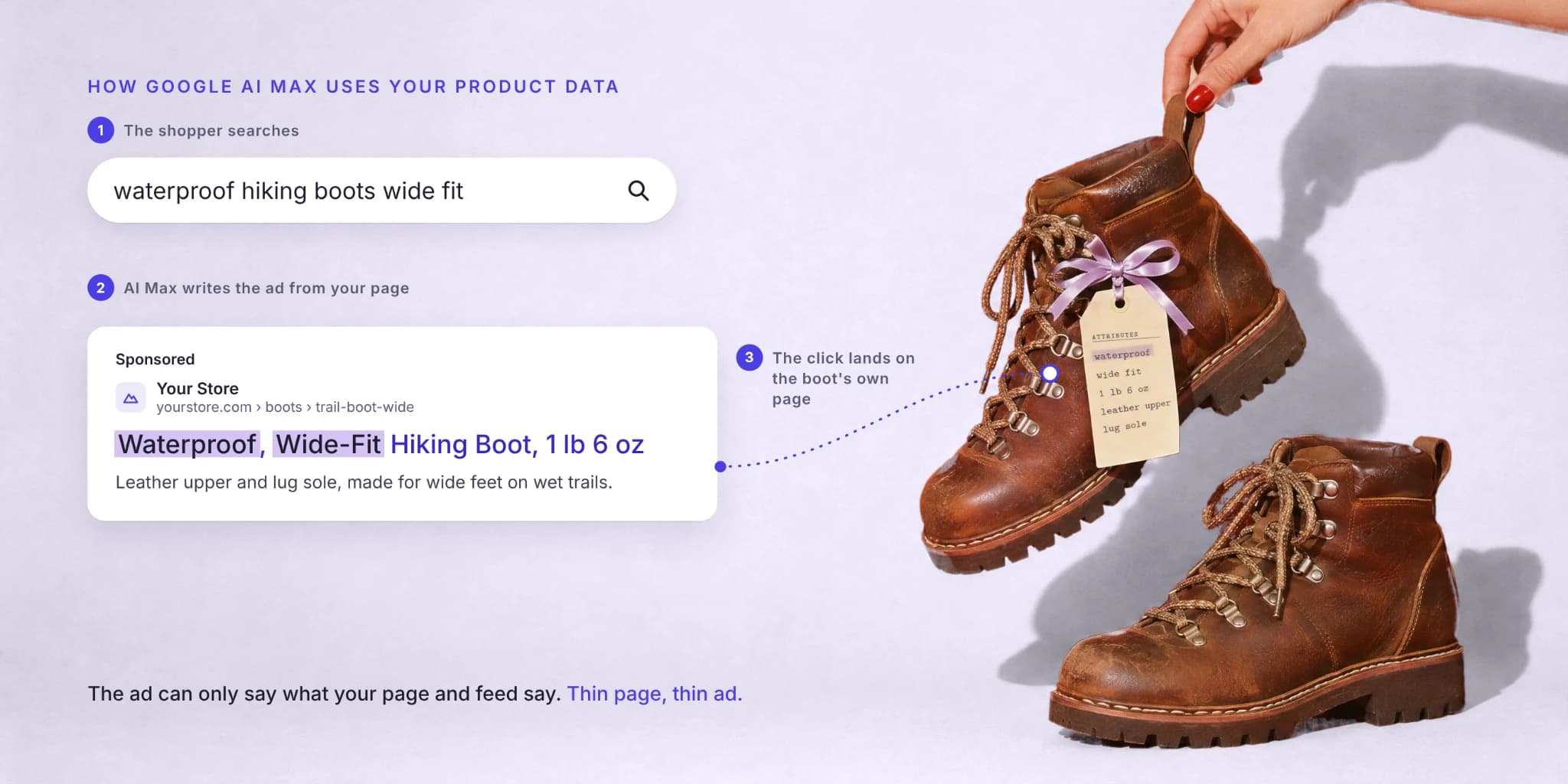
Google’s Shopping help page shows how. Its example is a feed title, “Mens Shoe SKU 123”, that AI Max rewrites as “Men’s Waterproof Hiking Boot”. Google says customized titles come from feed content, the attributes extracted from it and website content. So the rewrite only works because someone wrote down that the boot keeps water out and is built for hiking. There’s a guardrail, too: a customized title serves only when Google predicts it will beat the title you uploaded. Your original title is the bar the rewrite has to clear.
The same goes for Search. Text customization writes from landing page copy, meaning the words on the page, so a fit note that lives only inside a size chart image gives AI Max nothing to write from. And because search term matching also learns from landing pages, what a page says in text helps decide which searches the ad enters in the first place.
Why thin product pages produce mismatched ads
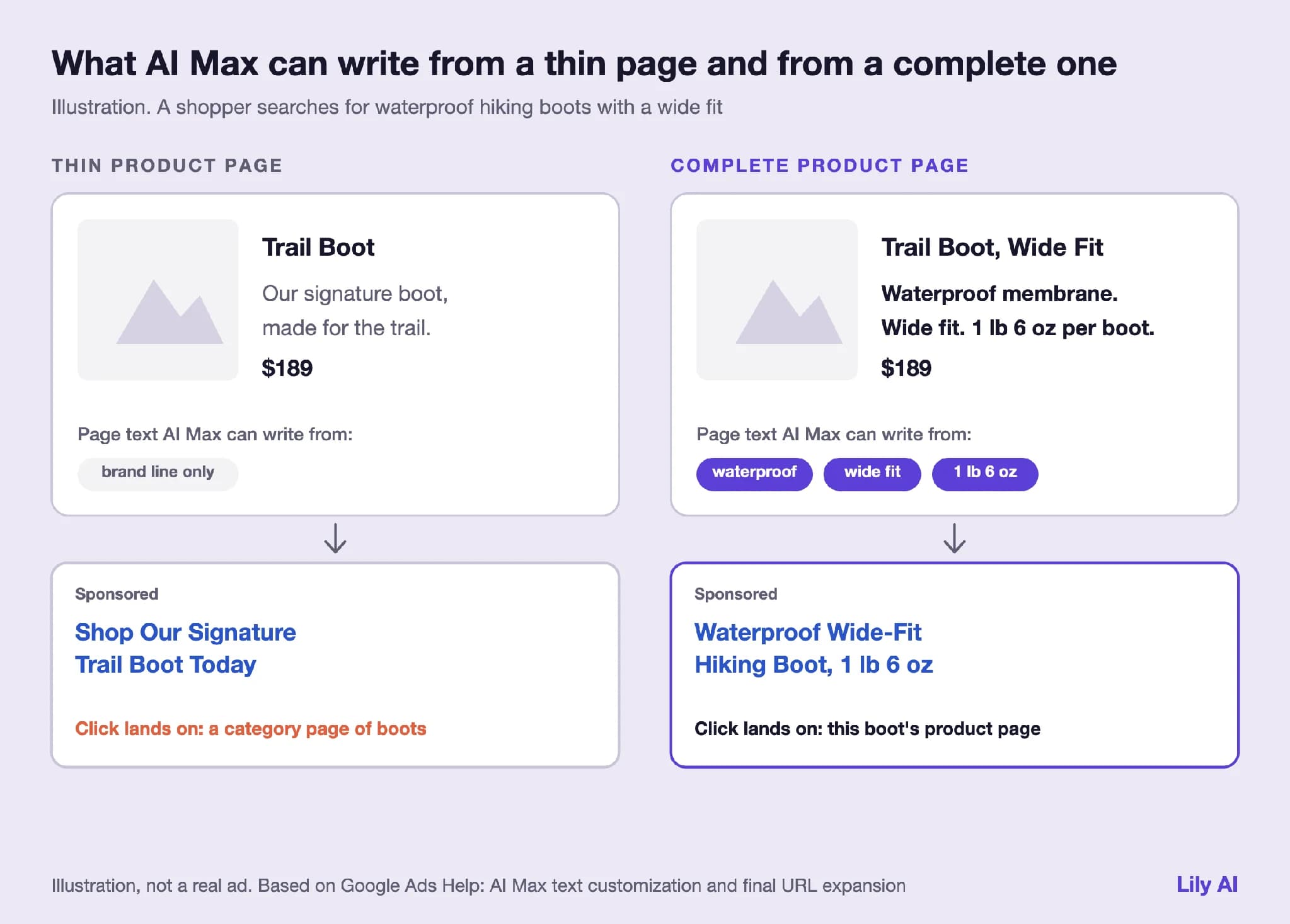
A thin product page says little in text beyond the product name, the price and a line of brand copy. Two things can then go wrong, and both follow from how Google describes the features. Google doesn’t publish how it weighs one page against another, so you can’t predict either one product by product. You can check for both, though.
The click lands on a page that doesn’t answer the search
Final URL expansion chooses among the pages on your domain that are relevant to the search. Say a shopper searches for waterproof hiking boots with a wide fit, and the product page for your best wide-fit waterproof boot never says “waterproof” or “wide” in its text. A category page or a buying guide that does use those words can look more relevant than the product page that actually sells the answer. The shopper asked about one boot and lands on a list.
The ad answers a specific search with a general claim
Text customization writes from what the page says. If the copy reads “our signature boot, made for the trail”, that’s all the raw material there is, and the generated headline has little to say about water, width or weight. The facts that would match the search sit in the product team’s spec sheet, somewhere AI Max never looks.
To check your own records, our free feed audit shows the gaps in a sample of up to 20 products from your Merchant Center feed.
What to check before you turn on AI Max
| Check | Why it matters | Where to look |
|---|---|---|
| Top landing pages state shoppers’ facts in text: material, fit, use, care | Text customization writes from page copy, and final URL expansion judges relevance from it | Pages behind your top ad groups |
| Feed titles and attributes carry the same facts (Shopping) | AI Max for Shopping rewrites titles from feed content, English feeds only | Merchant Center |
| Pages that should never take paid traffic are excluded | Final URL expansion can send clicks to any relevant page on your domain | URL exclusions (campaign), URL inclusions (ad group) |
| Tracking templates work with expanded pages | Google warns dynamic URLs can break expanded pages with a 404 error | Tracking settings, using {lpurl} as Google recommends |
| Bidding and budget fit | Conversion-based Smart Bidding is needed, Shopping’s final URL expansion needs target ROAS, and Google says AI Max isn’t effective when budget-limited | Campaign settings |
| The campaign can still run an AI Max experiment | Closed if text customization is already on, or with a shared budget, a portfolio bid strategy, bidding exploration, Display network targeting or another active experiment | Experiments page |
| Brand and wording guardrails are set | Brand exclusions and inclusions, text guidelines; Shopping allows up to 25 term exclusions and 40 messaging restrictions per campaign | Campaign settings |
| You know which reports to read | The search terms report labels AI Max matches and their source, the landing pages report shows AI-selected pages, and Shopping adds a product titles report | Reports |
The experiment row is the one that catches teams out. Text customization is the new name for automatically created assets, so a campaign that had those switched on is shut out of Google’s AI Max experiment flow (About AI Max experiments). Google’s text customization page adds that, starting in September 2026, campaigns using it “will automatically be upgraded to AI Max” (About text customization). If you want a clean test, run it on a campaign that has never had text customization switched on.
The finding most teams miss: Google’s AI Max uplift figure excludes retailers
Google’s main AI Max help page says advertisers that activate AI Max in Search campaigns typically see 14% more conversions or conversion value at a similar CPA or ROAS. The source note under that figure reads: Google internal data, 2025, for non-Retail advertisers (About AI Max for Search campaigns).
Google’s figure for retailers sits on the Shopping page instead. There, advertisers that activate AI Max for Shopping see 5% more conversions or conversion value on average at a similar CPA or ROAS, based on Google internal data, global, 2026, for retail advertisers (About AI Max for Shopping campaigns). Neither note gives a method or a sample, and the two figures cover different campaign types in different years, so you can’t compare them directly. What they do show is that the headline Search number was never a retail number, and the Search help page offers retailers no figure of their own.
The experiment can apply itself
Google’s AI Max experiment runs inside your existing Search campaign. A share of the campaign’s traffic keeps AI Max off as the control, and the rest runs with it on. During setup you can tick “Apply your experiment changes if results are favorable”, and the AI Max page doesn’t say what favorable means (About AI Max experiments).
The closest published definition is in Google’s FAQ for Shopping experiments, which sets it out by bid strategy. Under target ROAS bidding, an experiment is applied when the trial arm’s conversion value and its ROAS are both higher than the control’s, and the answer never mentions statistical significance. The same FAQ says auto-apply is on by default for new Shopping experiments, and that only experiments that reach the end date you set get applied (Experiments FAQs). Google’s experiment reports also use an 80% confidence interval by default unless you pick another (Monitor your experiments).
What the test is really grading
The trial arm writes its ads from your pages and feed and sends clicks to the pages it picks, so the experiment measures AI Max working on the content you have today. A retailer with thin pages can watch the trial lose, decide AI Max doesn’t suit its category, and never learn that the pages held it back. Or the trial can edge past the control on conversion value, apply itself, and lock in ads written from those same thin pages. Either way, the pages shaped the result.
If you want a verdict you can defend to finance, fix the product facts before the test starts. Then raise the confidence level above Google’s 80% default and keep everything else constant for the full window.
Google has been automating the operator’s decisions one at a time, and with auto-apply even the decision to adopt the automation can be made by its own test. As Purva Gupta argued in automation commoditized everything except your feed, the product input is the one thing no two brands share. The pages and listings AI Max reads are what’s left in the retailer’s hands.
What this does not show
- Google documents what AI Max reads, not how it weighs those inputs, so this guide can’t predict what any single page change will do to your results.
- The 14% and 5% figures are Google’s own, from internal data with no published method, sample or comparison design.
- AI Max for Shopping is in beta, and Google’s help pages carry no update dates and can change without notice. We read everything here on 16 November 2026.
Where Lily Max fits
Lily Max works on the material AI Max reads. It checks each product record against what shoppers search for in its category, writes the missing facts into the fields Google reads, such as feed attributes, titles and descriptions, and tests each change against a control group of products before it rolls out. A person approves every change. For an AI Max rollout, that order matters: your records are complete before the experiment starts, and you can measure the effect of the content separately from the effect of the automation. See how Lily Max works.
[Book a demo](https://www.lily.ai/book-a-demo) to see what AI Max would read in your catalog today.
Frequently asked questions
What is Google AI Max?
Does AI Max use my Merchant Center feed?
Can I stop AI Max from sending traffic to certain pages?
Do AI Max experiments apply automatically?
Is Google’s 14% AI Max figure a retail number?

See Lily in action
Book a personalized demo and see how Lily can grow your retail revenue.
Related Blogs
Product feed management: when a feed tool is enough and when it isn’t
Product feed management explained: what feed tools do well, where the product content itself is the problem, and how to decide what your catalog needs.
By Lily AI
Ecommerce code freeze: retail sites lock just before holiday shoppers start searching
Your code freeze locks the site as holiday searches peak. What still changes without a deploy in Merchant Center, Meta and Shopify, and how to check.
By Lily AI
Meta Commerce Manager in 2026: the catalog fields Meta's AI reads
Meta paused the terms that would let it crawl the sites behind your catalog. The Commerce Manager fields that matter, where they drift, what to check.
By Lily AI
ChatGPT product feed optimization: the fields that decide what gets shown
ChatGPT product feed optimization, field by field: what OpenAI requires, which optional fields match shopper questions, and what to write in each one.
By Lily AI
Google Shopping feed requirements: every field that matters in 2026
Google Shopping feed requirements for 2026: the seven required fields, when brand, GTIN, color and size apply, image rules, and fields that win searches.
By Lily AI
What actually goes in Google Merchant Center conversational attributes
What actually goes in Google Merchant Center conversational attributes: worked before-and-after values for apparel and home, plus where to mine them.
By Lily AI