Google Shopping feed requirements: every field that matters in 2026
Part of: Product feed optimization

Google Shopping requires seven attributes for every product: id, title, description, link, image link, availability and price. Brand, GTIN or MPN, condition and, for apparel, color, size, gender and age group become required in many cases. Meeting the requirements gets a product approved. The optional fields decide which searches it can match.
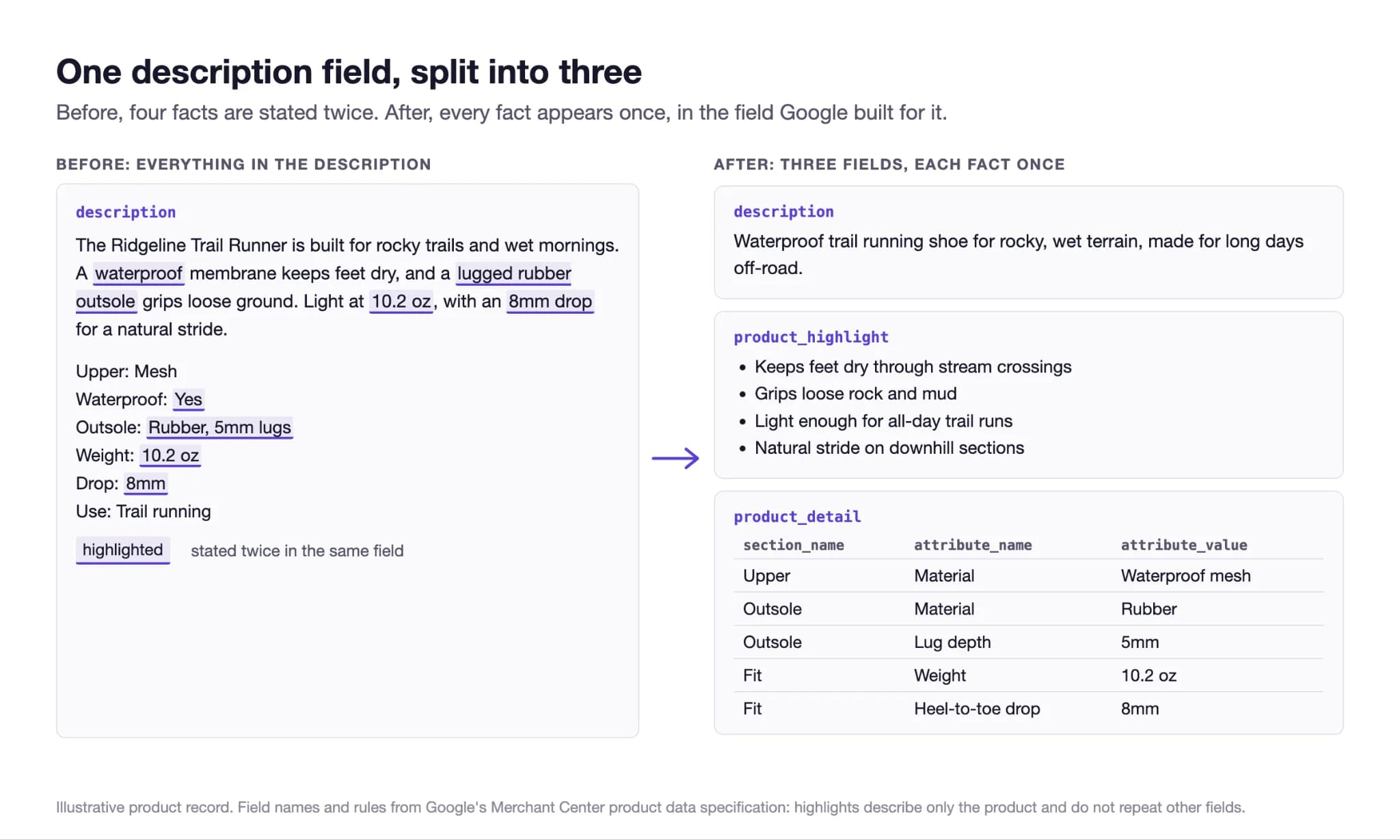
One sporting goods retailer's product descriptions looked fine. Every fact was correct, but every fact showed up twice: once in the copy, and again underneath as a list of colon-separated specs. Nobody did this on purpose. The feed build was merging two fields, the product description and the product highlights, into one, so Google got one long block of text with no structure. When Lily Max audited 20 of those products, moving each fact back into its own field took 344 attribute changes, including 226 entries in the product detail field.
That feed met every Google Shopping requirement, but most of what a shopper might ask about was stuck inside one paragraph. So this guide covers two things: the fields Google requires, and the fields that decide whether an approved product gets found. Every requirement below comes from Google's product data specification.
Which fields does Google Shopping require for every product?
Seven. Google says that if a required attribute is missing, the product “won't be able to serve in ads and free listings.”
The seven attributes Google requires for every product, with Google's limits and the gap we see most often.
| Attribute | What Google asks for | Common gap |
|---|---|---|
| id | A unique identifier for the product | IDs that change between feed builds |
| title (or structured_title) | The product name, up to 150 characters | The title differs from the landing page |
| description (or structured_description) | An accurate description, up to 5,000 characters | Specs pasted in a second time, or marketing copy with no facts |
| link | The product's landing page | A redirect, or a page that drops the selected variant |
| image_link | The main image, crawlable by Googlebot | Promotional text or watermarks on the image |
| availability | In stock, out of stock, preorder or backorder | Stock that lags the site |
| price | The price, matching the landing page | The feed and the page disagree during a sale |
When do brand, GTIN and MPN become required?
It depends on what you sell. Here's what Google's specification says:
Conditional requirements in Google's product data specification.
| Attribute | Required when | Notes |
|---|---|---|
| brand | For new products, except movies, books and music recordings | Own-brand products still need the brand name |
| gtin | Strongly recommended if the product has one | Google labels it “It Depends” |
| mpn | When the product has no manufacturer-assigned GTIN | Pairs with brand |
| identifier_exists | Set to “no” when a product has no GTIN, or no MPN-plus-brand pair, such as some apparel without a brand | Defaults to yes |
| condition | When the product is used or refurbished | Optional for new products |
| adult | When the product contains adult content |
What extra fields does apparel need?
Four, in the six markets Google lists: Brazil, France, Germany, Japan, the UK and the US.
Apparel requirements in Google's product data specification.
| Attribute | Required for |
|---|---|
| color | Apparel targeted to those six markets, any product sold in more than one color, and free listings for all Apparel & Accessories products |
| size | Clothing and Shoes targeted to those markets, and any product sold in more than one size |
| gender | Apparel targeted to those markets, and gender-specific products |
| age_group | Apparel targeted to those markets, and products with an assigned age group |
| item_group_id | Variants in those markets, and all variants in free listings |
Whether these apply depends on the product’s category, which Google assigns automatically (you can override it). If Google files a shirt outside apparel, it can miss requirements it should meet. Our guide to product taxonomy covers how categorization decides what a product is eligible for.
What are Google's image requirements?
Images need to be crawlable, accurate and free of promotional overlays. Google accepts JPEG, WebP, PNG, non-animated GIF, BMP and TIFF. Don't upscale images, and don't submit thumbnails, placeholders, generic images, promotional text, watermarks or borders. You can add up to 10 more images showing the product in use.
Two changes to plan for now:
- A higher minimum size. Google's specification announces a new minimum of 500 x 500 pixels for all product images, with enforcement beginning 31 January 2027. If your catalog has older, smaller images, you have until then to replace them.
- AI-generated images keep their labels. Images made with generative AI must keep their embedded metadata, such as the IPTC DigitalSourceType tag.
Which optional fields decide what a product matches?
The ones a shopper's question can be checked against. Google's specification now has several fields made for this:
Optional Google Shopping attributes that carry product facts, with Google's limits.
| Attribute | What it holds | Google's limits and rules |
|---|---|---|
| product_highlight | The most relevant highlights of the product | 2 to 100 highlights, up to 150 characters each. “Describe only the product itself,” and do not repeat the description |
| product_detail | Technical specifications as section, attribute name and attribute value | Up to 100 details. Confirmed values only; no price, shipping or company names |
| question_and_answer | Questions and answers about the product | Up to 30 pairs, 1,000 characters each |
| related_product | Parts, accessories and substitutes | Linked by GTIN or product ID |
| item_group_title | One shared title for a group of variants | Used together with item_group_id |
| product_type | Your own category path | Up to 750 characters; the first value organizes Shopping bidding and reporting |
| popularity_rank | Your own popularity score for the product, 0 to 100 | Your assessment, not user ratings |
| document_link | PDF documents such as manuals or spec sheets | Up to 5 PDFs you hold the rights to |
The sporting goods retailer from the start of this post already had every fact a shopper would need. It just didn't have each one in its own field. Specs belong in product highlights and product details, and Google's rules for both say not to repeat what's already in the description. So if your description repeats its specs underneath, or your feed merges two fields into one, you're working against how Google set these fields up.
For which attributes matter most by category, see product attributes. For the fields Google added for AI shopping surfaces, see Merchant Center conversational attributes.
Does an AI-written title need a different field?
Yes. Google's specification has separate attributes for text created with generative AI: structured_title and structured_description. Each takes the content (up to 150 characters for a title, 5,000 for a description) and an optional digital_source_type that marks it as algorithmically generated. Anything written without generative AI goes in the regular title and description. If you're using AI to write product copy across your catalog, check which field it's going into.
A Google Shopping feed requirements checklist
- Confirm all seven required attributes are present for every product, and that IDs stay stable between builds.
- Check brand, GTIN, MPN and identifier_exists against what each product actually has.
- For apparel in the six listed markets, fill color, size, gender, age group and item group ID.
- Compare feed price and availability against the landing page during your next sale.
- List any images under 500 x 500 pixels and replace them before 31 January 2027.
- Split specs out of descriptions into product_highlight and product_detail, and say each fact once.
- Add question_and_answer pairs for the questions your customer service team hears most.
- Write product_type paths that carry the detail Google's taxonomy lacks, with the first value set for bidding.
- Route AI-generated titles and descriptions to structured_title and structured_description.
- Re-read Google's specification each quarter. Requirements change, and the image rule above shows how much notice Google gives.
What we don't know yet
Meeting every requirement gets your product approved. It doesn't guarantee impressions, clicks or sales, and Google doesn't say how much each optional field counts in matching. The retailer at the top of this page had a compliant feed before any change was made. The only way to know if a restructured record earns more is a controlled test, which is how a feed change should be judged before it is rolled out.
What this means for your team
Most teams stop working on Merchant Center once a product is no longer disapproved. But Google's requirements are the minimum. A feed can pass all of them and still keep its best facts in one long description. The fields to work on next are the ones no error report will ever flag.
Lily Max goes through your Merchant Center feed field by field, puts each fact where Google reads it, and tests the changes against a control. Book a demo to see it in your catalog.
Frequently asked questions
What are the Google Shopping feed requirements?
Every product needs id, title, description, link, image link, availability and price. Brand, GTIN or MPN, and condition are required in some cases, and apparel in the US, UK, Brazil, France, Germany and Japan also needs color, size, gender and age group.
What happens if a required attribute is missing?
Google says the product won't be able to serve in ads and free listings. Check the affected products in Merchant Center, add the missing attribute, and resubmit the feed.
What is the minimum image size for Google Shopping?
Google's specification announces a new minimum of 500 x 500 pixels for all product images, with enforcement beginning 31 January 2027. Images also must not carry promotional text, watermarks or borders.
What is the difference between product_highlight and product_detail?
Product highlights are short statements of the most relevant features, from 2 to 100 of them at up to 150 characters each. Product details are technical specifications written as section, attribute name and attribute value.
Do AI-generated product titles go in a different field?
Yes. Google's specification uses structured_title and structured_description for text created with generative AI, with an optional field that marks it as algorithmically generated, and the ordinary title and description for other text.

See Lily in action
Book a personalized demo and see how Lily can grow your retail revenue.
Related Blogs
What actually goes in Google Merchant Center conversational attributes
What actually goes in Google Merchant Center conversational attributes: worked before-and-after values for apparel and home, plus where to mine them.
By Lily AI
Merchant Center suspended for misrepresentation: the checklist, in the order we find them
Merchant Center suspended for misrepresentation? Work this checklist in the order we find them, catch every mismatch, and appeal once with the whole fix.
By Lily AI
Meta Commerce Manager in 2026: Meta can crawl the page behind each product
From 20 November 2026, Meta's terms let it crawl the sites behind your catalog. The Commerce Manager fields that matter, where they drift, what to check.
By Lily AI
ChatGPT product feed optimization: the fields that decide what gets shown
ChatGPT product feed optimization, field by field: what OpenAI requires, which optional fields match shopper questions, and what to write in each one.
By Lily AI
Product feed optimization: what it is, what actually moves revenue, and how to prove it
Product feed optimization is a vocabulary problem. The three layers, the eight changes that move revenue, and how to prove the lift with a control.
By Lily AI
Google Universal Cart turns your price drops into shopper alerts
Google Universal Cart alerts US shoppers when saved items drop in price or restock. What it reads from your listings, and what to check before your freeze.
By Lily AI