Google Universal Cart turns your price drops into shopper alerts
Part of: AI discovery and agentic commerce

Google Universal Cart is a cart in Google Search, including AI Mode, and the Gemini app that holds products from many stores and alerts US shoppers when a saved item drops in price or comes back in stock. Those prices and stock levels come from Google's Shopping Graph, which retailers feed through Merchant Center and their product pages.
So two of the most basic fields in retail, price and availability, now reach shoppers as notifications. When you mark down a saved product, people who already showed interest can hear about it as soon as Google picks up the new price. That isn't always when your site changes it.
What is Google Universal Cart?
As of 20 October 2026, Google says Universal Cart is rolling out to US shoppers across Google Search and the Gemini app, starting 15 October (Google). Shoppers save products from different stores, for example from an answer in AI Mode, and the cart keeps them together. Google's launch post lists four things it does: price-drop and back-in-stock notifications, payment suggestions based on card perks through Google Wallet, relevant promo codes, and checkout with Google Pay at participating stores or a transfer to the merchant's own cart, with the merchant remaining the seller of record.
Google previewed the cart at I/O on 19 May 2026, promising YouTube and Gmail later, along with price history and a check for products that do not work together (Google). None of those appear in the October launch post, so plan without them for now.
Where does Universal Cart get product information?
The Shopping Graph
Google says the cart is built on the more than 60 billion continually refreshed listings in its Shopping Graph, according to its 15 October launch post. Google has described the Shopping Graph as built from what retailers share through Merchant Center and what retailers and brands publish across the web (Google, February 2023). So the price in a shopper's cart is whatever price Google currently has for your listing.
Merchant Center
The cart depends on price, sale_price and sale_price_effective_date, and on availability (in_stock, out_of_stock, preorder or backorder) with availability_date (Merchant Center Help). Merchant Center can also update price, sale price, availability and condition from the structured data on your product pages, a setting Google calls automations and turns on by default. The same help page warns that automations can miss products whose price or stock changes more than once a day, and that a mismatch can get a product disapproved instead of updated (Merchant Center Help). Our misrepresentation checklist shows how those disagreements turn into account problems.
Universal Commerce Protocol checkout
Checkout runs on the Universal Commerce Protocol (UCP), the open standard Google announced at NRF on 11 January 2026 (Google). Google Pay inside the cart is open to select merchants, chosen through an interest form in Merchant Center's UCP integration hub (Merchant Center Help), and only products with native_commerce(checkout_eligibility) set to TRUE show the Buy button, an attribute that defaults to FALSE (Google, updated 2 October 2026).
The alternative moves the shopper's items into your own site's cart through UCP's Cart API, a POST /carts call that needs UCP version 2026-04-08 or later and a profile at /.well-known/ucp, with no native checkout required (Google, updated 16 October 2026). Google's UCP FAQ adds that native checkout does not change how it ranks your offers, and that the merchant must check inventory in real time and return an out_of_stock error when an item sells out (Google, updated 16 October 2026).
What Universal Cart reads, field by field
Each thing a shopper sees in the cart, and its source as Google documented it on 20 October 2026.
| What the shopper sees | Where Google gets it | Field or source behind it | Who controls it |
|---|---|---|---|
| The product, its name and image | Shopping Graph | title, image_link and link, plus your product page | You |
| The current price | Shopping Graph | price, sale_price, sale_price_effective_date; automations read your page's structured data | You |
| A price-drop alert | A fall in the price Google holds for a saved item | The same price fields; Google has not published the threshold or timing | You set the price; Google decides when to notify |
| A back-in-stock alert | A change in the stock status Google holds | availability and availability_date; automations | You |
| Promo codes | Not stated by Google | Merchant Center promotions are the documented route for codes | Unknown for the cart |
| Card perks and payment suggestions | Google Wallet | The shopper's own cards | Google and the shopper |
| Google Pay checkout in the cart | UCP native checkout, select merchants | native_commerce(checkout_eligibility) set to TRUE | You, once Google selects you |
| Transfer to your site's cart | UCP Cart API | POST /carts and a profile at /.well-known/ucp | You |
| Returns and customer support | You, as seller of record | Return policy and support contact in Merchant Center, both required for UCP checkout | You |
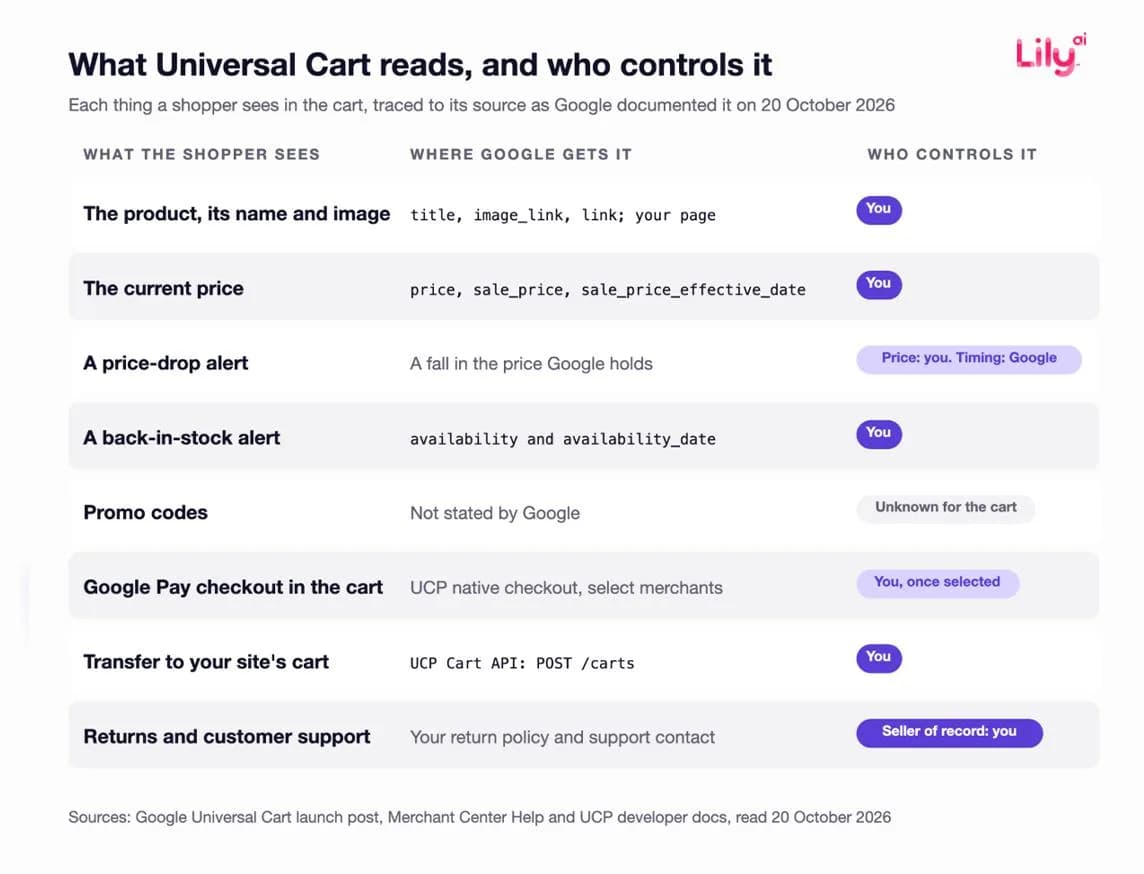
Why the rest of the listing still matters
Shoppers save products from AI Mode answers and Gemini conversations, and those answers draw on the whole listing. In testing with one apparel brand, Google reports that brand-submitted conversational attributes were used in 50% of relevant AI Mode product recommendations, without disclosing the method or sample (Google, 16 September 2026). Our product taxonomy guide covers how an AI assistant groups and retrieves products from the language in each record.
Inside the cart, Google only alerts shoppers about price drops and restocks. So if someone has saved similar products from two stores, price is what they keep seeing change. If your listing only says what the product is and what it costs, a machine will compare it on price alone. The facts that make it worth paying more only count if they're written where Google reads them.
Your markdown calendar now decides when shoppers get alerts
On launch day, Google also published a holiday guide to when discounts tend to peak, built from last year's promotional patterns, Search trends and discount data across US merchants on Google (Google, 15 October 2026). It tells shoppers to buy fragrance within the first two weeks after Black Friday weekend, to hold off on handbags until mid or late December, and to expect the deepest cuts on large suitcases and motorized tech toys in the last weeks of December.
So shoppers now have a reason to save a product in November and wait for the cart to tell them the price dropped. Every markdown on a saved product can turn into a notification, timed by when Google's data changes. Three documented rules decide that timing.
- Time zones. Merchant Center reads sale_price_effective_date as UTC when no offset is given (Merchant Center Help). A Black Friday sale entered as 2026-11-27T00:00/2026-11-30T23:59 starts at 7 pm Eastern on Thanksgiving, five hours before an Eastern-time site changes its prices, and ends just before 7 pm Eastern on Cyber Monday. For about five hours at each end, your feed and page disagree, and that kind of mismatch can get a product disapproved mid-sale.
- Frequent changes. Prices that change more than once a day can outrun automations, and Google points those products to the Merchant API.
- Lead times. Google asks for new product data 3 to 5 business days before a sale and no earlier than 30 days ahead, and for promotions at least 24 hours before they start, with review that can take up to 72 hours; it also warns that an item switched to in_stock can take up to 24 hours to show (Merchant Center Help).
Feed teams already know these rules. What's new is that shoppers feel them too: a sale price that lands five hours early, a restock that shows a day late or a disapproval in the middle of Cyber Week now shapes what a shopper who saved your product is told.
A Black Friday sale entered as 2026-11-27T00:00/2026-11-30T23:59, with no offset, against the same sale on an Eastern-time site.
| Feed (read as UTC) | Site (Eastern time) | |
|---|---|---|
| Sale starts | 7 pm Thursday 26 November (Thanksgiving) | Midnight, Friday 27 November |
| Sale ends | Just before 7 pm Monday 30 November (Cyber Monday) | 11:59 pm Monday 30 November |
Checks to make before your holiday freeze
Most freezes start early. In our recorded meetings with retail teams, most freeze dates fall between mid-October and the first week of November. If yours hasn't started yet, you still have time for these checks.
- Ask what your freeze covers. The cart's alerts run on Merchant Center data, so if your freeze also stops feed changes, the cart won't hear about your markdowns.
- Load sale data inside Google's window. For a sale starting Friday 27 November, Google's guidance puts new product data between 19 and 24 November and no earlier than 28 October. If your freeze covers feeds from early November, you only have the days between 28 October and the freeze.
- Write every holiday sale date with an offset. For an Eastern-time sale that is 2026-11-27T00:00-0500/2026-11-30T23:59-0500, because US clocks fall back on 1 November.
- Submit promotions by the end of Monday 23 November for a Black Friday start, which leaves more than the 72 hours Google says review can take.
- Send fast-changing products through the Merchant API if their price or stock will change more than once a day at peak.
- Decide on checkout. Set native_commerce(checkout_eligibility) on the products you want eligible for the Buy button, leaving out pre-orders, personalized and final-sale items and the other exclusions Google lists. On Shopify, the Google AI Mode and Gemini channel has direct checkout on by default for eligible US stores, so confirm the setting is the one you intend (Shopify Help).
- Write what the listing says beyond price. For your top holiday products, fill product highlights, product details and question-and-answer attributes with plain facts about who each product suits and what it is for. Our free feed audit shows the gaps in a sample of up to 20 products from your Merchant Center feed.
- Run the cart yourself. From a US account, save your 10 biggest holiday products to Universal Cart from AI Mode and the Gemini app, then compare the cart's prices and stock with your product pages and Merchant Center.
What we don't know yet
- Google has not published how the cart ranks items, times alerts or sources promo codes, what it does with a saved product that Merchant Center disapproves, what it offers stores without UCP, or whether fees apply. The timing risks above rest on Merchant Center's documented rules for the data the cart is built on.
- The freeze timing comes from Lily's recorded meetings with retail teams, not a survey, and freezes differ in what they cover.
- Google's 50% figure comes from a test with one brand, with no published method or sample.
- We're not claiming any Lily results in this post.
Where Lily Max fits
Lily Max works on everything in the listing except price. It scans a retailer's Merchant Center feed, product pages, schema and attributes for gaps, then writes titles, descriptions and attributes, including who a product suits and what it is for, into the fields Google reads, such as product highlights, product details and conversational attributes. Each change is tested against a control, and a person approves it before it rolls out across the catalog. Lily Max doesn't touch prices, promotions or stock. Those stay in your own systems, so the timing checks above are still on your team. See how Lily Max works.
Book a demo to see what your top holiday listings say beyond price.
Frequently asked questions
What is Google Universal Cart?
Universal Cart is a cart in Google Search, including AI Mode, and the Gemini app that holds products from many stores in one place. It alerts US shoppers to price drops and restocks on saved items and checks out through Google Pay or a transfer to the merchant's own cart.
Where does Universal Cart get prices and stock levels?
From Google's Shopping Graph, which draws on the product data retailers send through Merchant Center and what they publish on their sites. Merchant Center automations can also update price and availability from your product pages, though Google says they may miss prices that change more than once a day.
Do retailers need UCP for their products to appear in Universal Cart?
Google has not said that UCP is required for a product to be saved to the cart. UCP powers its two checkout paths: Google Pay inside the cart, which needs native_commerce(checkout_eligibility) set to TRUE and selection by Google, and a transfer to your own cart through UCP's Cart API.
Does native checkout improve ranking?
Google's UCP FAQ says choosing native checkout does not change how Google ranks your offers in product listings. It adds a direct purchase option, and the merchant stays seller of record.
Is Universal Cart available outside the US?
Universal Cart is rolling out in the US only, across Google Search and the Gemini app, from 15 October 2026. Merchant Center's UCP integration hub is also US-only for now, with Australia and Canada to follow next year.

See Lily in action
Book a personalized demo and see how Lily can grow your retail revenue.
Related Blogs
Muse vs Instinct: what personal shopping agents mean for retailers
Meta Muse and Instinct shop on a person's behalf. How the two personal agents find products and check out, and what retailers should fix in product data.
By Lily AI
WebMCP for ecommerce: AI assistants can now shop your store directly
WebMCP lets AI assistants search and shop your store directly, and Shopify and BigCommerce switched it on. What it is, what assistants read, how to check.
By Lily AI
Meta Muse holiday checklist: 10 fixes before Black Friday
Ten fixes retailers can make before Black Friday so Meta Muse can find, read and recommend their products, from gift facts to checkout and order tracking.
By Lily AI
How Meta Muse finds and picks products: a guide for retailers
Meta Muse finds products in three stages. See what it reads, why found is not the same as picked, and what retailers should fix before the holiday rush.
By Lily AI
Agentic commerce: what it is, what changed in 2026, and what a brand actually has to do
Agentic commerce is AI agents buying on a shopper's behalf. What changed in 2026, what an agent reads from your catalog, and what to fix before Q4.
By Lily AI
How AI Shopping Assistants Actually Pick Which Products to Recommend
AI shopping assistants retrieve before they rank. See what each surface reads from your product record, and which missing attributes disqualify you.
By Lily AI