WebMCP for ecommerce: AI assistants can now shop your store directly
Part of: AI discovery and agentic commerce

WebMCP is a proposed browser standard that lets a website give AI assistants ready-made actions, such as product search and add to cart, so they no longer have to click through pages like a person. Shopify switched it on for its standard online stores in August 2026, and BigCommerce turned it on by default for eligible stores on October 21.
Not many people noticed, but WebMCP is one of the bigger retail changes this year. Most brands never chose to let AI assistants shop their stores. Their platform turned it on for them. What an assistant can do there now depends on something you still control: your product data.
Here's what WebMCP is, which stores have it switched on, what an assistant reads when it shops, and how to check your own store before the holidays.
What is WebMCP?
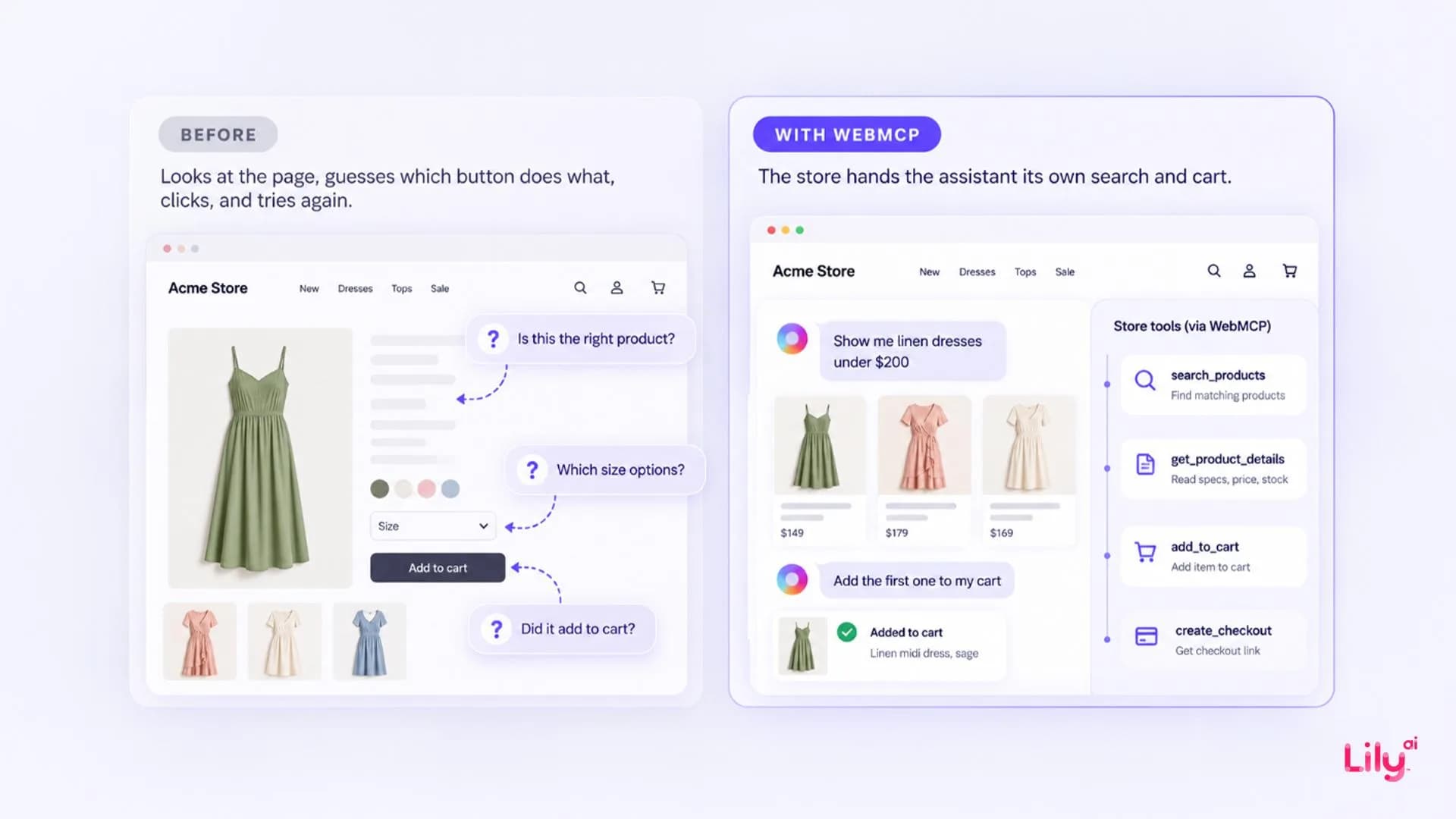
Until now, an AI assistant shopping on a website had to behave like a person with a mouse. Cloudflare, which delivers many online stores, describes how most shopping agents work: they read the page, “guess which button does what, click, and try again when they get it wrong.” A theme change, a cookie banner or a size drop-down could break the whole thing.
WebMCP removes the guesswork. The store tells the browser which actions it offers, like searching products or adding an item to the cart, what each action needs (a search phrase, a size, a maximum price) and what it returns. An assistant running in the shopper's browser calls those actions directly, inside the shopper's own session, so the cart it fills is the shopper's real cart.
WebMCP was first drafted in August 2025 by engineers from Google and Microsoft. It is published as a draft by the Web Machine Learning Community Group at the W3C, and the draft itself says it isn't a W3C Standard. Right now it works in Chromium-based browsers like Chrome and Edge, through early-preview programs.
Which stores have WebMCP switched on?
Two major store platforms have turned it on in the last three months. It came as part of the platform, so brands didn't have to start a project to get it.
| Platform | When | What is switched on | What the merchant does | Who completes checkout |
|---|---|---|---|---|
| Shopify, Liquid storefronts (its standard, theme-based online stores) | August 5, 2026 | Catalog search, product details, variants, cart, store policies and FAQs, handoff to checkout. Checkout tools added September 28, 2026 | Nothing. Shopify says “There's nothing to install or configure” | Shopify's checkout tools submit an order only after the buyer confirms |
| BigCommerce, Stencil storefronts and Catalyst storefronts hosted on Cloudflare | October 21, 2026 | WebMCP is on by default. The shopping actions (search, product details, related products, cart, checkout link) appear once Storefront MCP is switched on | Switch on Storefront MCP in Settings, under API and MCP. A settings menu also lets merchants switch the feature off | The shopper, on the store's own checkout |
Sources: Shopify developer changelog (August 5 and September 28, 2026); BigCommerce Dev Center, WebMCP; Cloudflare blog (October 21, 2026).
Stores built another way can add WebMCP too. Shopify's Hydrogen storefronts load the tools by default from the 2026-10 version, and BigCommerce enables custom headless stores on Cloudflare through its support team. On the two platforms above, though, it just showed up.
What an AI assistant does on a WebMCP store
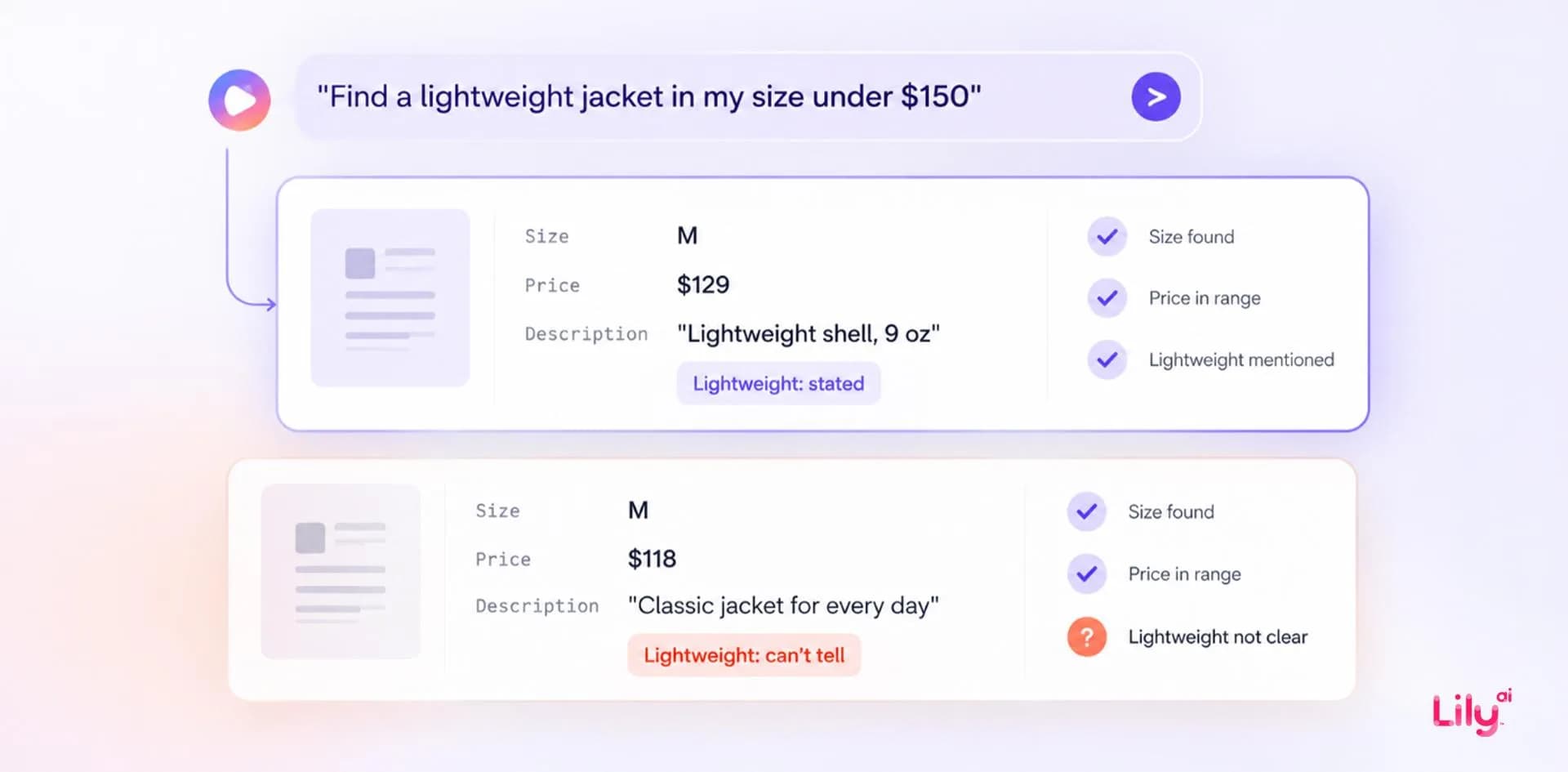
BigCommerce's announcement gives a shopper's request as its example: “find a lightweight jacket in my size under $150.” On a WebMCP store, the assistant handles it in three steps.
- It calls the store's search action with the shopper's words, their size and a maximum price of $150.
- The store sends back the products that match, with their details, straight from its catalog.
- The assistant picks one, adds it to the cart and hands the shopper a link to checkout, where the shopper reviews the order and pays.
Step 2 is where your product data comes in. The assistant only knows what the store's search and product details send back, and all of that comes from your product data. Every store fills in size and price. But whether a jacket is lightweight only shows up if someone wrote it in the title, description or an attribute. If the listing never says so, the jacket may not come back at all, and the assistant won't know it exists.
Same with the questions holiday shoppers ask: who a gift is for, what it's for, the occasion. Google's product data specification has no standard field for occasion, recipient or activity, so those facts only exist if someone wrote them into the listing. For more on how assistants choose between the products they find, see How AI shopping assistants actually pick which products to recommend.
What WebMCP changes for retailers
Your product data does more of the selling
The assistant skips your homepage, campaign pages and filters, and goes straight to the product record. So fit, material, intended use and the right variant all need to be in that record, where the store's search and product details can return them. Our guide to product attributes and which ones each discovery surface reads covers what a good attribute looks like.
WebMCP is also one more reader of the record that already feeds Google Shopping, Meta catalogs and AI assistants. So a gap in that record now shows up on your own store too. We explain the one-record idea in One record, four readers.
You keep the checkout
On both platforms, the order goes through your own checkout. The assistant fills the cart, and the order is placed with your store like any other.
Turning it on is only the first step
Having it on by default means assistants can reach your store. Whether they find the right product depends on your settings (on BigCommerce, Storefront MCP) and on what your product data says. Browser support is still in preview, so you have some time to get ready before more shoppers start using it.
How to check your store before the holidays
- Find out whether it is on. On a Shopify Liquid storefront, it is. On BigCommerce, look under Settings, then API and MCP. On a custom build, ask your developers.
- Ask your store what shoppers ask. Take five real requests from your customers, in their words, such as “lightweight jacket for travel” or “gift for a dad who runs”, and type them into your own site search. An assistant doesn't take exactly that path, but it draws on the same catalog, so if the right product doesn't come back for you, treat that as a warning.
- Read five product records the way a machine does. Look at the title, description, attributes and variants. Does each record say what the product is made of, how it fits, what it is for and who it suits?
- Check variants and prices. The assistant builds the cart from your sizes, colors and prices, so they have to match what checkout shows.
- Run one priority product end to end. If your team has access to the browser preview, test one product from request to checkout link: right product, right variant, right price.
Where Lily Max fits
Lily Max works on the part you control: the product record. It finds what's missing or weak across your feed, product pages and attributes, then writes titles, descriptions and attributes in the words shoppers use. Each change is tested against a control group before it rolls out, and nothing goes live without your sign-off. See how Lily Max works.
See what an AI assistant can and can't find in your catalog. Book a Lily Max demo.
Frequently asked questions
What is WebMCP?
WebMCP is a proposed browser standard that lets a website offer AI assistants ready-made actions, such as product search and add to cart. The assistant calls those actions in the shopper's browser instead of clicking through pages.
Is WebMCP the same as MCP?
They are related. MCP, the Model Context Protocol, is an open standard for connecting AI applications to outside systems, while WebMCP brings the same idea into a web page, where the actions run in the browser inside the shopper's own session.
Do I need to do anything to turn on WebMCP?
On Shopify's standard Liquid storefronts, no: Shopify says there is nothing to install or configure. On BigCommerce, WebMCP is on by default for Stencil stores and for Catalyst stores hosted on Cloudflare, and the shopping actions appear once Storefront MCP is switched on in settings.
Can an AI assistant check out for a shopper through WebMCP?
On BigCommerce, the assistant hands back a checkout link and the shopper completes checkout on the store. Shopify's checkout tools let an assistant submit an order only after the buyer confirms, and hand control back when the buyer has to act, for example to verify a card.
Which browsers support WebMCP?
Chromium-based browsers, such as Chrome and Edge, through early-preview programs. Support is still in preview, so expect it to change.

See Lily in action
Book a personalized demo and see how Lily can grow your retail revenue.
Related Blogs
Muse vs Instinct: what personal shopping agents mean for retailers
Meta Muse and Instinct shop on a person's behalf. How the two personal agents find products and check out, and what retailers should fix in product data.
By Lily AI
How Meta Muse finds and picks products: a guide for retailers
Meta Muse finds products in three stages. See what it reads, why found is not the same as picked, and what retailers should fix before the holiday rush.
By Lily AI
Agentic commerce: what it is, what changed in 2026, and what a brand actually has to do
Agentic commerce is AI agents buying on a shopper's behalf. What changed in 2026, what an agent reads from your catalog, and what to fix before Q4.
By Lily AI
How AI Shopping Assistants Actually Pick Which Products to Recommend
AI shopping assistants retrieve before they rank. See what each surface reads from your product record, and which missing attributes disqualify you.
By Lily AI
Google Universal Cart turns your price drops into shopper alerts
Google Universal Cart alerts US shoppers when saved items drop in price or restock. What it reads from your listings, and what to check before your freeze.
By Lily AI
Meta Muse holiday checklist: 10 fixes before Black Friday
Ten fixes retailers can make before Black Friday so Meta Muse can find, read and recommend their products, from gift facts to checkout and order tracking.
By Lily AI