How Meta Muse finds and picks products: a guide for retailers
Part of: AI discovery and agentic commerce
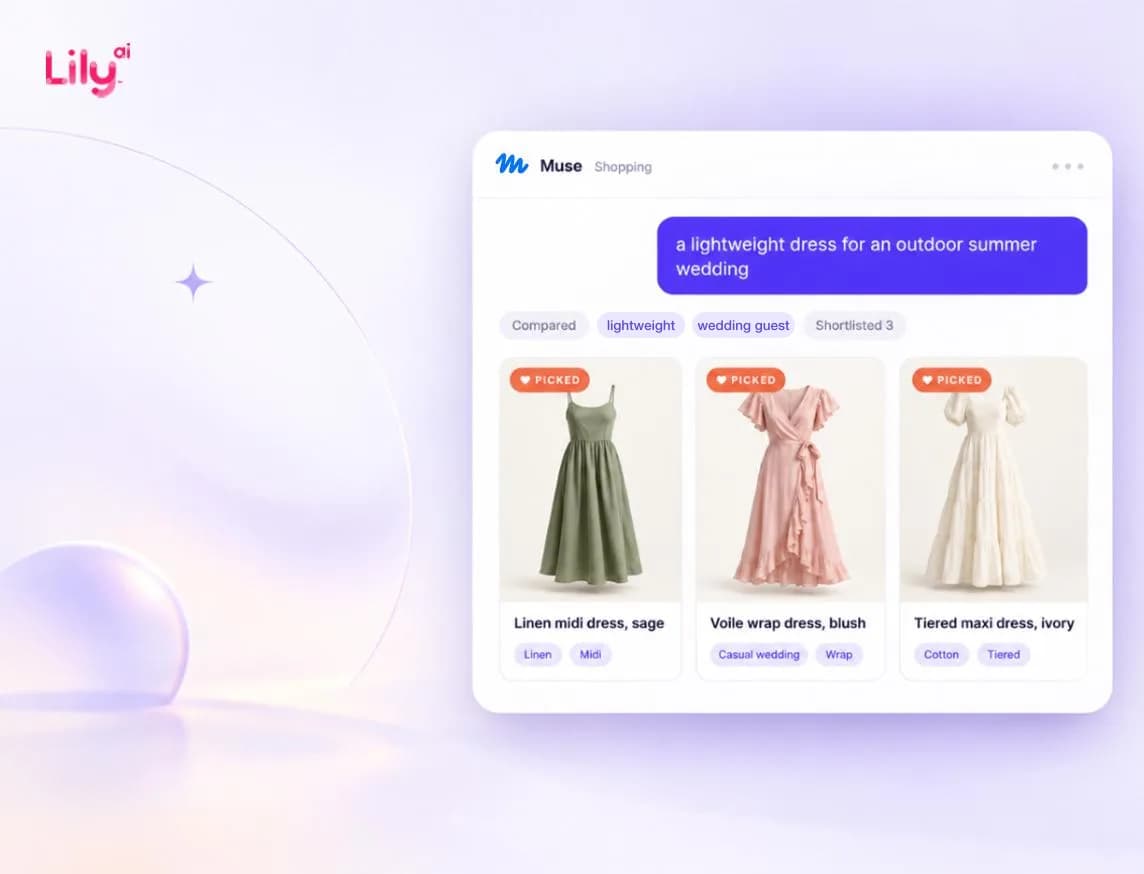
Meta Muse finds products in three steps. First, your product data has to say enough to match what the shopper asked for. Second, it has to sit somewhere Muse can read it, so cover the Meta catalog, Shopify Catalog and your own product pages. Then Muse picks a short list from what it found. Getting found doesn't mean getting picked.
Muse arrived on 8 September 2026, weeks before the holiday rush, and it shops differently from the Meta ad system most retail teams have tuned their catalogs for. Here's what Muse reads, where products drop out, and what to fix first.
What is Meta Muse?
Muse is Meta's personal AI agent. When Meta launched it on 8 September 2026, it described Muse as an agent that does tasks for people. It launched in the US in its own app, at muse.ai and in WhatsApp.
Shopping is one of them. Muse can search, compare and buy, and Meta says it checks with the shopper before buying anything. Meta's launch post names Link by Stripe for checkout. Meta later added Shop Pay, and on 6 October said it was adding PayPal. At its Connect 2026 event, Meta added shopping connectors for retailers including Walmart, Best Buy, Sephora and Wayfair.
For retailers, the big change is that the shopper isn't the one browsing anymore. They type one request, and Muse does the searching, comparing and shortlisting for them.
Why don't your Meta Ads results show how Muse sees your products?
Many retail teams have spent years tuning their Meta catalog for Advantage+ catalog ads, and it's easy to assume that work carries over. It may not. The two systems work in opposite directions.
With catalog ads, you give Meta your catalog and a budget, and its system picks the products and the people to show them to. With Muse, a shopper types a request, and the agent goes looking for products that fit, across more than just your catalog.
| Advantage+ catalog ads | Meta Muse | |
|---|---|---|
| Starts from | Your catalog and your budget | One shopper's request, in their own words |
| Who chooses the product | Meta's ad system, for an audience | The agent, for one person |
| What it reads | Your Meta catalog | Not fully published by Meta. Shopify documents Shopify Catalog as one route |
| What wins | A product the system can match to people likely to buy | A product the agent can match to the words in the request |
| Where you see results | Ads Manager | Meta had not published a merchant report for Muse recommendations as of October 2026 |
A catalog that does well in ads can still go missing in Muse. Ads can work with thinner product data because the system also learns from who clicks and buys. An agent answering “lightweight” and “outdoor wedding” needs those facts written down somewhere it can read.
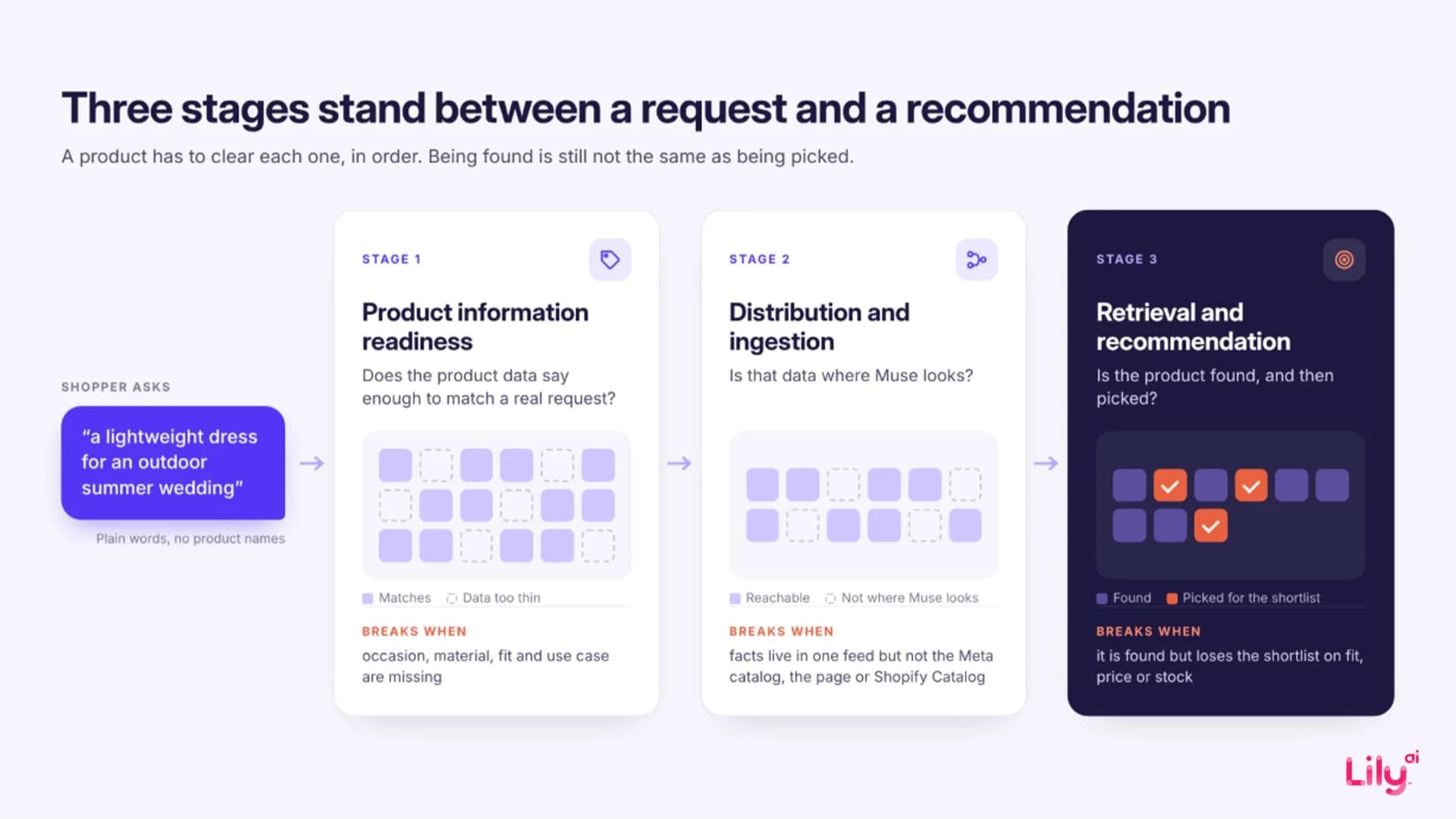
Stage 1: Does your product data say enough to match the request?
Start with what the shopper asks for. Muse has to connect “a lightweight dress for an outdoor summer wedding” to a product whose title probably reads something like “Tiered Midi Dress, Sage”. The shopper never typed the product name or category, so every word they used has to match a fact in your product data.
| Shopper's words | Fact the agent needs | Where it should live |
|---|---|---|
| lightweight | Fabric and weight, such as linen or cotton voile | Material attribute and description |
| outdoor | Breathable, comfortable in heat | Description and product details |
| summer | Season | Season or occasion attribute |
| wedding | Occasion: wedding guest, dressy | Occasion attribute and product highlights |
| dress | Category | Product category and product type |
| unstated budget and size | Price, sizes in stock | Price, size and availability fields |
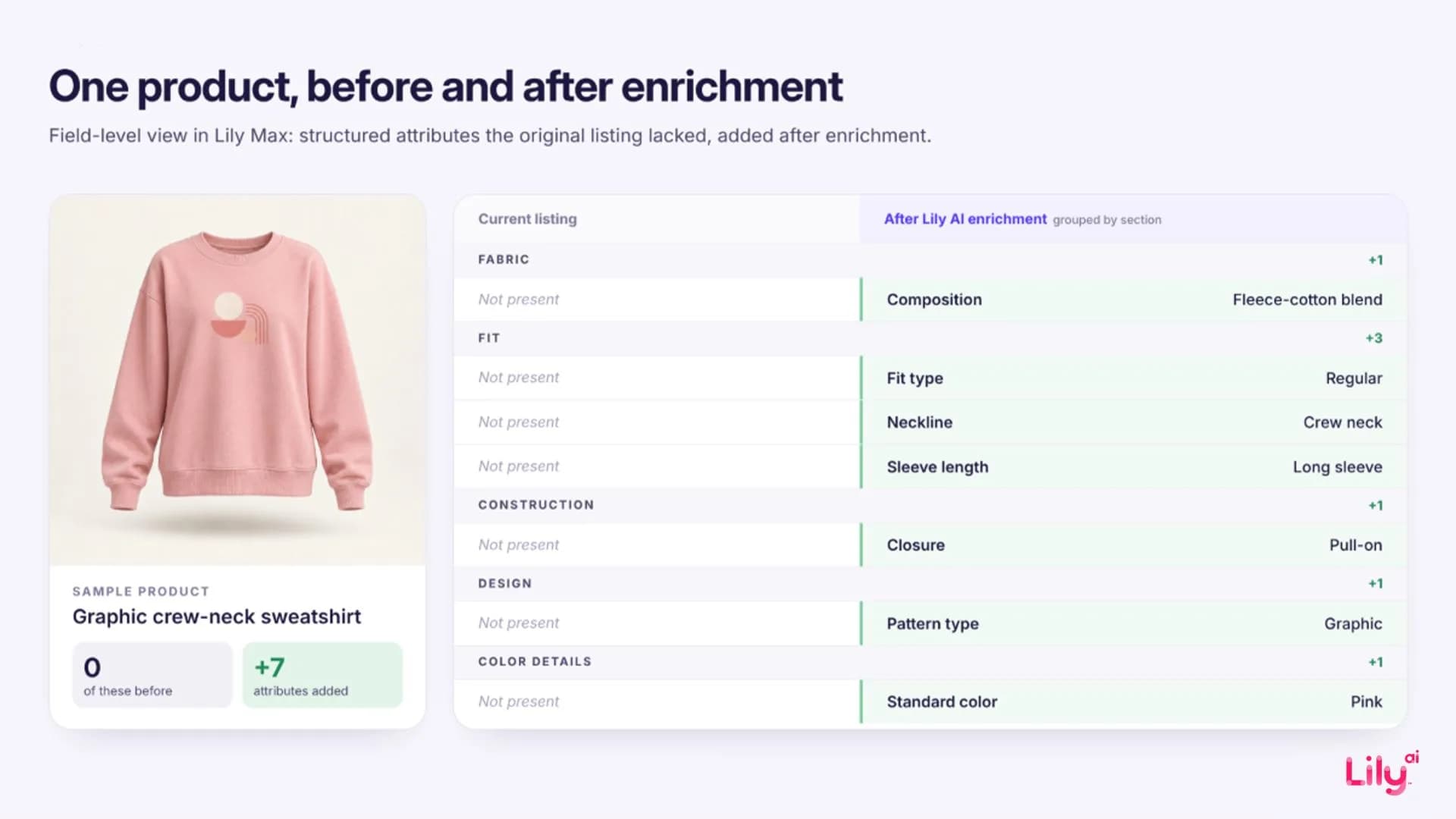
If a fact isn't written down anywhere, the product can't be matched on it, no matter how good the photos are. That's what enrichment means when a machine is doing the reading: adding occasion, use case, material, fit and season as plain facts, taken from what the product actually is. Our guide to product attributes covers which attributes each discovery surface reads, and product data enrichment covers how to add them at catalog scale.
Stage 2: Is that data where Muse looks?
Good product data only helps if it sits somewhere Muse reads. Meta hasn't published a full list, but between its announcements and Shopify's documentation, there are three routes you control.
| Route | What is known | What to check |
|---|---|---|
| Meta product catalog | Meta has not said whether Muse reads it. Shopify documents that shoppable ads on Meta still need product syncing through the Facebook and Instagram channel, a separate route from Shopify Catalog | Your enriched fields are in the Meta catalog, and not only in your Google Shopping feed |
| Shopify Catalog | Shopify's Help Center lists a “Meta AI and Muse” setting under Sales channels > Agentic, and says products reach Meta through Shopify Catalog. Products Shopify classifies as Uncategorized are excluded from Catalog | The channel is on, Catalog mapping covers the metafields that hold your best product facts, and every product has a specific category |
| Your website | Meta says Muse can open a browser and navigate websites. Shopify notes products can still reach Meta through web crawling with Catalog access turned off | Product pages state price, stock, sizes and key facts in readable page text, and bot rules do not block Meta's agent fetcher (meta-externalfetcher) |
A common problem: the enrichment only lives in one place. A fabric fact gets added to the Google Shopping feed and never reaches the Meta catalog. The product page says “breathable linen” while the catalog row says nothing about fabric. So the agent ends up knowing less about the product than the retailer thinks it published. The same routes matter for every AI shopping agent, which our agentic commerce guide covers in more depth.
Stage 3: Why are products found but not picked?
Finding a product and recommending it are separate steps. Retrieval gets a product into the pool of options. Recommendation is when the agent picks a handful from that pool to show the shopper.
Meta hasn't published how Muse ranks products, but its announcements and Shopify's documentation show what happens around the pick. Muse asks the shopper before it buys, and Meta names Link by Stripe, Shop Pay and PayPal for payment. On Shopify, direct checkout does not support subscriptions, bundles, customizable products or B2B-only products, and a checkout that needs details Meta can't collect moves to the retailer's own checkout in an in-app browser. These limits don't stop a product from being found, but they change how the purchase gets completed.
Based on how AI shopping assistants handle requests in general, our working model is that the agent breaks a request into constraints and keeps only the products whose records can answer them. If a record is missing a fact the agent needs, the product gets dropped from the list, and nobody tells the retailer it happened. If the record is vague, the agent may guess, and that guess reaches the shopper as a claim about your product. Meta hasn't confirmed how Muse does this, so treat it as something to test with prompt checks, not a rule.
So a product can be found and still not get picked. Once it's clearly described, adding more text may not change that. Price, availability and a precise fit to the request decide the pick. Our explainer on how AI shopping assistants pick products goes further into that selection step.
How can you tell whether Muse recommends your products?
Nobody has a full answer yet, but there are two things you can check now.
- Prompt checks. Write the requests your shoppers actually make, at three levels: the exact product name and size, an attribute request (“cushioned running shoes for wide feet”), and a context request (“running shoes for my trip next month”). Run them in Muse on a schedule and record whether your product is found, picked and in what position.
- Checkout tracking. Shopify's documentation says Google Analytics and custom pixels won't fire in Meta's direct checkout. If you sell on Shopify, decide before Black Friday how you'll count those orders.
One thing to keep in mind: getting shown isn't the same as making a sale. Report visibility, traffic and attributable orders separately.
What should retailers fix before the holiday rush?
- Pick your top holiday products and write ten real shopper requests for them.
- Add occasion, use case, material, fit and season to the Meta catalog, in plain words.
- Put the same facts on the product page, in text an agent can read.
- Match price, stock and sizes across the catalog and the site.
- On Shopify, check the Meta AI and Muse setting and your Catalog mapping.
- Make sure guest checkout and wallets such as Link, Shop Pay and PayPal work, since Muse pays through them.
- Agree how Muse orders will be counted before Black Friday on 27 November.
What we don't know yet
- Meta has not published how Muse ranks products or which catalog fields it reads.
- Muse personalizes. A shopper's history and preferences can change the picks, so results from a test account are a baseline.
- Visibility checks do not measure sales.
How Lily approaches Muse
We treat Muse as a separate channel. Our Meta catalog work gives retailers a head start on Stage 1, but we don't assume ad results carry over to an agent that starts from a shopper's words.
Everything runs on one product intelligence layer. Lily Max adds the attributes, occasions, use cases and descriptions an agent needs to each product, and publishes them to the Meta catalog, product pages and Shopify Catalog. Muse then gets its own track for each retailer, with its own readiness checks and measurement, instead of being judged by Meta Ads results.
Book a demo to see how your top holiday products show up in Muse.
Frequently asked questions
Does Meta Muse use the Facebook product catalog?
Meta has not documented whether or how Muse uses catalog data. For Shopify merchants, Shopify documents that products reach Meta AI and Muse through Shopify Catalog.
Can Meta Muse buy products for shoppers?
Yes. Meta says Muse can complete purchases and asks the shopper before it buys. Meta names Link by Stripe, Shop Pay and PayPal as payment options. Shopify merchants who sell to customers in the US, Canada or Mexico have Meta's direct checkout turned on by default.
Will my Meta Ads performance carry over to Muse?
There is no public evidence that it does. Ads start from an audience Meta's system chooses, while Muse starts from one shopper's request and also reads retailer websites. Measure Muse on its own.
How do I check whether Muse recommends my products?
Run real shopper requests in Muse on a schedule and record whether your products are found, picked and in what position. Because Muse personalizes, treat results from a test account as a baseline.

See Lily in action
Book a personalized demo and see how Lily can grow your retail revenue.
Related Blogs
Meta Muse holiday checklist: 10 fixes before Black Friday
Ten fixes retailers can make before Black Friday so Meta Muse can find, read and recommend their products, from gift facts to checkout and order tracking.
By Lily AI
Muse vs Instinct: what personal shopping agents mean for retailers
Meta Muse and Instinct shop on a person's behalf. How the two personal agents find products and check out, and what retailers should fix in product data.
By Lily AI
Agentic commerce: what it is, what changed in 2026, and what a brand actually has to do
Agentic commerce is AI agents buying on a shopper's behalf. What changed in 2026, what an agent reads from your catalog, and what to fix before Q4.
By Lily AI
WebMCP for ecommerce: AI assistants can now shop your store directly
WebMCP lets AI assistants search and shop your store directly, and Shopify and BigCommerce switched it on. What it is, what assistants read, how to check.
By Lily AI
Meta Commerce Manager in 2026: Meta can crawl the page behind each product
From 20 November 2026, Meta's terms let it crawl the sites behind your catalog. The Commerce Manager fields that matter, where they drift, what to check.
By Lily AI
Google Universal Cart turns your price drops into shopper alerts
Google Universal Cart alerts US shoppers when saved items drop in price or restock. What it reads from your listings, and what to check before your freeze.
By Lily AI