Meta Muse holiday checklist: 10 fixes before Black Friday
Part of: AI discovery and agentic commerce

To get ready for Meta Muse before Black Friday on 27 November, start by testing real holiday requests in Muse. Then add recipient, occasion, material and fit facts to your Meta catalog and product pages. Keep price and stock consistent, check Shopify's Meta AI and Muse setting, and decide now how you'll count Muse orders.
This is the first holiday season with Meta's shopping agent live. Muse launched on 8 September 2026, and Meta says it can search, compare and buy for shoppers, checking with them before it pays. Many retail teams freeze site and feed changes in November, so you don't have much time. We've listed the ten fixes below in the order we'd do them. For how Muse finds and chooses products in the first place, start with our guide to how Meta Muse finds and picks products.
Shoppers are already using it this way. On Meta's earnings call on 21 October, Mark Zuckerberg said shopping is the most common use case for Muse, with more than a quarter of people using Muse shopping with it, at an average purchase of over $200.
How much time is left?
| Week of | Fixes | What gets done |
|---|---|---|
| 20 October | 1 and 2 | Holiday requests written and run in Muse |
| 27 October | 3, 4 and 5 | Gift, material and fit facts in the catalog and on product pages |
| 3 November | 6, 7 and 8 | Prices, Shopify settings and agent access checked |
| 10 November | 9 and 10 | Checkout tested, order counting agreed |
| 17 November onward | 1 and 2 again | The same requests rerun every week through Cyber Monday on 30 November |
1. Write the holiday requests your shoppers will actually type
Holiday requests look different from the rest of the year. People mention who it's for, a budget and often a deadline, but rarely a product name. Before you change anything, write ten of these for each of your top holiday categories.
| Request | What it tests |
|---|---|
| “A gift for my dad who runs, under $100” | Recipient, use case and price |
| “A dress for a winter wedding” | Occasion and season |
| “Cozy slippers for my mom that arrive before the 20th” | Recipient, material and delivery |
| “A safe, quiet toy for a three-year-old” | Age range and product safety facts |
| “A carry-on bag that fits under a plane seat” | Dimensions |
2. Run them in Muse
For each request, note whether your product shows up, whether it's one of the few Muse recommends, where it ranks, and which merchants showed up instead. Run every request at least twice, because agent answers change.
Keep track of which account you tested with. Muse personalizes its picks, so always compare runs from the same account.
3. Add the gift facts: recipient, occasion and age
Most catalogs describe what a product is, but holiday shoppers usually describe who it's for. If “for runners”, “wedding guest” or “ages 3 and up” appears nowhere in your product data, Muse has nothing to match “a gift for my dad who runs” against.
Add recipient, occasion and age range wherever you can: catalog attributes, product highlights and the description. Our guide to product attributes lists which attributes each discovery surface reads.
4. Write materials, dimensions and fit as plain facts
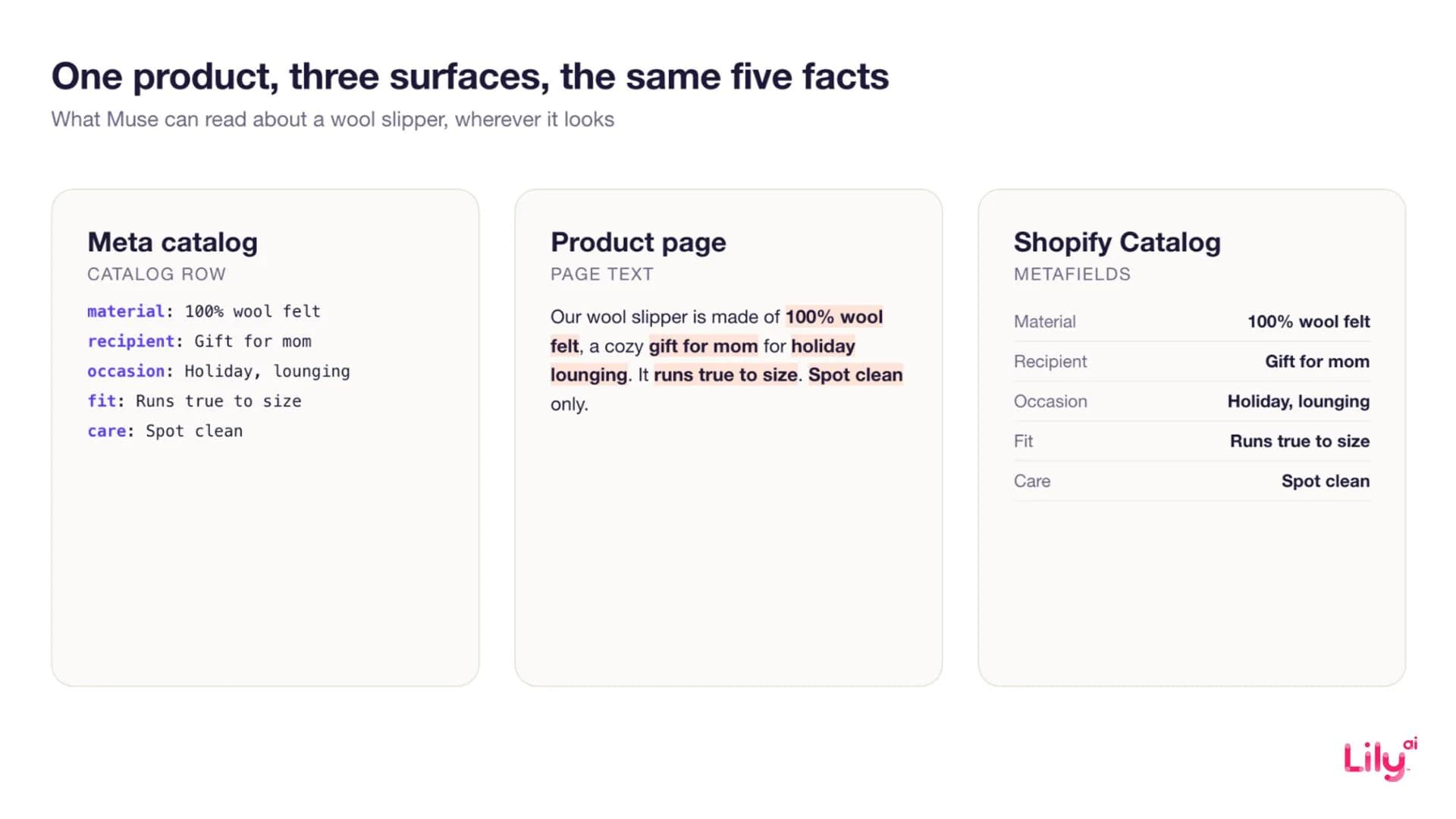
“Soft knit” tells an agent very little. “100% merino wool, midweight, runs true to size” answers three questions a shopper might ask. Same goes for dimensions on bags and luggage, care instructions on gifts, and fit notes on apparel. Write each one once, as a plain fact, and reuse it everywhere.
5. Put the same facts on the product page
Meta doesn't only read your catalog. From 30 October, Meta's revised Commercial Terms let it crawl the product pages linked from your catalog, to give people information about your products.
That means your product pages matter more now. Put the facts from fixes 3 and 4 in the page text, not only in images, and keep your Product structured data (price, availability, brand) accurate.
6. Match price, stock and sizes everywhere
Holiday prices change daily. When the catalog says $89 and the product page says $69, the agent sees two different offers and the shopper may get a surprise at checkout. Make sure promotional prices reach the Meta catalog through the sale price field, and that sold-out sizes drop out of every surface on the same schedule.
7. If you sell on Shopify, check the Meta AI and Muse setting
Shopify's Help Center lists a “Meta AI and Muse” setting under Sales channels > Agentic and says products reach Meta through Shopify Catalog. Direct checkout is on by default for merchants selling to customers in the US, Canada or Mexico. Check that the channel is set the way you want it, and that Catalog mapping includes the metafields where your best product facts live.
8. Decide whether agents can reach your product pages
Some retailers block AI agents at the bot-management layer. Practical Ecommerce reported on 24 September that Amazon blocks Muse. Blocking is a fair choice, as long as you make it on purpose. Check your bot rules, login walls and pop-ups, and confirm a product page loads with its price, sizes and key facts for someone who isn't signed in.
9. Test checkout the way Muse will use it
Meta's launch post names Link by Stripe for Muse checkout. Meta later added Shop Pay, and on 6 October said it was adding PayPal. Muse checks with the shopper before it buys, so a blocked wallet or a forced login can lose you the sale right there. Before the freeze, place a test order as a guest, on a phone, with each wallet you accept.
10. Decide how you will count Muse orders before the rush
Shopify's documentation says Google Analytics and custom pixels won't fire in Meta's direct checkout. If you're on Shopify and rely on pixels, those orders might not show up in your reports. Agree now on where you'll count Muse orders, and keep three numbers separate: how often you were recommended, the traffic you can identify, and the orders you can attribute.
What this checklist will not do
- It will not guarantee a pick. Meta has not published how Muse ranks products or which catalog fields it reads.
- It will not measure revenue on its own. Visibility and sales are different numbers.
- It does help beyond Muse. Google, ChatGPT and other shopping agents read the same facts, as our guide to how AI shopping assistants pick products explains.
How Lily helps
Fixes 3 to 6 are the hard part at catalog scale. Lily Max writes recipient, occasion, material and fit facts for every product, and publishes them to the Meta catalog, product pages and Shopify Catalog from one record. We also track Muse separately from Meta Ads results for each retailer. More on the approach in our guide to product feed optimization.
Book a demo to see where your top holiday products stand in Muse.
Frequently asked questions
When should retailers prepare for Meta Muse before Black Friday?
Now. Black Friday is 27 November 2026, and many retail teams freeze site and feed changes in early November. Writing and running holiday requests takes a week. Fixing product facts takes two to three more.
Do I need to sell on Shopify for Muse to find my products?
No. Shopify Catalog is the one route Shopify has documented, but Meta has not said Muse reads only that. Cover the Meta catalog and your product pages too, and if you sell on Shopify, check its Meta AI and Muse setting.
Can I block Muse from my website?
Yes. Bot-management tools can block AI agents, and Practical Ecommerce reported that Amazon blocks Muse. Blocking keeps the agent off your pages, which may also keep your products out of its recommendations.
Will these fixes help with other AI shopping agents?
Yes. Clear recipient, occasion, material and fit facts, consistent prices and readable product pages help every agent that reads product data, including Google's and ChatGPT's shopping features.

See Lily in action
Book a personalized demo and see how Lily can grow your retail revenue.
Related Blogs
How Meta Muse finds and picks products: a guide for retailers
Meta Muse finds products in three stages. See what it reads, why found is not the same as picked, and what retailers should fix before the holiday rush.
By Lily AI
Muse vs Instinct: what personal shopping agents mean for retailers
Meta Muse and Instinct shop on a person's behalf. How the two personal agents find products and check out, and what retailers should fix in product data.
By Lily AI
Agentic commerce: what it is, what changed in 2026, and what a brand actually has to do
Agentic commerce is AI agents buying on a shopper's behalf. What changed in 2026, what an agent reads from your catalog, and what to fix before Q4.
By Lily AI
Meta Commerce Manager in 2026: Meta can crawl the page behind each product
From 20 November 2026, Meta's terms let it crawl the sites behind your catalog. The Commerce Manager fields that matter, where they drift, what to check.
By Lily AI
WebMCP for ecommerce: AI assistants can now shop your store directly
WebMCP lets AI assistants search and shop your store directly, and Shopify and BigCommerce switched it on. What it is, what assistants read, how to check.
By Lily AI
Google Universal Cart turns your price drops into shopper alerts
Google Universal Cart alerts US shoppers when saved items drop in price or restock. What it reads from your listings, and what to check before your freeze.
By Lily AI