Meta Commerce Manager in 2026: Meta can crawl the page behind each product
Part of: Product feed optimization

Meta Commerce Manager is where businesses manage the product catalog Meta uses for ads, shops and checkout on Facebook and Instagram, and Meta tells them to audit it for AI-driven shopping. From 20 November 2026, Meta's revised Commercial Terms also spell out that it can crawl the web pages linked to those products, putting your site in play alongside your catalog.
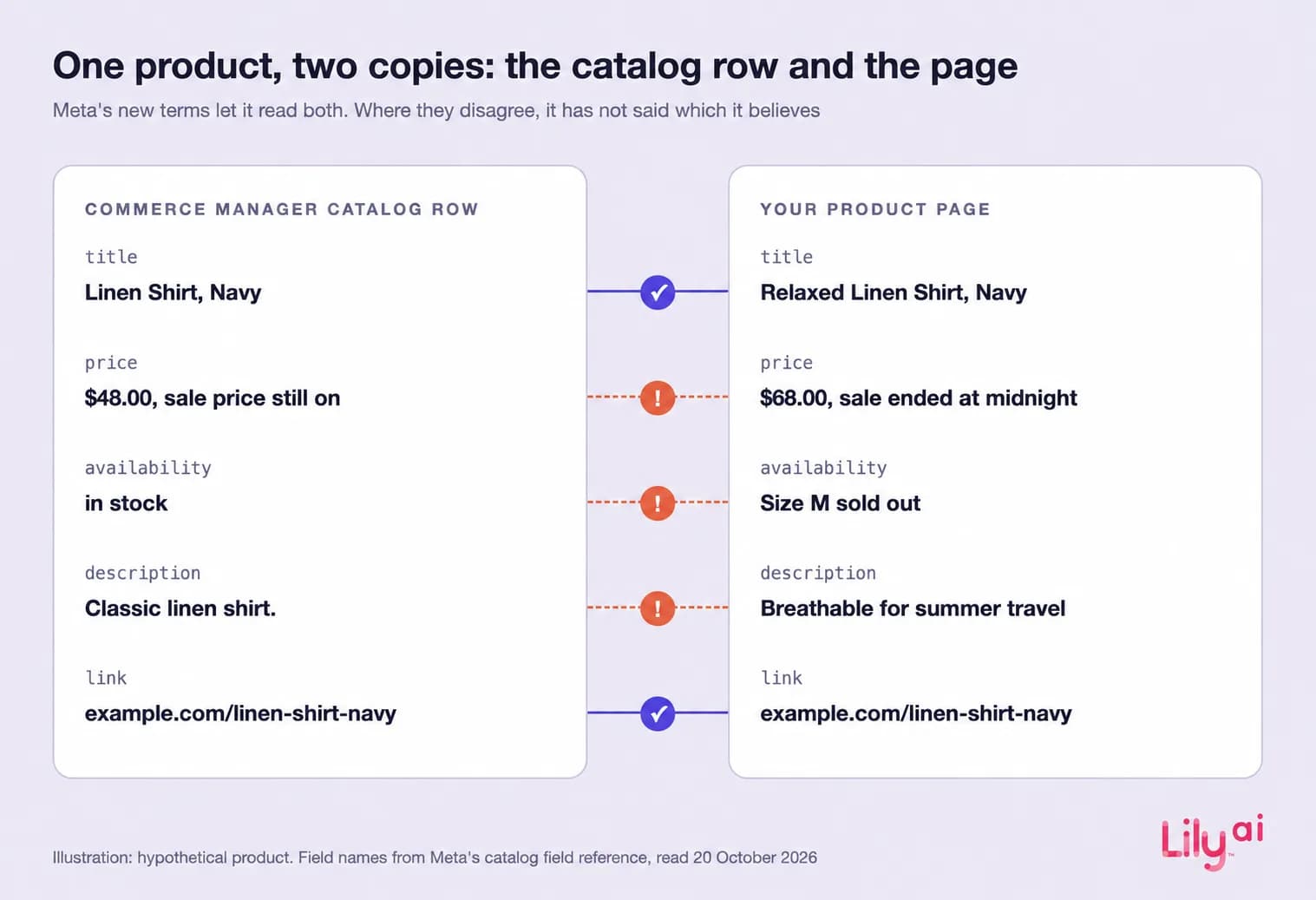
That gives Meta two copies of each product: the catalog you send through Commerce Manager and the product page its crawlers can read. Meta has not said which copy it trusts when they disagree, and some of the facts it asks businesses to add for AI shopping have no general field in the catalog.
What is a Meta Commerce Manager?
Meta calls Commerce Manager the central tool for online selling across Facebook and Instagram, where businesses manage product catalogs, set up a shop, view sales activity and turn on checkout (Meta for Business). The catalog is the part that travels. Meta's 2026 peak-season guide, published 11 June, tells businesses to audit their catalog for AI discovery and warns that products without detailed descriptions, use cases and reviews lose out on AI-driven shopping traffic (Meta).
Muse, Meta's personal AI agent, began rolling out in the US on 8 September 2026, running on a dedicated computer with its own browser and checking out with Link by Stripe (Meta). On 6 October, Meta said it was adding a PayPal wallet to Muse and would begin testing direct checkout in Meta AI this fall, and described product recommendations that analyze an ad's image, text and landing page to identify the featured product (Meta).
How products get into a Commerce Manager catalog
Meta's developer documentation lists the routes (Meta for Developers):
- Feed files in CSV, TSV, RSS XML, ATOM XML or Google Sheets, uploaded by hand or on an hourly, daily or weekly schedule. A Replace schedule refreshes the whole feed and deletes any item missing from the file, while an Update schedule changes only the items it contains. Meta says most businesses run one Replace a day.
- The Batch API, which Meta suggests for fast-selling products whose stock moves faster than an hourly feed.
- A Meta pixel reading product page markup in Open Graph, schema.org or JSON-LD. Updated markup reaches the catalog only after the pixel fires on that page, so a shopper has to visit (Meta for Developers).
- Commerce platforms. Shopify, for example, shares eligible stores' products with Meta by default through Shopify Catalog (Shopify, 8 September 2026).
Uploads are asynchronous, so errors can go unnoticed, and Meta advises checking the Diagnostics view regularly.
What changes on 20 November
Meta's revised Commercial Terms take effect on 20 November 2026, three weeks later than first planned, a Meta spokesperson told Reuters on 23 October (Meta's terms). In the section on the licenses and rights a business grants Meta, they authorize Meta, and anyone acting for it, to use automated software such as crawlers, bots and user agents to “access, index, cache, analyse, collect, retrieve or crawl” the domains, pages and URLs associated with your products or services, and to pull updates from them periodically. The same clause covers creating test credentials to reach those pages. The stated purposes are providing, developing, improving, researching and maintaining Meta's advertising and business products, plus the integrity and security of its products, and as read on 29 October 2026 the clause does not mention robots.txt, an opt-out or AI training. Meta told reporters the update does not change how it uses web crawlers and that content owners can still use robots.txt to signal their preferences (CIO).
In a pixel-based catalog, page markup reaches Meta only when a visit fires the pixel. The new terms authorize Meta to pull updates from the page on its own schedule, and Meta has not said how it will use crawled page data alongside the catalog you send, or which it believes when the two disagree.
Which Meta crawlers can visit your site
Meta documents five crawlers (Meta for Developers):
| Crawler | What Meta says it does | robots.txt |
|---|---|---|
| Meta-ExternalAds | Crawls the web for advertising and other business-related products and services | Meta's guidance: add a disallow rule to block it |
| Meta-ExternalAgent | Crawls to train foundation AI models or to improve products by indexing content | Meta's guidance: add a disallow rule to block it |
| Meta-WebIndexer | Crawls to improve Meta AI search results and to cite and link content in Meta AI answers | Meta's guidance: add a disallow rule to block it |
| Meta-ExternalFetcher | Fetches individual links at a user's request, including to help AI complete tasks on websites | May bypass robots.txt, because the user requested the fetch |
| FacebookExternalHit | Fetches links shared on Facebook, Instagram or Messenger to show a title, description and thumbnail | Might bypass robots.txt for security or integrity checks |
The terms do not name a crawler. Meta-ExternalAds is the one Meta describes for advertising and business products, the purpose the terms give, but that is our reading. Meta also says its crawlers may cache robots.txt for up to 24 hours.
Which Commerce Manager catalog fields matter in 2026
Meta's catalog reference sorts fields into required, required where they apply, recommended and optional, plus a pair for checkout on Meta (Meta for Developers). The table covers the fields that describe a product, what the spec says about each and where each can drift from your page. For what happens on Google when a feed and its page disagree, see our misrepresentation checklist.
| Field | What Meta's spec says | Where it can drift from your page |
|---|---|---|
| title | Required; up to 200 characters, with 65 or fewer recommended | The feed keeps an ad-length title while the page carries the full product name |
| description and rich_text_description | description is required plain text up to 9,999 characters; rich_text_description is recommended HTML, also up to 9,999, and is not used in ads | The page carries fit notes, care and use cases, while the feed carries a short export |
| price, sale_price, sale_price_effective_date | sale_price must be lower than price; without sale_price_effective_date, a sale price stays active until you remove it | A promotion ends on the site at midnight and the catalog keeps the sale price |
| availability | in stock or out of stock | A size sells out between scheduled uploads |
| item_group_id, color, size, gender, age_group, material, pattern | Required where they apply; color is described in words | Variants are grouped one way on the site and another in the feed |
| image_link and additional_image_link | At least 500 x 500 pixels and up to 8 MB; a changed image needs a new URL | An image replaced at the same URL is not picked up, so the catalog shows the old one |
| link | Must be a valid URL on your own domain | The product URL redirects, or a sold-out page bounces to a category |
| native_commerce and product_disclosures | native_commerce marks a product eligible for checkout on Meta, and a missing value means not eligible; up to 20 disclosures per product, shown at checkout and on the product details page | A warning shown in the site's checkout never reaches the catalog |
| disabled_capabilities | Per-product switches for Facebook and Instagram Shops, Marketplace, Instagram product tagging and Advantage+ catalog ads | No documented switch for Meta AI or Muse |
The finding most teams miss: Meta asks for use cases, but its catalog has no general field for them
Meta's own peak-season guide names use cases as something AI shopping needs. Its main field reference has no field for a use case, an occasion or a recipient, and product_type, custom labels and internal labels are your own categories. The nearest documented fields are category-specific and optional: apparel can carry activity, sport and theme, and still nothing for an occasion or a recipient (Meta for Developers). Everywhere else, the facts Meta asks for live in free text, in description or rich_text_description, and on your product page.
From 20 November, those are two free-text accounts of the same product that Meta can read, and different teams may write them on different schedules. A feed description can be a short export, while the page carries the size advice and the paragraph a merchandiser wrote about who the product suits. When the page says more than the catalog, or says something different, Meta has not said which version its ads, shops or AI features use. Our product taxonomy guide covers why occasion and recipient work as attributes rather than places in a category tree.
Opting a single product out of Meta's AI is not documented either. Inside the catalog, disabled_capabilities has no switch for Meta AI or Muse. Shopify lets a store turn off Catalog access for Meta, but its help pages also say that blocking AI crawlers in robots.txt affects only open-web discovery and does not stop what Shopify Catalog sends to the AI channels a store has turned on (Shopify Help). For most retailers, that leaves what the two copies say as the part they control.
What to check before 20 November
- Read your Replace schedule. A Replace upload deletes every item missing from the file, so a holiday feed built from a partial export can remove products from the catalog.
- Give every sale price an end date. Without sale_price_effective_date, Meta keeps a sale price live until you remove it. Meta's format takes UTC offsets, so an Eastern-time Black Friday to Cyber Monday sale is 2026-11-27T00:00-05:00/2026-11-30T23:59-05:00.
- Move fast-selling stock to the Batch API if an hourly feed is too slow for it at peak.
- Write use cases once and use the same words twice. Put them in description or rich_text_description and in the product page text, starting with your top holiday products, and fill activity, sport or theme where your category supports them.
- Check every link and every changed image. Each link should resolve to the product page on your own domain, and any image you replace needs a new URL.
- Decide robots.txt crawler by crawler. Meta says its crawlers may cache robots.txt for up to 24 hours, so new rules for Meta-ExternalAds, Meta-ExternalAgent and Meta-WebIndexer can take a day to register, and Meta-ExternalFetcher may bypass them. Blocking a crawler keeps it off your pages, and Meta has not said what that does to ads or AI features.
- Set native_commerce and product_disclosures on the products you want eligible for checkout on Meta, including any Proposition 65 warnings.
- Open the Diagnostics view after each upload, because uploads are asynchronous and errors otherwise go unnoticed.
What this does not show
- Meta has not published how its AI features weigh catalog fields against crawled pages, or how Muse ranks products.
- The terms were read on Meta's preview page on 29 October 2026, and Meta can revise them.
- The drift examples in the field table show how the two copies can differ. They are not measured rates.
- This post claims no Lily result.
Where Lily Max fits
Lily Max works on both copies Meta can now read. It scans the Commerce Manager catalog, product pages, schema and attributes, and flags missing fields, weak variant signals and image or availability issues. It writes paid-social-ready titles, descriptions and attributes, including the use and fit facts that lack a general field, so the catalog and the page carry the same facts. A person approves every change before it rolls out across the catalog. See how Lily Max works.
Book a demo to compare your catalog with your product pages before Meta reads both.
Frequently asked questions
What is Meta Commerce Manager used for?
Commerce Manager is Meta's tool for managing product catalogs, shops, sales activity and checkout across Facebook and Instagram. The catalog it holds feeds Meta's ads and shops, and Meta's 2026 peak-season guide tells businesses to audit it for AI discovery.
What changes in Meta's Commercial Terms on 20 November 2026?
The revised terms authorize Meta to crawl, index, cache and collect content from the domains and pages associated with a business's products or services, and to pull updates from them periodically. The stated purposes are Meta's advertising and business products and their integrity and security, and the clause does not mention robots.txt or an opt-out. Meta says the update does not change how it uses web crawlers and that content owners can still use robots.txt to signal their preferences.
Which fields are required in a Meta catalog?
Meta's catalog reference requires id, title, description, availability, condition, price, link, image_link, brand and additional_image_link, plus a Google or Facebook product category. Fields such as item_group_id, color, size, sale_price and sale_price_effective_date become required where they apply, and native_commerce marks a product eligible for checkout on Meta.
Can I stop Meta from crawling my product pages?
Meta's crawler documentation says a robots.txt disallow rule blocks crawlers such as Meta-ExternalAds, Meta-ExternalAgent and Meta-WebIndexer, while Meta-ExternalFetcher may bypass robots.txt because it fetches pages at a user's request. The new terms do not name a crawler. Meta says content owners can still use robots.txt to signal their preferences, but it has not said what blocking does to ads or AI features.
How often should a Meta catalog update during the holidays?
Meta's documentation says most businesses run one Replace upload a day with more frequent Update schedules, and suggests the Batch API for products whose stock moves faster than an hourly feed. Check the Diagnostics view after each upload, because uploads are asynchronous and errors can go unnoticed.

See Lily in action
Book a personalized demo and see how Lily can grow your retail revenue.
Related Blogs
Meta Muse holiday checklist: 10 fixes before Black Friday
Ten fixes retailers can make before Black Friday so Meta Muse can find, read and recommend their products, from gift facts to checkout and order tracking.
By Lily AI
How Meta Muse finds and picks products: a guide for retailers
Meta Muse finds products in three stages. See what it reads, why found is not the same as picked, and what retailers should fix before the holiday rush.
By Lily AI
ChatGPT product feed optimization: the fields that decide what gets shown
ChatGPT product feed optimization, field by field: what OpenAI requires, which optional fields match shopper questions, and what to write in each one.
By Lily AI
Google Shopping feed requirements: every field that matters in 2026
Google Shopping feed requirements for 2026: the seven required fields, when brand, GTIN, color and size apply, image rules, and fields that win searches.
By Lily AI
What actually goes in Google Merchant Center conversational attributes
What actually goes in Google Merchant Center conversational attributes: worked before-and-after values for apparel and home, plus where to mine them.
By Lily AI
Merchant Center suspended for misrepresentation: the checklist, in the order we find them
Merchant Center suspended for misrepresentation? Work this checklist in the order we find them, catch every mismatch, and appeal once with the whole fix.
By Lily AI