ChatGPT product feed optimization: the fields that decide what gets shown
Part of: Product feed optimization

ChatGPT product feed optimization is the work of filling OpenAI's product feed with the facts shoppers ask about, in the fields built to hold them. Nine required fields get a product into ChatGPT. The optional ones, such as material, size, age group, dimensions, weight, reviews and returns, decide which shopper questions that product can answer.
Getting your products into ChatGPT is getting easier. Shopify and Etsy catalogs are integrated by default, and any other merchant can apply to share a feed through OpenAI's merchant program. Once most catalogs are in, just being listed won't set you apart. What will is what your product record says when a shopper asks for something specific.
This guide goes through OpenAI's product feed spec field by field: what each one is for, what to write in it, and the gaps we see most when retailers export their catalog as is. For how an assistant narrows a question down to a shortlist in the first place, see how AI shopping assistants pick products.
What does OpenAI's product feed require?
Nine fields, and every one needs a real value. OpenAI asks for “a real brand and seller name, not placeholders,” and a stable item ID per item or variant.
The nine required fields in OpenAI's product feed spec, and the most common way each one goes wrong.
| Field | What OpenAI asks for | The common gap |
|---|---|---|
| item_id | A stable ID, unique per item or variant | IDs that change between exports, so the product looks new each time |
| title | Product name, including the selected variant when relevant; up to 150 characters | Internal names, or the variant left out |
| description | A factual product description in plain text; up to 5,000 characters | Brand mood copy with few facts, or HTML left in |
| url | The product page with the variant selected | A link to the parent page, so the shopper lands on the wrong color |
| brand | The brand as displayed | Blank for own-brand products |
| seller_name | The seller supplying the offer | A placeholder |
| image_url | The main image, a direct JPEG or PNG link | Lifestyle images where the product is hard to see |
| availability | in_stock, out_of_stock, pre_order, backorder or unknown | Stock that lags the site |
| price | The current price with currency, for example “79.99 USD” | The feed and the page showing different prices during a sale |
Which optional fields answer shopper questions?
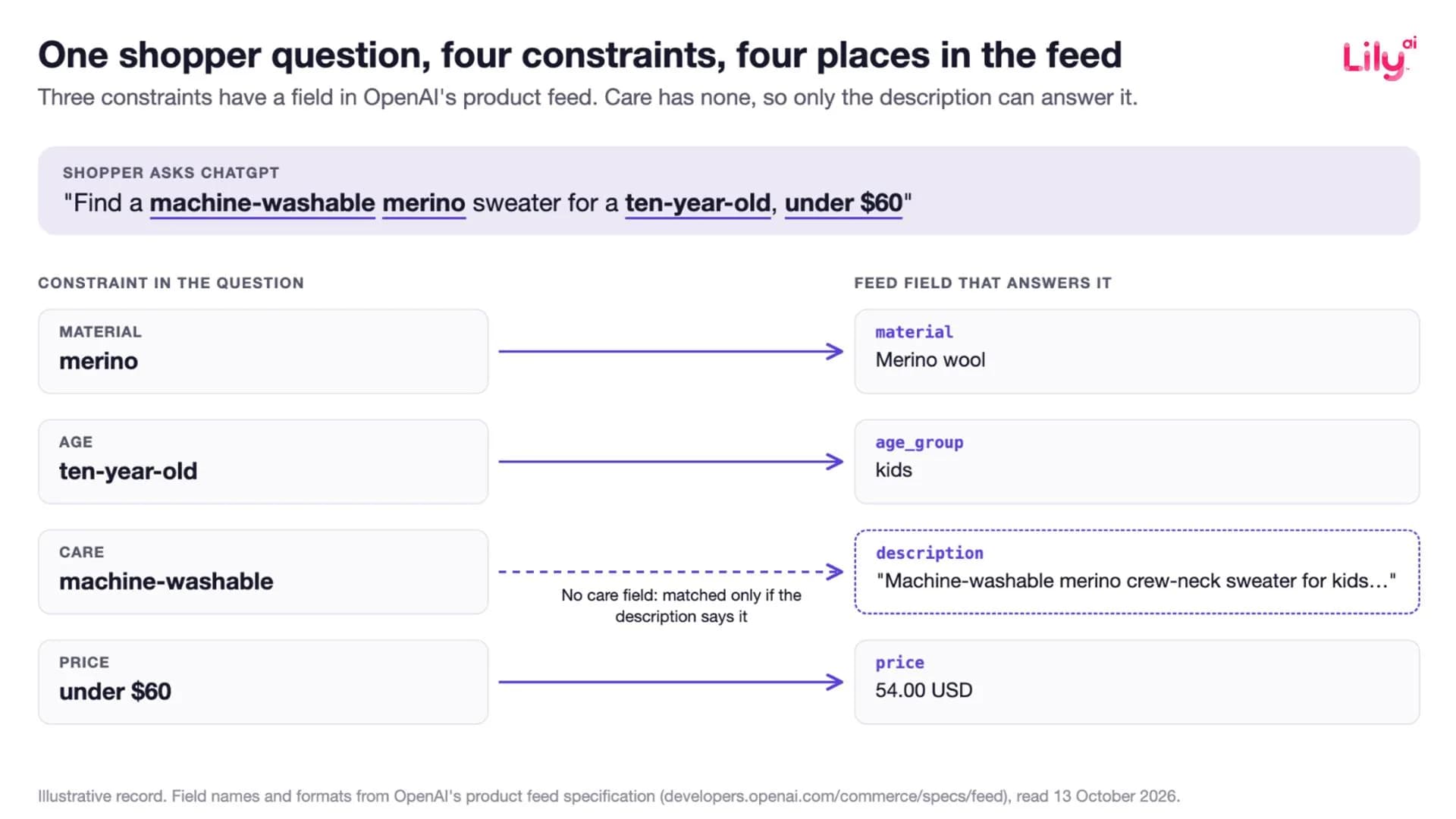
The optional fields are where ChatGPT matches the details a shopper asks for. When someone asks ChatGPT for a machine-washable merino sweater for a ten-year-old under $60, three of those four constraints have a field: price, material and age_group. The fourth, machine-washable, doesn't have a field, so it only gets matched if the description mentions it.
Optional fields in OpenAI's product feed spec, mapped to the shopper language each one answers.
| Field | The shopper says | What to write |
|---|---|---|
| material | “linen”, “merino”, “solid oak” | The principal materials, in the words a shopper uses |
| color | “navy”, “olive” | The selected color as it appears in the image |
| size | “a size 10”, “UK 8” | The selected size label (size_system is also available once OpenAI sets it up for your feed) |
| gender, age_group | “for women”, “for a toddler” | male, female or unisex; newborn, infant, toddler, kids or adult |
| dimensions, length, width, height, weight | “fits under an airline seat”, “under 2 kg” | Measured values with units |
| review_count, star_rating | “well reviewed”, “highest rated” | Product-level aggregates |
| accepts_returns, return_deadline_in_days, return_policy | “easy to return” | The real policy and a public URL |
| shipping_price, shipping | “free delivery” | The charge, in the feed's currency (the detailed shipping field needs setup with OpenAI) |
| product_category | “running shoes”, “duvet covers” | A category path from broad to specific, separated by “>” |
| group_id, variant_dict, gtin, mpn | (keeps variants together) | One group per product as it appears on your site |
Two rules in the spec trip up a lot of exports. First, “for optional fields, omit an unknown value.” A feed that writes “n/a”, “null” or “unknown” into every empty attribute is filling fields with noise. Second, “raw review entries and question-and-answer lists are not part of this discovery contract.” Anything shoppers usually learn from Q&A, such as care, fit notes or what a product works with, has to live in the description or on the product page.
For which attributes matter most by category and by surface, see our guide to product attributes.
What should go in the title and description?
Facts, in the order a shopper cares about them. OpenAI's guidance here is short: titles name the product “including the selected variant when relevant,” and descriptions are a “factual product description for this item.” OpenAI's help page on shopping adds that ChatGPT may generate simplified titles and descriptions to make results easier to read. But a rewrite can only work with the facts it's given. It can't add ones that were never there.
We saw this in a feed review this September with a large apparel and merchandise seller. One of their jackets came back with “black/black” removed from the title and the waterproof rating, 11,000mm, added. Their team asked why the rating went in and not the fit. The answer had to do with the whole record, not just the title. Google now looks at how complete the whole feed is, not only the title and description. So the title should say what the product is and the one fact that sets it apart, and the rest goes into the fields built for detail, without repeating itself. In that meeting we suggested keeping the description concrete about the product. Fit, use cases and technical detail went into the product details and highlights, each said once.
The same applies to ChatGPT. If your title leads with product type, brand and the one attribute that decides the purchase, any rewrite has something accurate to work from. A description that opens with the facts (material, fit, use, care) gives ChatGPT a way to match the requests that don't have a field of their own.
How should product_category be written?
Start from Google's product taxonomy and go one level deeper where Google stops. OpenAI's spec describes product_category as “your category path, from broad to specific, separated by >,” and its own example, “Apparel & Accessories > Shoes,” is a Google taxonomy path. Most retailers already map to Google's taxonomy for Merchant Center, so start there.
The catch is that Google's taxonomy stops early in places shoppers do not. It has no separate node for sandals, boots or slippers: all three sit at “Apparel & Accessories > Shoes.” It has no node for sweaters, polos or jeans either. A path that ends at “Shoes” tells ChatGPT nothing about whether the product is a sandal, so that difference has to be carried by your own deeper path (“Apparel & Accessories > Shoes > Sandals”), the title and the description. Our product taxonomy guide has a table of common products and where Google's taxonomy places them.
How do you keep a ChatGPT feed accurate?
Update price and availability when they change, not on a weekly export. The spec says to “update the feed when a sale starts or ends” and to update availability “when the item becomes available or sells out.” OpenAI's help page notes there may be a delay before updated pricing appears, and that when several merchants sell the same item, ChatGPT ranks them on factors including availability, price, quality and whether the merchant is the maker or primary seller.
That last one matters if you're a brand that also sells through retailers. Being the maker helps, but only if your own record is as complete and up to date as the retailer's.
A ChatGPT product feed checklist
- Confirm each item_id stays the same from one export to the next.
- Fill all nine required fields with real values, with no placeholders.
- Rewrite titles to lead with product type, brand and the one deciding attribute, then the variant.
- Open each description with facts: material, fit, use, care, and what the product works with.
- Fill every optional field you can state truthfully, and omit the rest rather than writing “n/a”.
- Write product_category as a path, starting from Google's taxonomy and going one level deeper where Google stops.
- Group variants exactly as they appear on your site, using group_id and variant_dict.
- Add review aggregates and the real returns policy.
- Sync price and availability whenever a sale starts or stock changes.
- Check that every fact in the feed also appears on the product page, which ChatGPT can read too.
What we don't know yet
OpenAI doesn't publish how ChatGPT ranks products. The spec says plainly that “eligibility does not guarantee display.” A complete record means a product can match more shopper questions. It doesn't guarantee a spot in any answer, and anyone promising placement is guessing.
It's also hard to measure. ChatGPT doesn't report impressions or ranking positions for products, so no retailer can run a controlled revenue test inside ChatGPT today. But the same product record also feeds surfaces where you can hold a control group, like Google Shopping and Meta catalog ads. That is where a change to the record can be tested before you trust it.
What this means for your team
Soon, almost every retailer will have its catalog in ChatGPT. Every Shopify catalog is already inside ChatGPT, and the waitlist for everyone else is moving. The difference will come down to how many of a shopper's needs each product record can answer, and in most retail teams, nobody owns the fields that decide that.
Lily Max writes and checks those fields across every surface that reads them, then tests each change against a control. Book a demo to see it in your catalog.
Frequently asked questions
What is ChatGPT product feed optimization?
ChatGPT product feed optimization is filling OpenAI's product feed with the facts shoppers ask about, in the fields built to hold them. The nine required fields get a product listed, and the optional fields decide which shopper questions it can answer.
What fields does a ChatGPT product feed require?
OpenAI requires item_id, title, description, url, brand, seller_name, image_url, availability and price for every item. Titles can run to 150 characters and descriptions to 5,000, in plain text.
How do I optimize my products for ChatGPT shopping?
Lead titles with product type, brand and the deciding attribute, open descriptions with facts, and fill optional fields such as material, size, age group, dimensions, reviews and returns. Keep price and availability in sync, and omit unknown optional values instead of writing placeholders.
Can I submit Q&A or individual reviews in a ChatGPT product feed?
No. OpenAI's spec says raw review entries and question-and-answer lists are not part of the discovery feed, so review counts and star ratings go in as aggregates, and anything usually covered in Q&A belongs in the description or on the product page.
Does a complete ChatGPT feed guarantee my products will be shown?
No. OpenAI states that eligibility does not guarantee display and does not publish how products are ranked, so a complete record widens the questions a product can match without promising placement.

See Lily in action
Book a personalized demo and see how Lily can grow your retail revenue.
Related Blogs
Meta Commerce Manager in 2026: Meta can crawl the page behind each product
From 20 November 2026, Meta's terms let it crawl the sites behind your catalog. The Commerce Manager fields that matter, where they drift, what to check.
By Lily AI
Google Shopping feed requirements: every field that matters in 2026
Google Shopping feed requirements for 2026: the seven required fields, when brand, GTIN, color and size apply, image rules, and fields that win searches.
By Lily AI
What actually goes in Google Merchant Center conversational attributes
What actually goes in Google Merchant Center conversational attributes: worked before-and-after values for apparel and home, plus where to mine them.
By Lily AI
Merchant Center suspended for misrepresentation: the checklist, in the order we find them
Merchant Center suspended for misrepresentation? Work this checklist in the order we find them, catch every mismatch, and appeal once with the whole fix.
By Lily AI
Product feed optimization: what it is, what actually moves revenue, and how to prove it
Product feed optimization is a vocabulary problem. The three layers, the eight changes that move revenue, and how to prove the lift with a control.
By Lily AI
How AI Shopping Assistants Actually Pick Which Products to Recommend
AI shopping assistants retrieve before they rank. See what each surface reads from your product record, and which missing attributes disqualify you.
By Lily AI