Product feed management: when a feed tool is enough and when it isn’t
Part of: Product feed optimization

Most teams buy feed management to solve a delivery problem, and it solves it well. The trouble starts when the same team expects the feed to fix a content problem. This guide separates the two, looks at what changes now that store platforms send feeds to AI assistants for free, and ends with a table to decide what your catalog needs.
What product feed management covers
A product feed is a file or connection that lists every product with its attributes: ID, title, description, price, stock, images, category and anything else a channel asks for. Feed management is everything that keeps that list correct, complete and accepted in each place it goes.
| Job | What it involves |
|---|---|
| Mapping | Matching your field names to each channel’s names, such as your “Colour Name” to Google’s color |
| Rules | Fixing values in bulk, such as adding the brand to every title or removing banned words |
| Formatting | Meeting each channel’s limits, such as Google’s 150-character title and 5,000-character description |
| Scheduling | Sending updates often enough that price and stock match the site |
| Error handling | Fixing disapprovals and warnings before they cost impressions |
| Channel coverage | Sending one catalog to many channels, each in its own format |
What feed tools do well
Feed tools are very good at moving data that already exists. They save hours of manual work, and at scale they are the only practical way to keep dozens of channels in sync.
One of our solutions engineers spent years building feeds at a feed management company before joining Lily. He described the work to a beauty brand on a call in August: “on average, I wrote about a 1,000 rules per feed, but the problem with it is it can’t really do anything more sophisticated than that.” Rules can check whether a field is required, recommended or optional, and whether it takes a fixed list of values or free text. That catches a lot. Many catalogs hold data they never send, and a good feed tool surfaces it.
What a rule cannot do is know something about the product that nobody wrote down. A feed tool pulls from your store platform or PIM. It reshapes what is there. It does not create new product knowledge.
Where the content itself is the problem
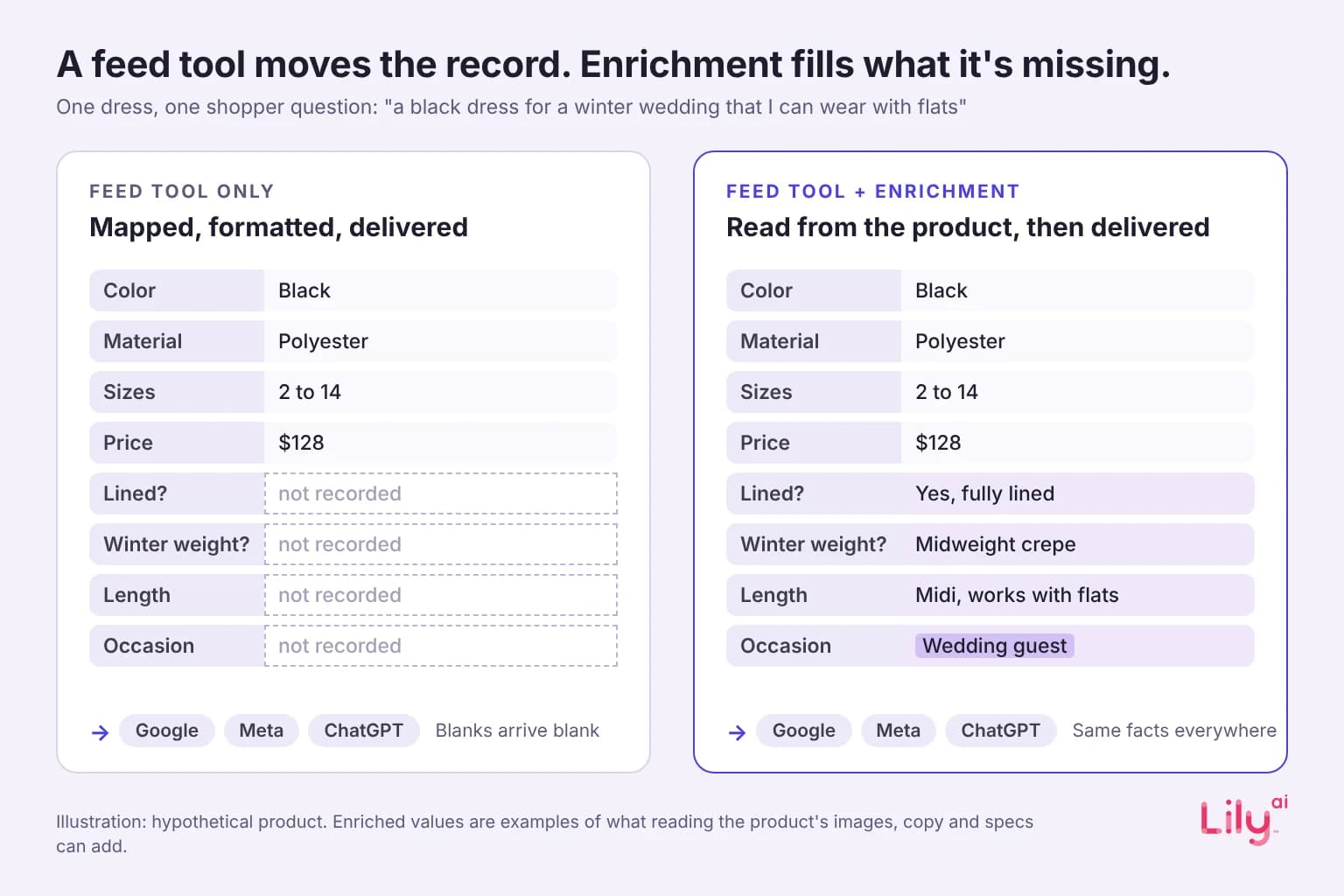
Here is a simple test. Take a dress whose record says: black, polyester, sizes 2 to 14, $128. A shopper asks an AI assistant for “a black dress for a winter wedding that I can wear with flats.” Every word in that question after “black” is a fact your record does not hold. Is it lined? Is the fabric heavy enough for winter? Is the length right for flats? Is it appropriate as a guest outfit?
No rule can answer those, because the answers are not in the source. You could write a rule that adds “wedding guest” to every black dress, but that puts a claim on products it does not fit, which is how listings get disapproved and how shoppers return things.
This is the line between feed management and product data enrichment. Feed management moves the record, while enrichment adds to it by reading the product (its images, copy and specs) and writing the attributes shoppers search and ask for. Google now has fields built for exactly this kind of detail. Our guide to Merchant Center conversational attributes covers what goes in them.
Built-in platform feeds: the free pipe to ChatGPT
The biggest change this year is that the store platform now runs the AI feed for you. Shopify says products are “automatically accessible to AI channels like ChatGPT, Shop, and Copilot through Shopify Catalog” (Shopify changelog, 11 May 2026). For merchants, “there’s nothing to configure,” and eligible products are listed by default (Shopify).
That is a strong reason not to pay for a separate pipe into ChatGPT, and brands are noticing. A heritage American apparel brand we work with put it plainly on a call in August: “we are kind of like leaning towards like Shopify is offering the box since they are a commerce platform.” They were right to. If the pipe is free, the work moves to what goes through it.
Two details in Shopify’s own description show where the question moves. First, “Shopify Catalog builds on the product information a merchant submits.” The built-in feed carries what your catalog says, like any other feed. Second, “Catalog infers additional product attributes” using machine learning and transaction signals. Some of what AI assistants read about your products may be written by the platform, not by you. Merchants can choose which AI partners receive their data, and Shopify says those with custom data setups can use Catalog Mapping to fine-tune how products are represented.
So the useful checks for a brand on a built-in feed are about content, not plumbing:
- What does the record say? The facts a shopper asks about need to be in your product data, in text.
- What is being inferred? Look at how your products appear in the AI channel and compare it with your own record. Where the inferred attributes are wrong or off-brand, fix the record so there is less to guess.
- Is it the same everywhere? The same product should say the same thing in Google, Meta, ChatGPT and on your product page.
How to decide what your catalog needs
| Your situation | What usually fits | Why |
|---|---|---|
| Under a few thousand products, one platform, one or two channels | The platform’s built-in feeds | Delivery is solved for free. Spend the effort on writing complete records |
| Thousands of products, three or more ad channels, frequent price changes | A feed tool | Rules, mapping and scheduling at scale are what feed tools are for |
| Any size, with thin or inconsistent product records | Enrichment, alongside whichever feed you use | No feed can send a fact that is not in the record |
| Large catalog, many channels and AI assistants, and paid media depends on the feed | A feed tool plus enrichment | Delivery and content are separate problems at this scale |
Most retail teams we speak with sit in the last two rows. They already have a pipe they trust, and what they lack is a record complete enough to answer the questions their shoppers now ask out loud.
Where Lily Max fits
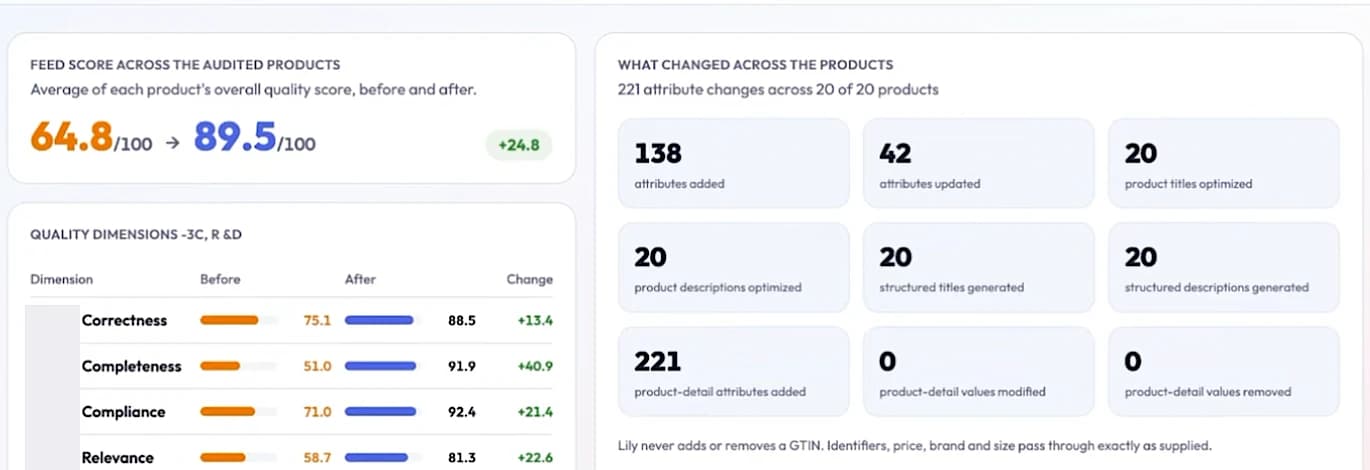
Lily Max does not replace a feed tool. It reads every product in the catalog and writes the attributes and copy shoppers search and ask for, then sends those content fields to Google as a supplemental feed, so the rules your feed tool already runs stay untouched. It leaves inventory and pricing alone. In a matched-spend A/B test, a large apparel brand saw 28% more Google Shopping revenue with product data enriched by Lily Max (case studies). See how Lily Max works, or book a demo to see what your current feed is missing.
Frequently asked questions
What is product feed management?
Product feed management is the work of sending a catalog’s product data to every sales channel in the format each one requires, and keeping it correct. It covers mapping, rules, formatting, scheduling and fixing errors.
Do I need a feed management tool if Shopify already sends my products to ChatGPT?
Not for ChatGPT delivery alone, since Shopify Catalog does that by default for eligible merchants. You may still want a feed tool if you run several ad channels at scale, and you still need complete product records for any channel to work well.
What is the difference between feed management and product data enrichment?
Feed management moves the product data you already have to each channel. Enrichment adds to that data by writing the attributes and facts the record was missing.
Can feed rules fix missing product attributes?
Rules can fill a field from data you already hold somewhere else, such as moving a color from the title into the color field. They cannot create a fact nobody recorded, such as whether a dress is lined.
What is product feed software?
Product feed software is a tool that connects to your store platform or PIM, applies mapping and rules, and sends formatted feeds to channels such as Google, Meta and marketplaces on a schedule.

See Lily in action
Book a personalized demo and see how Lily can grow your retail revenue.
Related Blogs
Ecommerce code freeze: retail sites lock just before holiday shoppers start searching
Your code freeze locks the site as holiday searches peak. What still changes without a deploy in Merchant Center, Meta and Shopify, and how to check.
By Lily AI
Google AI Max writes your ads from your site and your product feed
Google AI Max picks searches, writes ad text and chooses landing pages from your site and Merchant Center feed. What it reads and what to check first.
By Lily AI
Meta Commerce Manager in 2026: the catalog fields Meta's AI reads
Meta paused the terms that would let it crawl the sites behind your catalog. The Commerce Manager fields that matter, where they drift, what to check.
By Lily AI
ChatGPT product feed optimization: the fields that decide what gets shown
ChatGPT product feed optimization, field by field: what OpenAI requires, which optional fields match shopper questions, and what to write in each one.
By Lily AI
Google Shopping feed requirements: every field that matters in 2026
Google Shopping feed requirements for 2026: the seven required fields, when brand, GTIN, color and size apply, image rules, and fields that win searches.
By Lily AI
What actually goes in Google Merchant Center conversational attributes
What actually goes in Google Merchant Center conversational attributes: worked before-and-after values for apparel and home, plus where to mine them.
By Lily AI