Why is ChatGPT showing the wrong price for my product?
Part of: AI discovery and agentic commerce
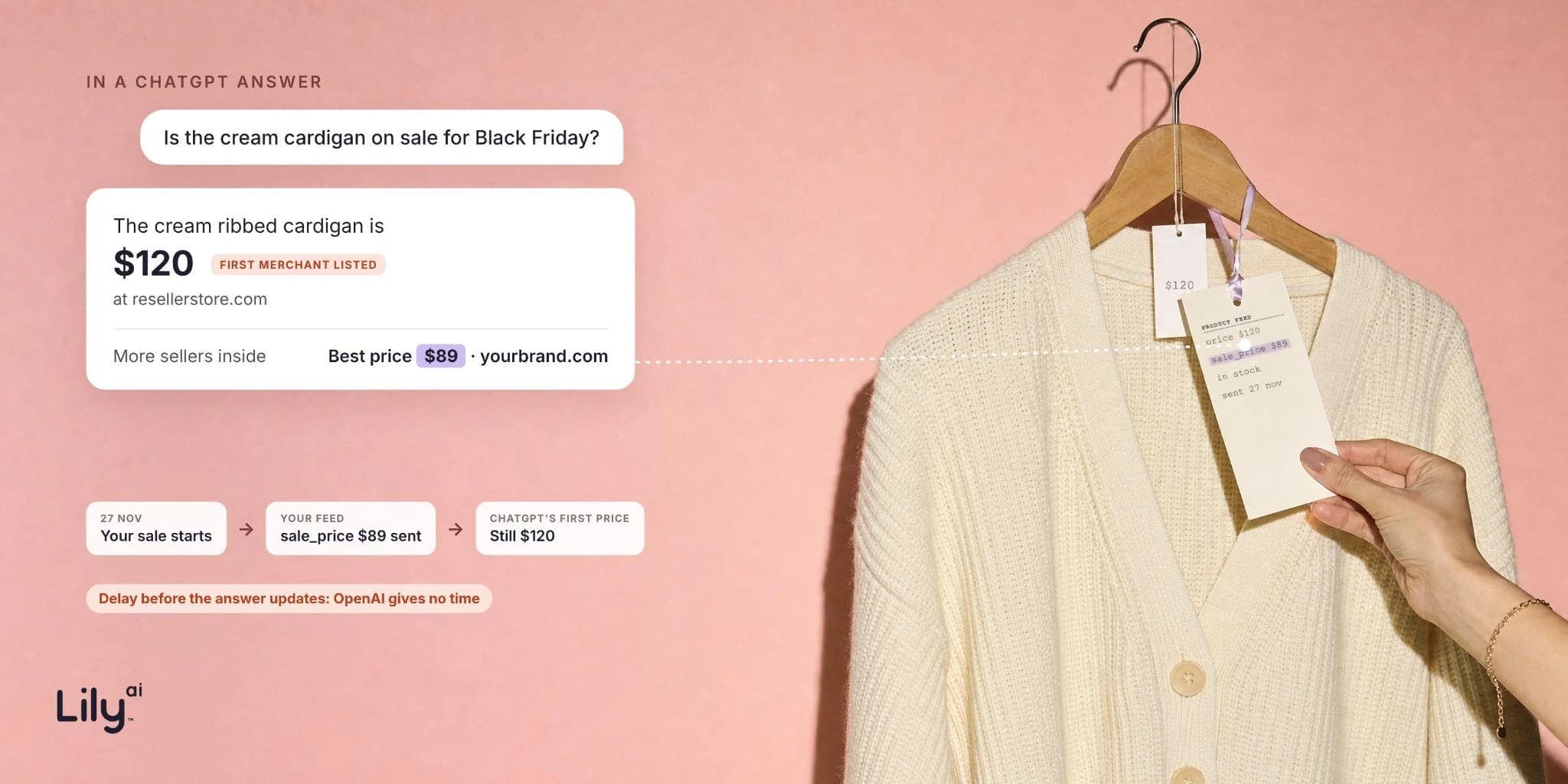
That matters most this week. Black Friday falls on 27 November 2026, and any price you mark down for it changes at least twice: once when the sale starts and once when it ends.
Where does ChatGPT get its prices?
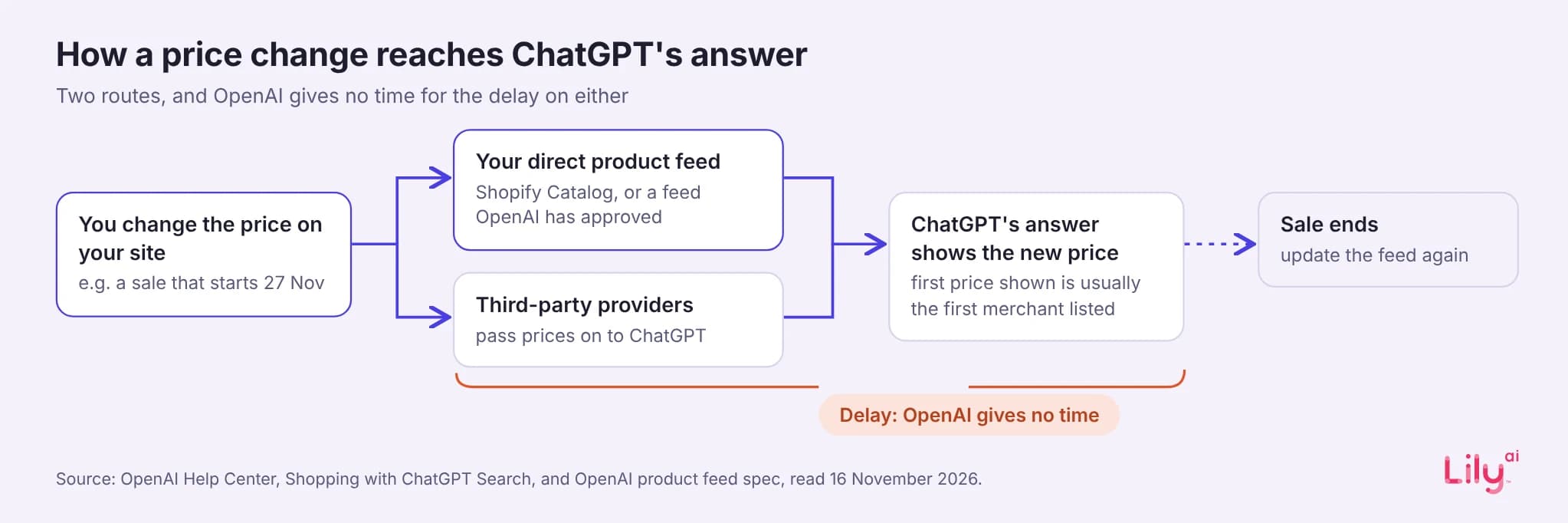
From third-party providers, and in some cases from merchants directly. OpenAI’s help page on shopping says product listings in ChatGPT “may include prices, which we receive from third-party providers,” and that the list of merchants for a product is built from metadata “from third-party providers or directly from the merchants themselves” (OpenAI Help Center, Shopping with ChatGPT Search, read 16 November 2026).
The same page admits the gap. “When merchants update their pricing or shipping terms, there may be some delay before it is reflected in the information you see,” it says, adding that OpenAI is “actively working on faster methods to update this information.” It gives no time for that delay.
Why is the first price sometimes someone else’s?
Because the first price usually comes from the first merchant in the list. OpenAI says prices in ChatGPT’s initial response “typically reflect the price from the first merchant listed, which may not be the lowest available price.” Open the product and other merchants may appear “at the same or different prices,” with the cheapest one ChatGPT knows of sometimes labeled “Best price.”
So if a marketplace seller or a reseller carries your product, the price a shopper sees first may be theirs, not yours. OpenAI ranks merchants “based on factors like availability, price, quality, and whether they are the maker or primary seller of that item.” Being the maker counts in your favor. Availability and price are on the same list, so an out-of-stock flag or a stale price works against you.
| What the shopper sees | Likely cause | What to check |
|---|---|---|
| Your old price after a sale starts | The update hasn’t reached ChatGPT yet | When your feed last sent the new price |
| A price you never charged | Another merchant listed first | Which merchants appear when the product is opened |
| Your full price during a sale | The sale price was never sent, or was rejected | That sale_price is set, and lower than price |
What can you fix before Black Friday?
You can’t control the provider chain, but you can control what you send and when. OpenAI says Shopify merchants are already integrated through Shopify Catalog, with “no additional work” required, and that other merchants who want ChatGPT to “always reflect the most up-to-date information” can apply to send a direct product feed. For what that feed needs field by field, see our guide to ChatGPT product feed optimization.
Two lines in OpenAI’s product feed spec decide whether a sale shows. It says to “submit the current price; update the feed when a sale starts or ends.” And it only uses a sale_price that is “strictly less than price” in the same currency: an equal, higher or different-currency sale price is ignored (OpenAI product feed spec, read 16 November 2026).
If a wrong price persists, report it through the product’s menu or thumbs-down, as OpenAI asks. On Google, the same mismatch gets a product disapproved, as our misrepresentation checklist explains.
What a correct price won’t do
A right price keeps you in the running, but it doesn’t decide whether you’re picked. In OpenAI’s own example, ChatGPT weighs available options, price, reviews and ease of use alongside what the shopper has told it, and OpenAI notes that “not all available products will necessarily be shown.” More on that in how AI shopping assistants pick products.
That’s where Lily Max fits. It doesn’t set prices. It reads every product in a catalog and writes the attributes shoppers ask about, such as fit, material, care, occasion and who the product is for, into the product record the feed is built from. See how Lily Max works, or book a demo to see what your records tell ChatGPT today.
Frequently asked questions
Why does ChatGPT show a different price than my website?
OpenAI says prices come from third-party providers and there may be some delay before a merchant’s price change shows in ChatGPT. The first price in an answer also usually belongs to the first merchant listed, which may not be you.
How do I update my product price in ChatGPT?
Send the current price in your product feed and update it when a sale starts or ends. Shopify merchants are integrated through Shopify Catalog, and other merchants can apply to OpenAI for direct feed access.
Why doesn’t my sale price show in ChatGPT?
OpenAI’s feed spec only uses a sale_price that is strictly less than the regular price and in the same currency. Check that the sale price is in its own field and was sent when the sale started.

See Lily in action
Book a personalized demo and see how Lily can grow your retail revenue.
Related Blogs
ChatGPT Business Hub: how it works, and what it counts as a mention
ChatGPT Business Hub lets a brand claim a profile, add a product feed and see its mentions. How it works, what counts as a mention, and what to fix first.
By Lily AI
Meta Muse holiday checklist: 10 fixes before Black Friday
Ten fixes retailers can make before Black Friday so Meta Muse can find, read and recommend their products, from gift facts to checkout and order tracking.
By Lily AI
How AI Shopping Assistants Actually Pick Which Products to Recommend
AI shopping assistants retrieve before they rank. See what each surface reads from your product record, and which missing attributes disqualify you.
By Lily AI
Muse vs Instinct: what personal shopping agents mean for retailers
Meta Muse and Instinct shop on a person's behalf. How the two personal agents find products and check out, and what retailers should fix in product data.
By Lily AI
WebMCP for ecommerce: AI assistants can now shop your store directly
WebMCP lets AI assistants search and shop your store directly, and Shopify and BigCommerce switched it on. What it is, what assistants read, how to check.
By Lily AI
Google Universal Cart turns your price drops into shopper alerts
Google Universal Cart alerts US shoppers when saved items drop in price or restock. What it reads from your listings, and what to check before your freeze.
By Lily AI