ChatGPT Business Hub: how it works, and what it counts as a mention
Part of: AI discovery and agentic commerce
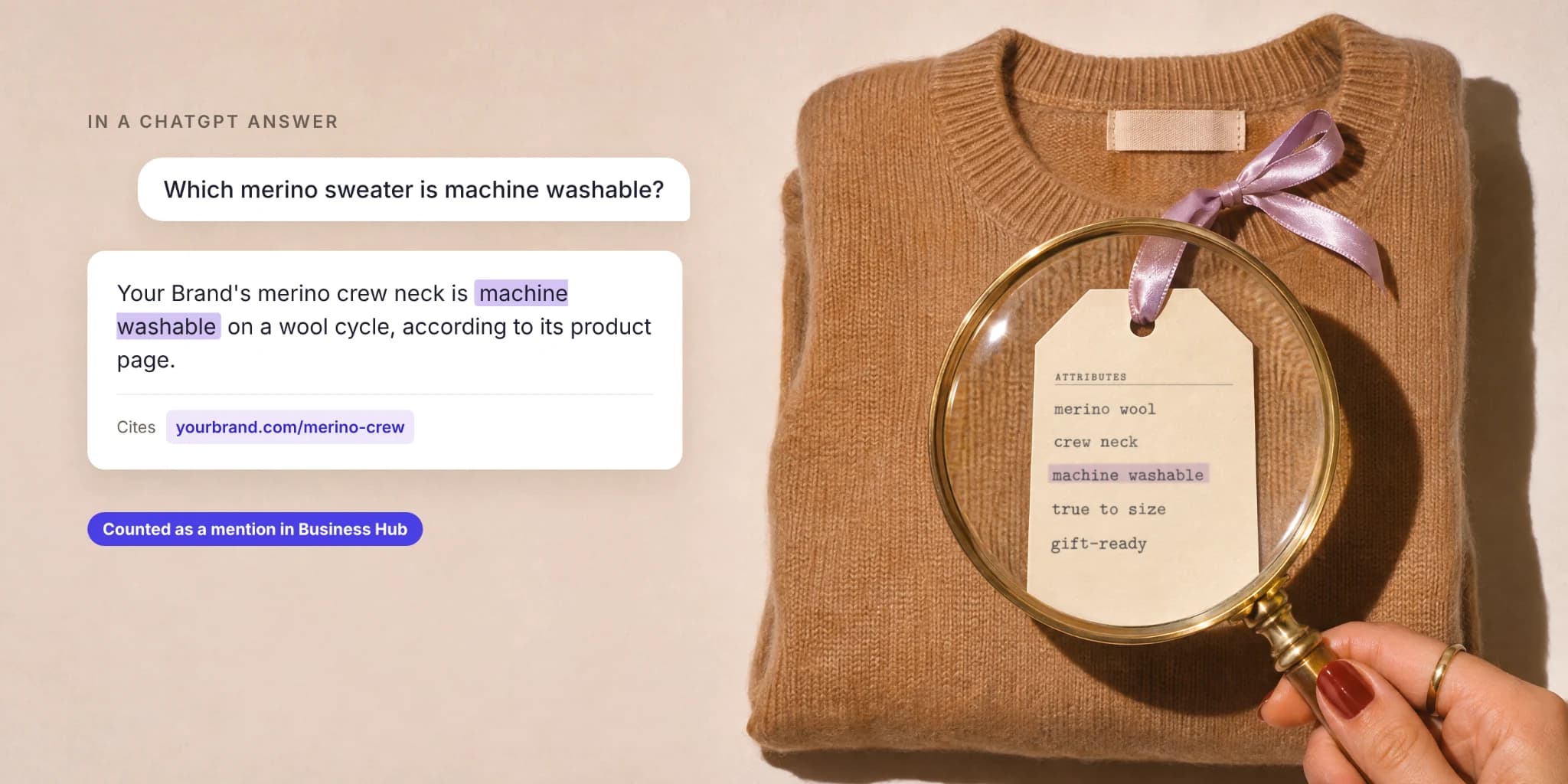
That last rule is the most useful thing OpenAI published at launch. It turns a vague question (“are we showing up in ChatGPT?”) into a specific one: can ChatGPT find, and cite, a page on your site that answers what the shopper asked? This guide walks through the four parts of the launch, what the new insights count and leave out, and where product data decides the result.
What OpenAI launched
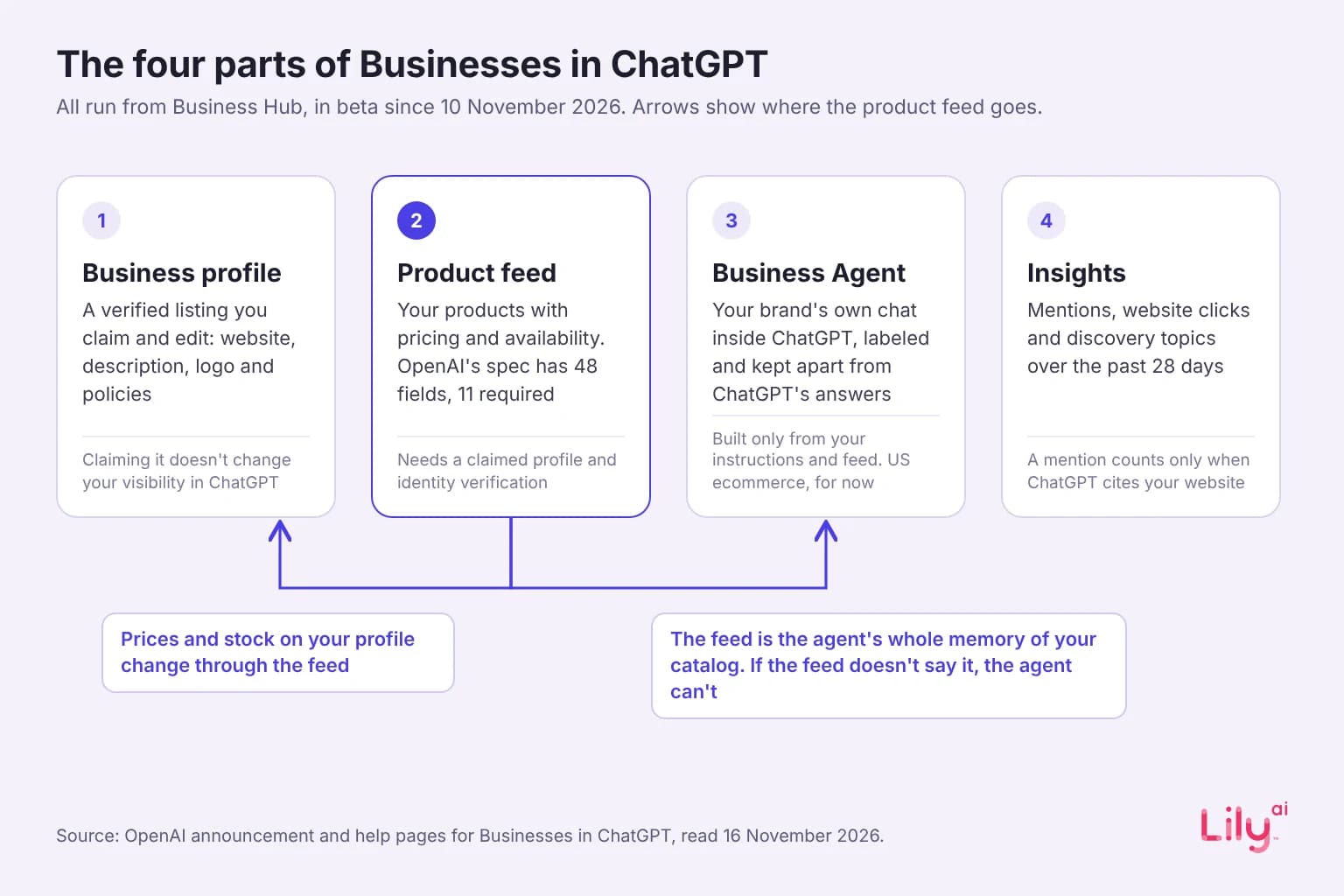
OpenAI calls the launch “Businesses in ChatGPT.” It has four parts, all run from Business Hub, and TechCrunch reports the whole thing is in beta.
| Part | What it does | Who can use it |
|---|---|---|
| Business profile | A verified listing the business claims and edits | Eligible businesses with a website, where ChatGPT is available and verification is supported |
| Product feed | Self-service feeds “with pricing and availability” | Claimed businesses that pass identity verification |
| Business Agent | A brand’s own chat inside ChatGPT, labeled and kept apart from ChatGPT’s answers | Eligible US ecommerce and online-service businesses, for now |
| Insights | Mentions, views, website clicks and discovery topics | Businesses that pass a volume threshold |
The feed detail comes from OpenAI’s announcement, and the eligibility rules from OpenAI’s help page. Business Hub and agents “are free for now,” according to Digiday, and OpenAI has not ruled out charging later.
How to claim your business profile
You claim the profile in Business Hub with a business phone number, a business email, a DNS record on your website’s domain or a Shopify store. Then comes a second step: identity verification through Persona, which OpenAI requires before you can publish changes, connect a feed, see insights or set up an agent (OpenAI). The blue check appears only once Persona approves you. After that you can edit your website, description, category, logo, and delivery and return policies, and OpenAI reviews each change before it goes live. Prices and stock change through the product feed.
Claiming a profile does not buy placement. OpenAI’s help page says that claiming a profile “doesn’t change its visibility in ChatGPT” (OpenAI), and Benji Shomair, OpenAI’s VP of monetization, told Digiday the core product needs to “maintain objectivity” (Digiday). The profile is where you correct the record. Whether you show up is still decided by ChatGPT’s answer.
What Business Hub insights count
This is the first time ChatGPT has given brands a first-party count of how they appear. OpenAI’s help page lists three measures: mentions, website clicks and discovery topics (OpenAI). Each is defined narrowly, and the definitions matter more than the numbers.
| Metric | What it counts | What it does not count |
|---|---|---|
| Mentions | For an online business, answers where ChatGPT references the business’s website | “The brand name alone doesn’t count,” per OpenAI’s help page |
| Website clicks | “Clicks on links from supported ChatGPT surfaces,” per OpenAI’s spokesperson to Digiday | Completed visits or purchases |
| Discovery topics | “Common themes in conversations where ChatGPT cites the business’s site” | The exact questions shoppers asked |
Four limits come with it. Insights show “aggregate activity over the past 28 days” (OpenAI). They appear only once activity passes a threshold OpenAI hasn’t published, and a blank metric “doesn’t necessarily mean zero activity” (same page). “Share of voice isn’t part of this beta,” OpenAI told Digiday, so you see your own counts and not a competitor’s. And OpenAI doesn’t share users’ chats with businesses (OpenAI).
Why the website rule changes what you measure
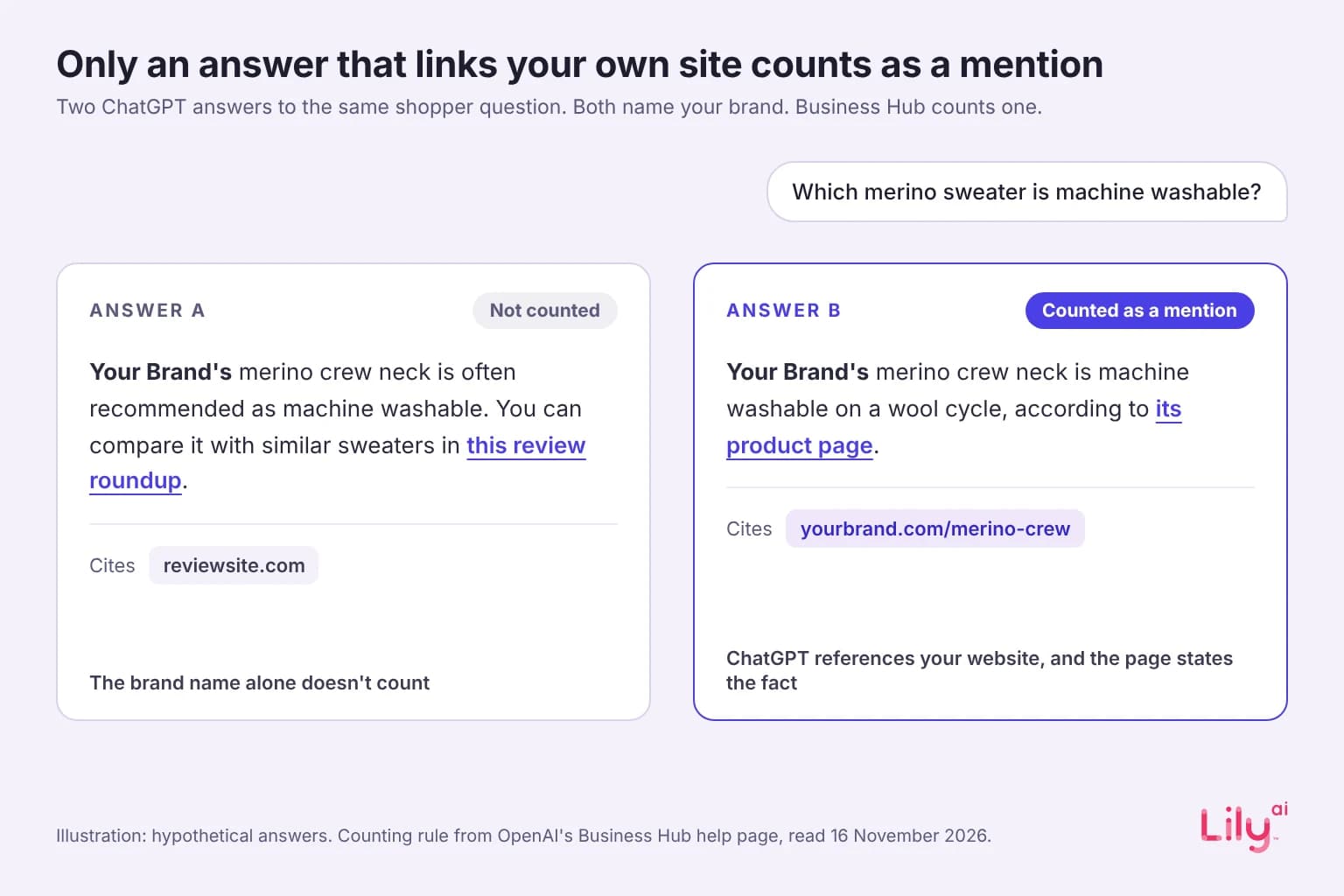
Picture two answers to the same shopper question. In the first, ChatGPT names your brand and links a review roundup. In the second, it links your own product page. Both put your name in front of the shopper. Only the second shows up in your Business Hub count.
So the number Business Hub reports is a reading of your own pages and records. A brand that is talked about widely but whose product pages never state the fact a shopper asked for can score low. A smaller brand whose pages state that fact plainly can score higher. Your count is also where you get your discovery topics, because those are only drawn from conversations where ChatGPT cites your site.
If you also track AI visibility with another tool, check how that tool counts a mention. A tool that counts brand names and Business Hub, which counts citations of your site, are measuring different things. Their numbers will not match, so report them on separate lines.
Your Business Agent can only say what you give it
The Business Agent is the part most brands will notice first. When a business shows up in a ChatGPT answer, a shopper can open its profile and chat with its agent, in a conversation that is labeled and kept apart from ChatGPT’s own answers (The Next Web).
The agent is built from the instructions and product feed the business supplies. Brands cannot plug in an agent they built themselves. “We aren’t allowing folks to bring their own agents,” Shomair said. The agent can’t complete a purchase or a booking. It links the shopper to the brand’s site to finish (OpenAI). OpenAI’s ChatGPT Wallet, announced on 13 November for US Pro subscribers, lets ChatGPT’s own agent pay on a user’s behalf, but it is separate from Business Hub (OpenAI).
The agent can also be bought. Businesses can sponsor it as the destination for a ChatGPT ad. “The sponsored agent is the paid experience, but the agent that sits behind it should be the same,” Shomair said. Shomair describes the free version as “the organic experience.”
Put those rules together and the feed becomes the agent’s whole memory of your catalog. If the feed says a dress is blue, size 8 and $120, that is what the agent knows. If it never says the dress is fully lined, machine washable or cut for a petite frame, the agent cannot tell a shopper who asks. And since the brand never reads the chats, nobody on your team will hear the question it failed to answer.
What to set up first
- Claim the profile and finish identity verification. Without the Persona step you can’t connect a feed, see insights or set up an agent. Then correct the description, category, logo and policies. It is free, and it does not change how often you appear.
- Audit the feed for the questions shoppers ask. OpenAI’s product feed spec has 11 required fields, and price and stock are table stakes. The questions that narrow a shortlist are about fit, material, care, occasion and who the product is for. Check that each one has a value in the feed, not only in a photo or a size chart image.
- Write the agent’s instructions from the same record. If the instructions promise something the feed does not hold, the agent has nothing to back it up.
- State the facts on the product page in text. The mention count rewards answers that cite your site, and a page can only be cited for what it says.
- Take a 28-day baseline before you change anything. Note mentions, clicks and the top discovery topics, then change one thing at a time so you can tell what moved the count.
For how assistants narrow a question to a shortlist, see our guide to agentic commerce. For the attributes that do this work in Google, see Merchant Center conversational attributes.
What OpenAI has not said yet
- How often feeds refresh. OpenAI has published a product feed spec: 48 fields, 11 of them required, sent as CSV or JSONL by upload, hosted URL or SFTP (OpenAI). It gives no refresh rate beyond updating the feed when a sale starts or ends.
- The thresholds. Insights appear only when volume passes a threshold, and the threshold is not public.
- How long mentions are kept beyond the 28-day insights window.
- Pricing after the beta. Free “for now.”
We will update this guide as OpenAI publishes its documentation.
Where Lily Max fits
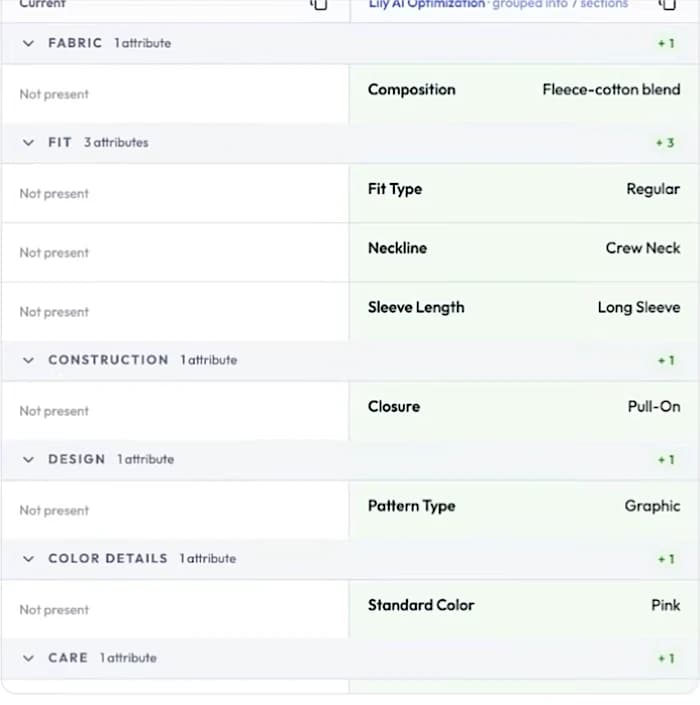
Lily Max reads every product in a catalog and writes the attributes shoppers ask about (fit, material, care, occasion, who it is for) into the product record. The same record then goes to the feed, the product page and the agent’s source material, so ChatGPT’s answer, the page it cites and the brand’s own agent all draw on the same facts. In a matched-spend A/B test, a large apparel brand saw 28% more Google Shopping revenue with product data enriched by Lily Max (case studies). See how Lily Max works, or book a demo to see what your records tell ChatGPT today.
Frequently asked questions
What is ChatGPT Business Hub?
ChatGPT Business Hub is OpenAI’s dashboard for businesses, launched in beta on 10 November 2026. Businesses use it to claim a verified profile, add a product feed, set up a Business Agent and see insights on how ChatGPT mentions them.
How do I claim my business on ChatGPT?
You claim your profile in Business Hub with a business phone, a business email, a DNS record or a Shopify store, then pass identity verification through Persona. The blue check appears after Persona approves you. Prices and stock change through your product feed.
What counts as a mention in ChatGPT Business Hub?
For an online business, a mention counts when ChatGPT references the business’s website in an answer. OpenAI says the brand name alone doesn’t count.
Does claiming a profile help my brand appear more often in ChatGPT?
No. OpenAI says claiming a profile doesn’t change its visibility in ChatGPT. The profile lets you correct your details, while ChatGPT’s answer still decides whether you show up.
Can I bring my own AI agent into ChatGPT?
No. Business Agents are built from the instructions and product feed the business supplies, and OpenAI is not allowing outside agents. For now, Business Agents are open to eligible US ecommerce and online-service businesses.

See Lily in action
Book a personalized demo and see how Lily can grow your retail revenue.
Related Blogs
Muse vs Instinct: what personal shopping agents mean for retailers
Meta Muse and Instinct shop on a person's behalf. How the two personal agents find products and check out, and what retailers should fix in product data.
By Lily AI
WebMCP for ecommerce: AI assistants can now shop your store directly
WebMCP lets AI assistants search and shop your store directly, and Shopify and BigCommerce switched it on. What it is, what assistants read, how to check.
By Lily AI
Google Universal Cart turns your price drops into shopper alerts
Google Universal Cart alerts US shoppers when saved items drop in price or restock. What it reads from your listings, and what to check before your freeze.
By Lily AI
Meta Muse holiday checklist: 10 fixes before Black Friday
Ten fixes retailers can make before Black Friday so Meta Muse can find, read and recommend their products, from gift facts to checkout and order tracking.
By Lily AI
How Meta Muse finds and picks products: a guide for retailers
Meta Muse finds products in three stages. See what it reads, why found is not the same as picked, and what retailers should fix before the holiday rush.
By Lily AI
Agentic commerce: what it is, what changed in 2026, and what a brand actually has to do
Agentic commerce is AI agents buying on a shopper's behalf. What changed in 2026, what an agent reads from your catalog, and what to fix before Q4.
By Lily AI