Product content management for AI-written copy: approvals, versions, rollback

The usual belief is that you check AI copy after it goes live, by reading a few product pages and hoping the rest look the same. When we walked through how Lily Max runs a catalog in our product demo, the order was the other way round. Review sits at step two of six, before the full catalog is written, and removals are treated as the riskiest change of all.
What we found, reading the demo screens:
- Approval comes before generation. In the Lily Max flow shown in the demo, Sample Review is step 2 of 6 and Full Catalog Generation is step 3, so nothing runs at scale until a person continues.
- The sample is scored, not just read. The demo sample was 10 products, each scored before and after enrichment against Google’s best practice guidelines, as the screen states.
- Removals get their own filter. On one product in the demo, the field view marked 8 attributes added, 3 changed, 9 removed and 3 unchanged, out of 23, with each removed value still visible.
- Some fields are never written. The audit screen in the same demo states that identifiers, price, brand and size pass through exactly as supplied.
Approval belongs before the catalog runs, not after
A model can rewrite a hundred thousand descriptions faster than one merchandiser can read a hundred. So the approval that matters can’t be a person reading the output line by line after the fact. It has to be a decision on a small, scored sample, made before the expensive part starts.
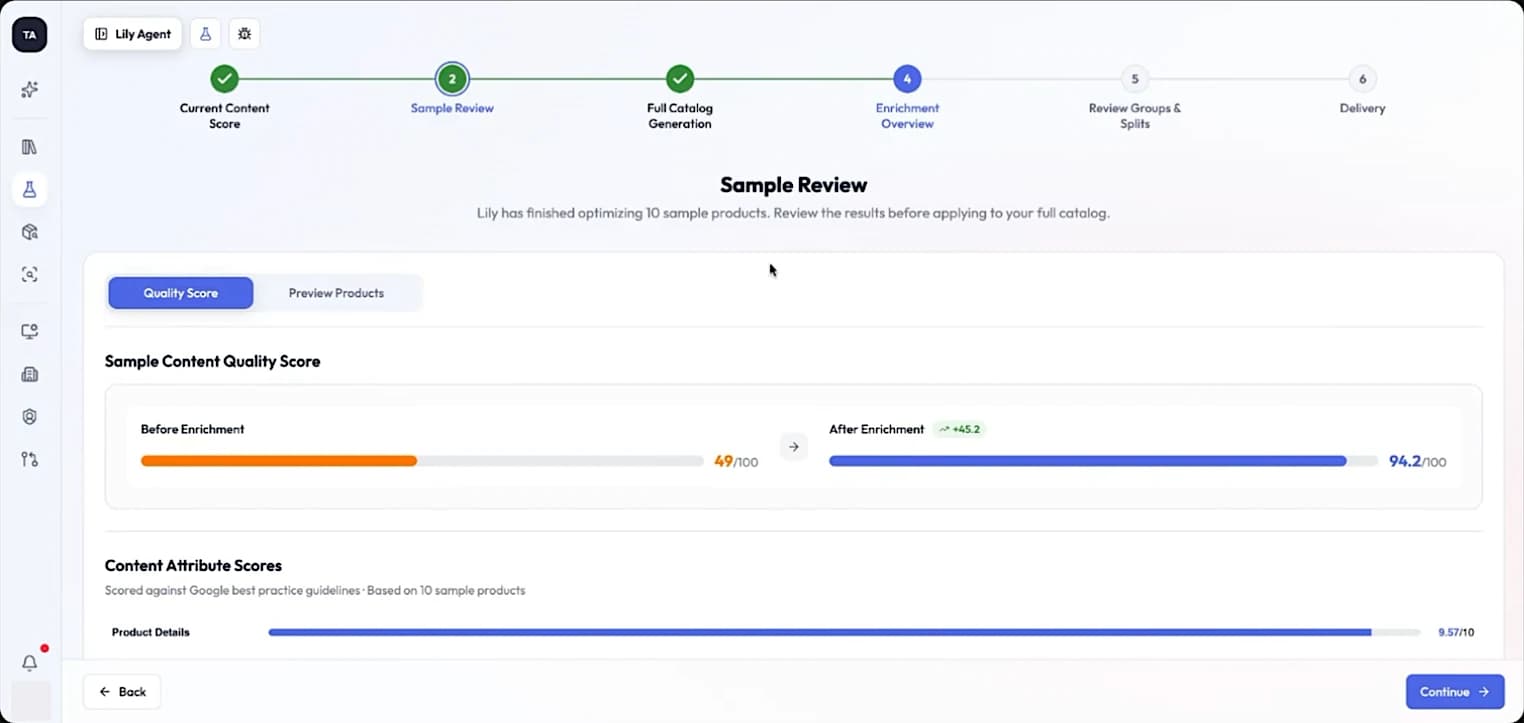
The screen above is that decision point. The six steps run Current Content Score, Sample Review, Full Catalog Generation, Enrichment Overview, Review Groups & Splits, and Delivery. The sample sits in the middle of the flow on purpose: the team has already seen how the catalog scores today, and the full run hasn’t happened yet. If the sample reads wrong, it costs ten products of rework, not a catalog’s.
A score tells you where to read
Ten products is still a lot of text to read closely. The score is there to point a reviewer at the right lines. The demo screen shows one overall content quality score for the sample before and after, then a score for each content attribute, such as product details, so a reviewer can see which field moved most and read that one first.
A score is a reading aid. It doesn’t tell you a product will sell more, and it doesn’t replace a person checking a claim against the product. What it does is turn “read everything” into “read the parts that changed most”.
Removals are the change nobody sees
An added field is easy to spot because it’s new text. A removed field is silence. Nothing on the product page says a fact used to be there, and no feed error fires when it goes. That’s why a removal needs a person’s eye more than any other change.
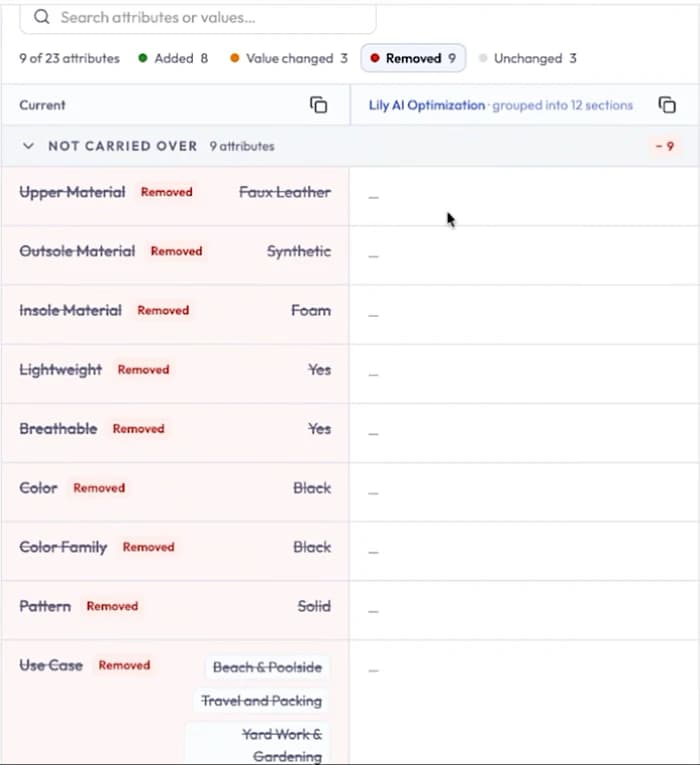
In the field view from the same demo, every attribute carries one of four statuses: added, value changed, removed or unchanged. Filtering to removed shows 9 of the product’s 23 attributes as “not carried over”, from upper material to use case, each struck through with the value it held. The optimized record beside them is grouped into 12 sections. Whatever the reason a field doesn’t carry over, the reviewer sees it before a shopper does, and can send it back.
Versions and rollback depend on keeping the original
You can only roll back to something you kept. For AI-written product content, that means the source record stays intact and the new content sits beside it, not on top of it.
Google’s Merchant Center already works this way for one common setup. A supplemental data source is one you use to “enhance or override information in your primary data source” (Merchant Center Help). When enriched content goes to Google that way, the primary feed stays as it was, so the original values are still there to go back to. Locked fields help too. Price, brand and product identifiers are fields Google requires for most products, as our guide to Google Shopping feed requirements shows. When a tool never writes them, a rollback never has to restore them, and they can’t drift in the first place. Getting them wrong is how listings end up in Merchant Center misrepresentation trouble.
These are the questions we’d ask any tool that writes product content, ours included:
| Control | The question to ask | Why it matters |
|---|---|---|
| Sample approval | Does a person approve a sample before the full catalog runs? | Mistakes stay small |
| Field status | Is every field marked added, changed, removed or unchanged? | Removals are otherwise invisible |
| Locked fields | Which fields can the tool never write? | Price and identifiers tie a listing to a real offer |
| Source kept | Is the original record kept untouched underneath? | You can only roll back to what you kept |
| Unit of rollback | Can you undo one product, one field or one whole run? | A bad title shouldn’t cost you a good description |
What this does not show
These findings come from screens in one recorded product demo, not from a customer rollout. The demo shows the sample review, the scores and the field statuses. It doesn’t show a version history screen, a rollback control, who approved a change or when, or which roles can approve, so we haven’t described those here.
The counts are one sample of 10 products and one product’s 23 attributes. They describe how the screens work, not how often fields get removed across a catalog. And the quality score measures the record against Google’s guidelines. It isn’t revenue.
What this means for retail marketers
If AI is writing your product content, the approval step is now your main point of control. Put it before the full run, and give it a sample small enough to read.
Ask to see removals as their own list. Additions make a demo look good; removals are where a fact quietly leaves a listing that Google, Meta and AI assistants all read.
Keep the original. A team that can’t say what a product said last week can’t roll it back, and can’t test whether the new version did better.
Where Lily Max fits
Lily Max is the agentic product intelligence engine for AI commerce. Your team sets the goals and approves what ships, and every result is measured against a control. See how Lily Max works, or book a demo to watch a sample of your own catalog go through review.
How we wrote this
We read the screens of a recorded Lily Max product demo, with customer names, product rows and identifiers covered. Every count in this post is what a screen shows: the 10-product sample, the six steps and the 23 attribute statuses on one product. We left out anything the screens don’t show.
Lily AI writes about product data for retail teams that sell through Google, Meta, AI assistants and their own sites.
Frequently asked questions
What is product content management?
How should a team approve AI-written product copy?
How do you roll back AI-written product content?
Is product content management the same as a PIM?

See Lily in action
Book a personalized demo and see how Lily can grow your retail revenue.
Related Blogs
What is product experience management (PXM)?
Product experience management (PXM) shapes how a product is shown in every channel. What it covers, how it differs from PIM, and why AI readers change it.
By Lily AI
What is PIM? Product Information Management vs Product Data Enrichment, and what a PIM can’t write
What is PIM? A PIM stores product data but can’t write facts nobody recorded. How it compares with enrichment, PXM, MDM and DAM, plus a checklist.
By Lily AI
Product listing optimization for AI shopping: a thin listing reads like its cheaper twin
Product listing optimization for AI shopping: put who a product is for, what it’s for and how it feels in fields machines read, or they compare only price.
By Lily AI
Google product category: 5,595 categories, and one for every shoe
Google's product taxonomy has 5,595 categories and one for every shoe. How to pick the right Google product category, with 25 examples and where it falls short.
By Lily AI
Product attributes: which ones each discovery surface reads, and what a good one looks like
Which product attributes each discovery surface reads, what a well-formed value looks like, and the 2026 Merchant Center fields to fill in first.
By Lily AI
Product Data Enrichment: What It Means When the Machines Are the Reader
Product data enrichment is not filling empty fields. Get the working definition, the four readers, the boundary with PIM, and a way to measure lift.
By Lily AI