Google product category: 5,595 categories, and one for every shoe
The Google product category is the attribute that places a product in Google's fixed taxonomy of 5,595 categories. Google assigns one to every product automatically, so you set it only to correct a wrong match. Choose the most specific category for the product's main function, then carry whatever the taxonomy lacks in product type, title and attributes.
Google publishes its product taxonomy as a plain text file. The current version is dated 21 September 2021 and lists 5,595 categories under 21 top-level branches. We went through the whole thing, line by line, to answer the question retail teams ask most: where does this product go?
Here's what we found:
- Depth is uneven. The taxonomy goes seven levels deep to separate cardstock from scrapbooking paper. It goes two levels deep for shoes and stops there: every sandal, boot, slipper and sneaker shares the single category “Apparel & Accessories > Shoes”.
- The busiest apparel categories have nothing below them. Clothing has 128 subcategories, but Shirts & Tops, Dresses and Pants have none. There is no node for sweaters, polos, sweatshirts or jeans.
- One word can sit in two branches. A fashion tote and a reusable shopping tote live in different parts of the tree, and so do a hair dryer and a pet hair dryer.
- The category only gets you so far. Where the taxonomy stops early, you have to put the detail shoppers search for somewhere else in the record.
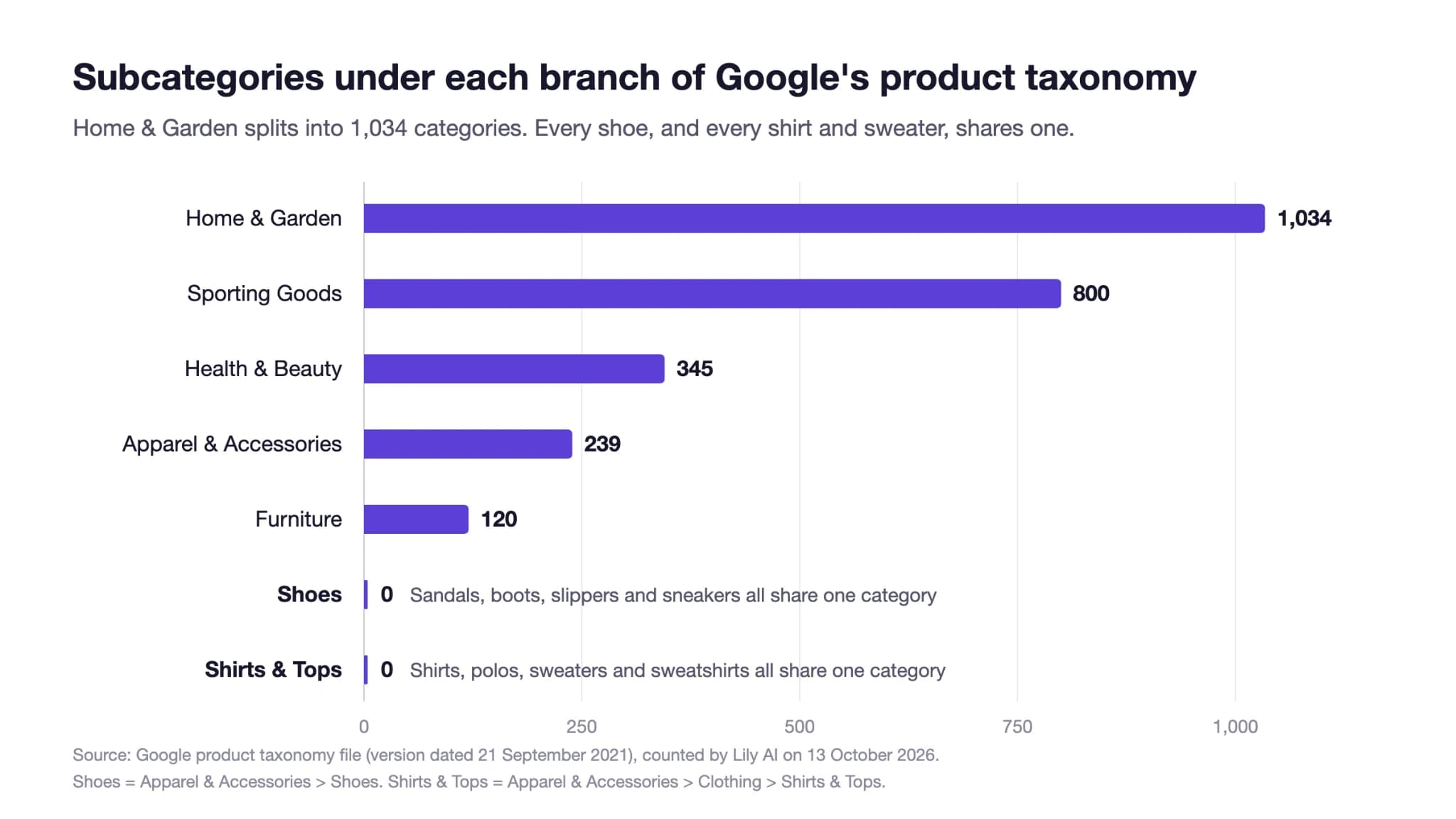
Google's taxonomy goes seven levels deep for paper and two for shoes
Google built the taxonomy to cover everything sold on Google Shopping, so it doesn't follow how any one retailer merchandises. Some branches go very deep and others stop early, and they rarely line up with what matters most in your catalog.
Number of subcategories below selected branches of Google's product taxonomy (version dated 21 September 2021).
| Branch | Subcategories below it |
|---|---|
| Home & Garden | 1,034 |
| Sporting Goods | 800 |
| Health & Beauty | 345 |
| Apparel & Accessories | 239 |
| Apparel & Accessories > Clothing | 128 |
| Furniture | 120 |
| Apparel & Accessories > Shoes | 0 |
| Apparel & Accessories > Clothing > Shirts & Tops | 0 |
| Apparel & Accessories > Clothing > Dresses | 0 |
| Apparel & Accessories > Clothing > Pants | 0 |
The deepest paths in the file run seven levels, for example “Arts & Entertainment > Hobbies & Creative Arts > Arts & Crafts > Art & Crafting Materials > Art & Craft Paper > Cardstock & Scrapbooking Paper > Cardstock”. Meanwhile, a footwear retailer has to map every style it sells to the same two-level path. So you can choose the right Google product category and still have a product that's hard to find.
How to categorize 25 common products
Where common apparel, footwear and home products sit in Google's product taxonomy, and what has to carry the detail the category leaves out. Where Google has no exact node, the category shown is the closest parent: our recommendation, not Google's.
| Product | Google product category (ID) | Exact node? | What carries the rest |
|---|---|---|---|
| Leather jacket | Apparel & Accessories > Clothing > Outerwear > Coats & Jackets (5598) | No jacket-type node | material: leather; product type: Outerwear > Jackets > Leather jackets |
| Winter coat | Apparel & Accessories > Clothing > Outerwear > Coats & Jackets (5598) | No season node | Title and description: insulation, warmth, weather |
| Wool blazer | Coats & Jackets (5598) for a standalone blazer; Apparel & Accessories > Clothing > Suits (1594) when sold as part of a suit | No blazer node | product type: Tailoring > Blazers; material: wool |
| Sweater | Apparel & Accessories > Clothing > Shirts & Tops (212) | No sweater node | product type: Knitwear > Sweaters; title leads with “sweater” |
| Shirt | Apparel & Accessories > Clothing > Shirts & Tops (212) | Yes | sleeve length, fit and occasion as attributes |
| Polo shirt | Apparel & Accessories > Clothing > Shirts & Tops (212) | No polo node | title and product type: Polos |
| Sweatshirt or hoodie | Apparel & Accessories > Clothing > Shirts & Tops (212) | No sweatshirt node | product type: Sweatshirts & Hoodies |
| Dress | Apparel & Accessories > Clothing > Dresses (2271) | Yes | length, occasion, silhouette |
| Jeans | Apparel & Accessories > Clothing > Pants (204) | No jeans node | product type: Denim > Jeans; fit and rise |
| Robe | Apparel & Accessories > Clothing > Sleepwear & Loungewear > Robes (2302) | Yes | material, length |
| Pajamas | Apparel & Accessories > Clothing > Sleepwear & Loungewear > Pajamas (2580) | Yes | material, set or separates |
| Lingerie | Apparel & Accessories > Clothing > Underwear & Socks > Lingerie (1772); bras have their own node (214) | Yes | style, coverage, material |
| Sandals | Apparel & Accessories > Shoes (187) | No | product type: Footwear > Sandals; title leads with “sandals” |
| Boots | Apparel & Accessories > Shoes (187) | No | product type: Footwear > Boots; shaft height, waterproofing |
| Slippers | Apparel & Accessories > Shoes (187) | No | product type: Footwear > Slippers; indoor or outdoor sole |
| Hat | Apparel & Accessories > Clothing Accessories > Hats (173) | Yes | hat style in the title |
| Tote bag (fashion) | Apparel & Accessories > Handbags, Wallets & Cases > Handbags (3032) | No tote node | product type: Bags > Totes |
| Tote bag (reusable shopping) | Luggage & Bags > Shopping Totes (5608) | Yes | material, capacity |
| Headboard | Furniture > Beds & Accessories > Headboards & Footboards (451) | Yes | bed size, material, mounting |
| Bath towels | Home & Garden > Linens & Bedding > Towels > Bath Towels & Washcloths (576) | Yes | material, weight, set size |
| Bed sheets | Home & Garden > Linens & Bedding > Bedding > Bed Sheets (2314) | Yes | bed size, material |
| Duvet cover | Home & Garden > Linens & Bedding > Bedding > Duvet Covers (2541) | Yes | bed size, closure, material |
| Rug | Home & Garden > Decor > Rugs (598) | Yes | size, material, room |
| Hair dryer | Health & Beauty > Personal Care > Hair Care > Hair Styling Tools > Hair Dryers (490) | Yes | wattage, attachments |
| Trophy | Arts & Entertainment > Party & Celebration > Trophies & Awards (5868) | Yes | material, engraving |
Eleven of these 25 products don't have an exact node. For those, the category only puts the product in the right part of the tree. The detail has to go in the fields below.
One word, two categories
Some product names fit two different branches. If you go by the word instead of what the product does, it can end up in the wrong one.
Product names that map to more than one branch of Google's taxonomy.
| Word in the product name | Branch A | Branch B |
|---|---|---|
| Tote | Handbags (3032), for a fashion tote | Shopping Totes (5608), for a reusable shopping bag |
| Hair dryer | Hair Dryers (490), for personal use | Pet Hair Dryers (8167), for grooming pets |
Google's own guidance answers this: pick the category that matches what the product is mainly used for. A canvas tote sold next to handbags and a canvas tote sold at a grocery checkout can be the same object and still belong in different categories.
Do you have to set the Google product category?
No. According to Google's Merchant Center help page, google_product_category is optional, because Google gives every product a category automatically. You only set it to fix a wrong match, using either the numeric ID or the full path (not both).
This matters most in categories with extra rules. Google says categories like Apparel & Accessories come with additional required fields. In Google's product data specification, color, size, gender and age group become required for apparel shown in the US, UK, Brazil, France, Germany and Japan. So if a shirt gets filed outside apparel, it can end up missing fields Google expects a shirt to have.
Product type carries what Google's taxonomy leaves out
Google product category uses Google's fixed tree. Product type is your own: a path written with “>” between levels, up to 750 characters, such as “Footwear > Sandals > Slide sandals”. Google only uses the first product type value to organize bidding and reporting in Shopping campaigns, so make that first value the one your paid search team bids on.
Here's how that splits for a pair of leather slide sandals:
How one product's category information divides across Google's fields.
| Field | Value | Job |
|---|---|---|
| google_product_category | Apparel & Accessories > Shoes (187) | Places the product in Google's tree; triggers apparel rules |
| product_type | Footwear > Sandals > Slide sandals | Carries the type Google's tree lacks; organizes Shopping bidding |
| title | “[Brand] Leather Slide Sandals, Women's, Tan” | Says the type in the shopper's words |
| material, color, gender, size | leather, tan, female, 8 | Answers the filters shoppers apply |
For which attributes each surface reads, see our guide to product attributes. For why the shape of your own hierarchy decides which searches a product qualifies for, see product taxonomy.
ChatGPT reads the same category paths
Other platforms are starting to use the same format. OpenAI's product feed spec for ChatGPT asks for a product_category written “from broad to specific, separated by >”, and its own example is a Google taxonomy path. A clean Google mapping, extended one level where Google stops, is reusable across the surfaces that read a product feed, which is the core of product feed optimization.
What we don't know yet
Picking the right Google product category won't move a product up the results on its own. Google assigns a category either way, and the right one mostly decides which rules and comparisons apply. We haven't measured the revenue impact of changing categories alone, and we wouldn't trust anyone who claims to without a controlled test. In the catalogs we work with, the bigger gaps are usually in the fields around the category: product type, title and attributes.
What this means for your team
Google's taxonomy file is still dated 2021, and it still puts every shoe in one category. Your catalog probably knows a lot more about each product than the taxonomy can hold, and Google can only read what's written into a field. So the question is whether anyone on your team owns filling in those fields.
Lily Max fills in the attributes the taxonomy leaves out, for every surface that reads your product record, and tests each change against a control. Book a demo to see it in your catalog.
Frequently asked questions
What is the Google product category?
The Google product category is the attribute that places a product in Google's fixed product taxonomy, which lists 5,595 categories in the version Google serves today. Google assigns one automatically, and merchants set it to override a wrong assignment.
How do I find the right Google product category?
Pick the most specific category that matches the product's main function from Google's taxonomy file, and submit either its numeric ID or the full path. If no exact node exists, use the closest parent and describe the specific type in product type and the title.
Is the Google product category required?
No. Google's help page lists it as optional because every product is categorized automatically, but some categories, such as Apparel & Accessories, bring extra required attributes, so a wrong category can cause problems.
What is the difference between product type and Google product category?
Google product category uses Google's fixed taxonomy, while product type is your own category path of up to 750 characters. Google uses the first product type value to organize Shopping campaign bidding and reporting.
Does Google's taxonomy have a category for sandals or sweaters?
No. Every shoe sits in “Apparel & Accessories > Shoes”, and sweaters share “Shirts & Tops” with shirts and polos, so the specific type has to be carried in product type, the title and attributes.

See Lily in action
Book a personalized demo and see how Lily can grow your retail revenue.
Related Blogs
Product taxonomy: where a product sits, and which queries it is eligible for
A product taxonomy decides which queries your catalog is eligible for. Learn to map it, structure it and maintain it across search, Shopping and AI.
By Lily AI
Product attributes: which ones each discovery surface reads, and what a good one looks like
Which product attributes each discovery surface reads, what a well-formed value looks like, and the 2026 Merchant Center fields to fill in first.
By Lily AI
Product Data Enrichment: What It Means When the Machines Are the Reader
Product data enrichment is not filling empty fields. Get the working definition, the four readers, the boundary with PIM, and a way to measure lift.
By Lily AI
What is Product Content Optimization? 3 Things to Know
In an AI-dominated retail world, basic product copy and bare minimum product data no longer cut it. Three things every retailer, brand, and agency needs to know about product content optimization.
By Lily AI
Google Universal Cart turns your price drops into shopper alerts
Google Universal Cart alerts US shoppers when saved items drop in price or restock. What it reads from your listings, and what to check before your freeze.
By Lily AI
Google Shopping feed requirements: every field that matters in 2026
Google Shopping feed requirements for 2026: the seven required fields, when brand, GTIN, color and size apply, image rules, and fields that win searches.
By Lily AI