What is PIM? Product Information Management vs Product Data Enrichment, and what a PIM can’t write

Earlier this year, an apparel brand’s ecommerce director asked us something every catalog owner asks eventually. Their product schema had no field for sleeve type. If sleeve type turned out to matter, would we add one? Then they went further. They weren’t sure they should be the one deciding which attributes the catalog needs at all, and hoped we could help decide.
That question sits at the center of the PIM debate. A PIM is very good at enforcing a schema. It has no view on whether the schema is the right one, and it can’t fill a field with a fact that was never written down. This guide covers what a PIM is, what it stores, how it differs from PXM, MDM and DAM, and who should decide which attributes your products carry.
What is a PIM?
A PIM is the system of record for product information. Merchandisers, copywriters and suppliers enter or import product data into it, the PIM checks that data against a set of rules, and approved records go out to the website, marketplaces, ad platforms and print catalogs.
Most retailers adopt one when spreadsheets stop scaling. Once a catalog runs into thousands of products and several channels, someone needs to know which description is current, who changed the color value last week, and whether a new product is ready to go live. A PIM answers those questions with workflows, permissions, version history and completeness checks.
The core of every PIM is its data model: the list of product types, the attributes each type carries, and the values each attribute allows. A dress might have color, size range, length, neckline and fabric. A sofa might have width, depth, seat height and upholstery. That model is the schema, and everything the PIM does is measured against it.
What does a PIM store?
A PIM holds the facts a retailer has decided to record about each product, in the shape its schema allows.
| What it stores | Example | Who usually writes it |
|---|---|---|
| Identifiers | SKU, GTIN, style number, variant IDs | Buying, supplier onboarding |
| Core attributes | Color, size, fabric, dimensions | Merchandising, suppliers |
| Category | Where the product sits in the site’s hierarchy | Merchandising |
| Copy | Title, description, bullet points | Copywriters, brand team |
| Channel fields | Values formatted for Google, Meta or a marketplace | Ecommerce or feed team |
| Asset links | Pointers to images and videos held elsewhere | Studio, creative team |
| Status and history | Approval state, who changed what and when | The PIM itself |
Notice the third column. Every value in a PIM was put there by a person or an import. The PIM can validate it, route it for approval and send it out. It doesn’t originate it.
What can’t a PIM write?
A PIM can’t create product knowledge. If nobody upstream recorded that a shirt is unlined, wrinkle resistant or cut for layering, the PIM has nothing to store, and every channel downstream receives the gap.
Take a men’s linen shirt. A typical record holds the color (white), the fabric (100% linen), the sizes (S to XXL) and a two-sentence description. Every required field is filled, so the PIM marks the product complete. Now look at what a shopper might type into a search box or ask an AI assistant: “a breathable white shirt for an outdoor dinner that doesn’t need ironing.” Breathability, the occasion and the care detail are questions about the product. None of them has a field in the record, so none of them can be answered from it.
The PIM’s completeness score can’t see this, because it only measures the fields that exist. A product can be fully complete against its own schema and still be silent on the details shoppers decide by. That’s why the director’s question matters. Often the gap is a field nobody ever created.
| Shopper’s words | Field in a typical record? | What would answer it |
|---|---|---|
| white | Yes, color | Already there |
| linen | Yes, fabric | Already there |
| breathable | No | A fabric feel or warm-weather attribute |
| outdoor dinner | No | An occasion attribute |
| doesn’t need ironing | No | A care or wrinkle attribute |
| relaxed fit | Sometimes | A fit attribute with a controlled list of values |
PIM vs product data enrichment
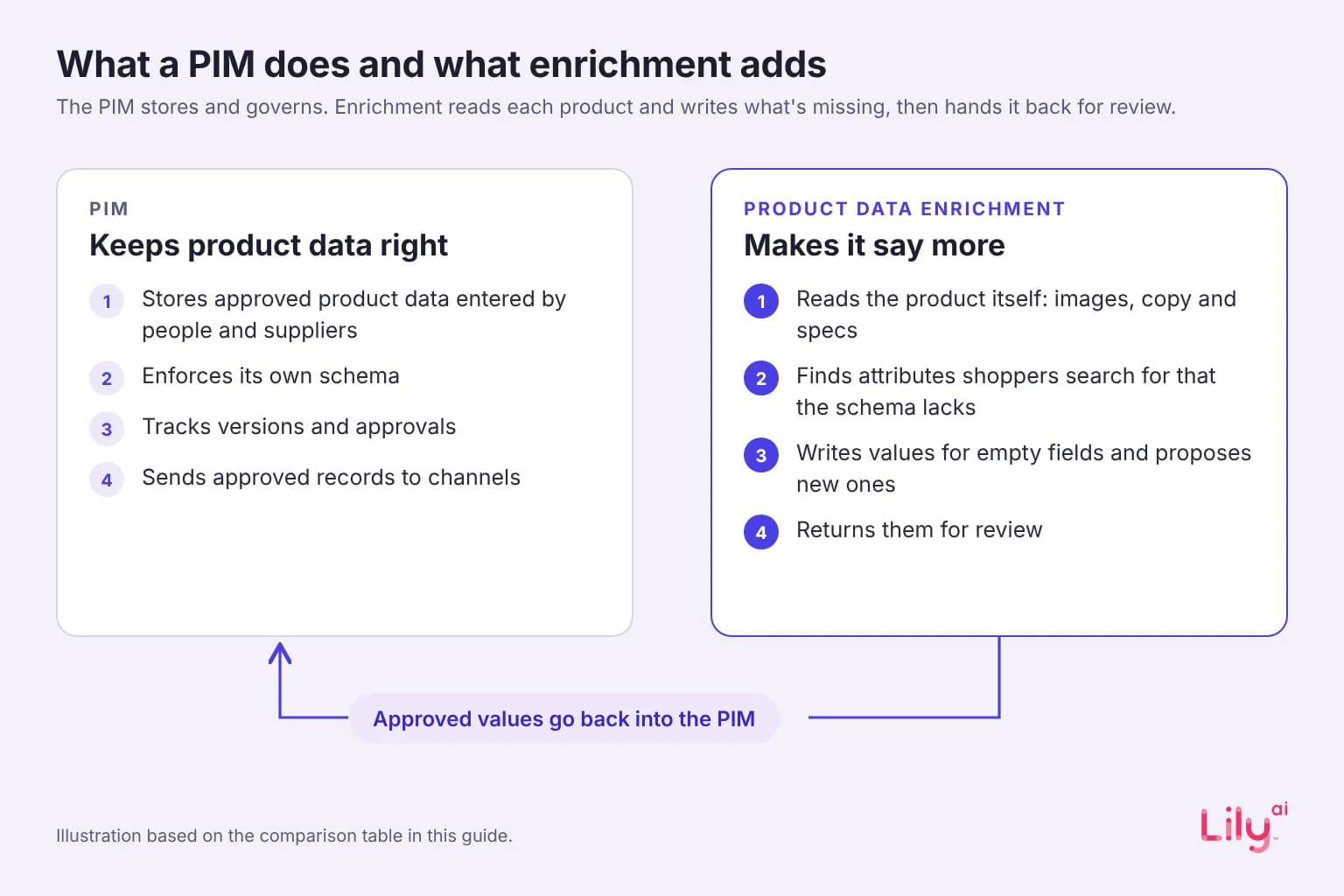
PIM and product data enrichment do different jobs, and most retail teams need both. The PIM stores and governs. Enrichment reads each product (its images, copy and specifications) and writes the missing attributes, then hands them back for review.
| PIM | Product data enrichment | |
|---|---|---|
| Main job | Store, govern and publish product data | Add facts and attributes the data is missing |
| Starting point | What people and suppliers enter | The product itself: images, copy, specs |
| Works against | Its own schema | What shoppers search for and what channels can read |
| Output | Approved records sent to channels | New or corrected attribute values, and proposed new fields |
| Measures success by | Completeness, accuracy, time to market | Coverage of shopper language, and channel performance |
| Typical owner | Merchandising or product data team | Ecommerce, search or performance team |
A PIM keeps product data right, and enrichment makes it say more. When enrichment skips the PIM, the business ends up with a second, unofficial version of the catalog. When a PIM runs without enrichment, the record stays accurate and thin.
PIM, PXM, MDM and DAM: which does what?
These four terms get mixed up because they overlap at the edges. Each one answers a different question.
| System | The question it answers | What it holds | Who relies on it |
|---|---|---|---|
| PIM | What is true about this product? | Attributes, copy, categories | Merchandising, ecommerce |
| PXM | How does this product come across in each channel? | Channel versions of copy, images and attributes | Ecommerce, brand |
| MDM | What is the one correct record for each core business entity? | Products, customers, suppliers, locations | IT, finance, operations |
| DAM | Where is the approved version of each image or video? | Photos, videos, brand files and their rights | Creative, studio, brand |
PIM vs PXM
PXM, product experience management, extends PIM from accuracy to presentation. A PIM makes sure the facts are correct. PXM tailors how those facts appear in each place a shopper meets the product: a shorter title for one marketplace, lifestyle images first for social, a different description length for a retail partner. In practice PXM is often sold as a layer on top of a PIM, so the choice is usually about how much channel tailoring your team needs to run by hand.
PIM vs MDM
MDM, master data management, governs the core records a whole business shares, and products are only one of them. It makes sure finance, the warehouse and the store all agree on a product’s ID, cost and supplier, alongside customer and location records. A PIM goes deeper on the selling side: the descriptive attributes, copy and channel formatting that MDM usually leaves out. Large retailers often run both, with MDM feeding the PIM its identifiers.
PIM vs DAM
DAM, digital asset management, stores the files: product photography, videos, brand assets and the usage rights attached to each. A PIM usually stores a link to the asset rather than the file itself. The two meet at the product page, where the PIM supplies the words and the DAM supplies the pictures.
Who decides which attributes the schema needs?
Somebody has to, and in most retailers nobody owns it outright. The schema was usually designed when the PIM was set up, around the attributes the site’s filters needed at the time. Channels have since asked for much more.
Google’s product data specification, for example, requires color, size, gender and age group for apparel sold in the US, and caps titles at 150 characters. It also offers optional fields that a launch-era schema rarely planned for: up to 100 product details, each a section, an attribute name and a value, and between 2 and 100 product highlights of up to 150 characters each (Google Merchant Center Help). A PIM built around six filters has nowhere to put most of that. Our guide to Google Shopping feed requirements covers which of those fields are required and which only help.
Three sources should decide which attributes to add, and none of them is the PIM:
- The channels’ specifications. What Google, Meta and the AI assistants that read your feeds can accept, and what each one requires.
- Shopper language. The words in your site search logs and search term reports that no current field can answer.
- The products themselves. What the images and specs show about a product that nobody has written down yet.
Enrichment works across all three at once. It reads the products, compares them with how shoppers describe what they want, and proposes both values and new fields. A person still approves the schema change, because a field added to a PIM is a promise to fill it for every product of that type. The same discipline applies to categories: our guide to Google product category shows how one category choice decides which attributes a product is expected to carry.
How enrichment feeds back into a PIM
The cleanest setups treat enrichment as a supplier to the PIM, with the same review any other supplier gets.
- Export. The PIM sends product records, with image links, to the enrichment process.
- Read. Enrichment reads the images, copy and specs, and compares each record with channel requirements and shopper language.
- Propose. It returns values for empty fields, corrections for wrong ones, and a list of attributes the schema doesn’t have yet.
- Review. The product data team approves values in bulk by category, and decides which proposed fields to add to the schema.
- Publish. Approved values go into the PIM, and the PIM sends them to every channel as usual.
- Measure. Performance by channel shows which new attributes earned their place, and that feeds the next round.
Run this way, the PIM stays in the system of record and the catalog gets richer each cycle. The alternative, where enrichment writes straight into one channel’s feed, can lift that channel while the website, the other channels and the PIM fall out of step.
A checklist you can run this week
- Count your schema. List the attributes each of your top five product types carries. Compare the list with the fields Google’s specification accepts for those products.
- Read 50 searches. Pull 50 recent site searches that returned weak results. Mark every word that no field in your schema could answer.
- Check one product’s journey. Pick a best seller and compare its PIM record with how it appears on your site, in Google Shopping and in an AI assistant’s answer.
- Name the owner. Write down who can approve a new attribute in your PIM, and how long that takes today.
- Find the side files. Ask the ecommerce and paid search teams whether they keep product data outside the PIM. Every side file is enrichment that never made it back.
Where this leaves a retail team
The director in that first meeting wasn’t avoiding work. They were naming a gap that most catalogs share: the PIM was built to keep data right, and nobody was given the job of deciding what the data should say. As more of the reading is done by machines that only know what a record states, that unowned question becomes a cost on every channel at once. A retailer that decides its schema by what shoppers ask, and fills it by reading the products, ends up with one record that works everywhere. One that leaves the schema as it was set up keeps paying for the same blank fields in every channel, every season.
Where Lily Max fits
Lily Max doesn’t replace your PIM. We optimize the product intelligence your feed manager, catalog system, or commerce stack distributes. It scans products and attributes against the surface and goal your team sets, generates titles, descriptions, attributes and taxonomy, and tests the changes before anything rolls out. Your team sets the goal and makes the final decision. In a matched-spend A/B test, a large apparel brand saw 28% more Google Shopping revenue with product data enriched by Lily Max (case studies). See how Lily Max works, or book a demo to see which attributes your catalog is missing.
Frequently asked questions
What is PIM in ecommerce?
PIM in ecommerce is the software that stores, governs and publishes a retailer’s product data, from attributes and copy to categories and links to images. It keeps one approved version of each product and sends it to the website, marketplaces and ad channels.
Do I need a PIM before I enrich product data?
No, enrichment can work from a store platform or a spreadsheet export. A PIM helps once the catalog is large, because it gives enriched values one approved home instead of scattering them across channel feeds.
What is the difference between PIM and PXM?
A PIM makes sure product facts are correct and consistent. PXM, product experience management, tailors how those facts are presented in each channel, such as different titles, image orders or description lengths.
What is the difference between PIM and MDM?
MDM governs the core records a whole business shares, such as products, customers, suppliers and locations. A PIM goes deeper on product information for selling, including descriptive attributes, copy and channel formatting.
What is the difference between PIM and DAM?
A DAM stores digital files such as product photos and videos, along with their usage rights. A PIM stores product information and usually links to those files rather than holding them.

See Lily in action
Book a personalized demo and see how Lily can grow your retail revenue.
Related Blogs
Product content management for AI-written copy: approvals, versions, rollback
Product content management for AI-written copy: why review comes before the full catalog runs, how every changed field is marked, and what rollback needs.
By Lily AI
What is product experience management (PXM)?
Product experience management (PXM) shapes how a product is shown in every channel. What it covers, how it differs from PIM, and why AI readers change it.
By Lily AI
Product listing optimization for AI shopping: a thin listing reads like its cheaper twin
Product listing optimization for AI shopping: put who a product is for, what it’s for and how it feels in fields machines read, or they compare only price.
By Lily AI
Google product category: 5,595 categories, and one for every shoe
Google's product taxonomy has 5,595 categories and one for every shoe. How to pick the right Google product category, with 25 examples and where it falls short.
By Lily AI
Product attributes: which ones each discovery surface reads, and what a good one looks like
Which product attributes each discovery surface reads, what a well-formed value looks like, and the 2026 Merchant Center fields to fill in first.
By Lily AI
Product Data Enrichment: What It Means When the Machines Are the Reader
Product data enrichment is not filling empty fields. Get the working definition, the four readers, the boundary with PIM, and a way to measure lift.
By Lily AI