How a Lily Max product feed A/B test can be set up in an afternoon

The ecommerce lead at a UK retailer said something on a call this month that every vendor in this category should have pinned above their desk: “during your biggest time of the year (holidays), every tool or anything you do just looks good.”
A Lily Max product feed A/B test is a matched-spend split, balanced to within one percent on pre-period revenue, run after a seven-day reset for 28, 45 or 60 days and read with difference-in-differences, so the result is the change in the gap between arms rather than the gap itself. The math is not new. What this post covers is everything around the math that decides whether the answer can be trusted.
He is right, and it sets a hard constraint on how we build. Retailers freeze changes through the holiday rush, so a test that runs in November proves nothing and a test that runs in December does not run. The honest window for measuring whether a product-data change moved revenue is a few weeks in autumn and a few in spring. If that is the window, then what limits how much a retailer can learn about its own catalog is how many clean tests fit inside it. A vendor who needs a call to set up a test and a call to read it out gives you two tests a year. Two lessons a year. So we built the testing layer around throughput.
What does a product feed A/B test setup involve?
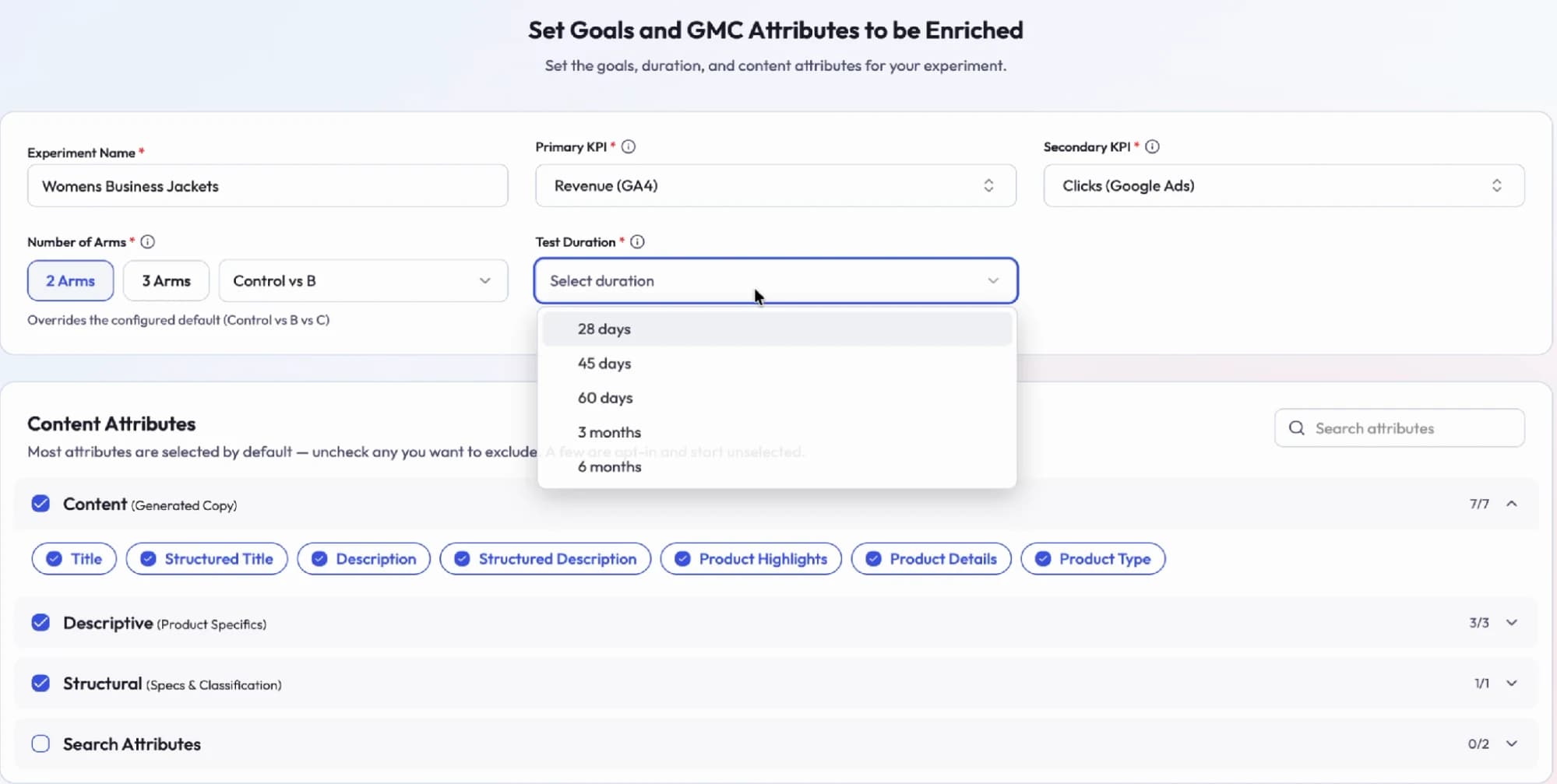
Setup is five screens and four decisions, and the decision most tools skip is which fields the test is allowed to change. The screens are: define the product groups, define the scope, connect the analytics, set the strategy, review and launch.
The four decisions, what each one fixes, and the options Lily Max offers.
| Decision | What it fixes | Options |
|---|---|---|
| Products | Which segment is tested, and what the rest of the catalog is held as | Any segment, such as one category; the rest is the comparison |
| Arms | How many treatments run against control | Two (control vs B) or three (control vs B vs C) |
| KPI | What “won” means | Primary: revenue as GA4 reports it. Secondary: clicks from Google Ads |
| Window | How long the read runs | 28, 45 or 60 days, or three or six months |
Then the minimum detectable effect is stated before the test starts. If the catalog is too small to detect the lift anyone expects, that gets said on day one rather than on day 28.
One more decision that most testing tools skip: which attributes the test is allowed to change. Title, structured title, description, product highlights, product details and product type are selected by default; a few are opt-in and start unselected. Google's product data specification defines what each of those fields accepts. That list is the test's blast radius, and it is written down before anything ships. What each of those fields does on the Google surface is in product feed optimization: the 2026 guide.
How is the split balanced?
Test and control are matched on pre-period revenue rather than assigned at random, and the two arms have to be balanced to within one percent before anything ships. Random assignment is fine for a million rows and a coin flip; on a few hundred products, one best seller landing in the wrong arm decides the test before it starts. So the tool builds the split, then checks it, and the day-zero gap is recorded and reported alongside the result. If the split cannot be balanced, the test does not ship.
I will admit this check felt like over-engineering when we added it. A balanced split is the difference between a result and a confident, wrong answer, and on small catalogs the wrong answer is the likelier one.
Why does the test start with a seven-day reset?
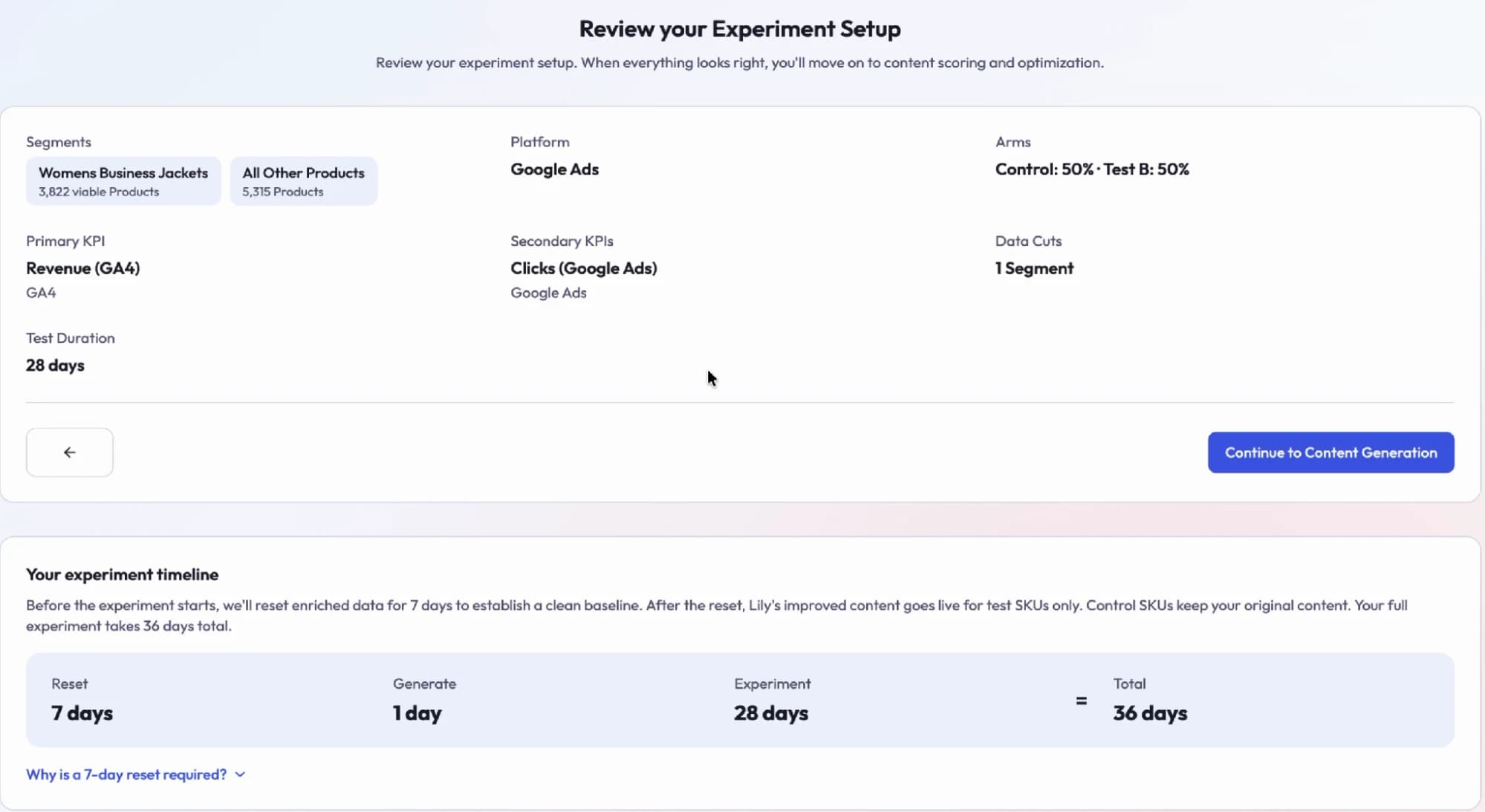
Before a Lily Max experiment starts, enriched data is reset for seven days to establish a clean baseline, because most retailers already have some enrichment from someone running on the feed. A test that starts the day the new copy lands starts with a contaminated baseline. After the reset, the rewritten content goes live for test SKUs only, and control SKUs keep their original content. A 28-day test is a 36-day commitment: seven to reset, one to generate, 28 to run.
Those seven days are the part retailers push back on, and I understand why; nobody wants to switch off something that might be working. We kept it because the alternative is a result nobody can attribute.
The sync check nobody asks for
There is a failure mode that has nothing to do with statistics. Test copy and control copy reach Google through feeds, and feeds have schedules. If the rewritten copy lands twelve hours before the control refresh, then for twelve hours the two arms are not the comparison you designed. In one retailer's setup this month, a twelve-hour gap between the two feeds mismatched 242 products in a single day, which is the kind of thing that never shows up in a results dashboard and quietly poisons the first week.
So the pre-launch checklist includes confirming that the test and control copies are in sync before the window opens. It is an unglamorous check. It is also the one I would ask any vendor about first.
How is the test read? The bidder moves before the shopper does
The first system to react to a product-data change is Google's bidder, so the test is read at checkpoints on day 1, 3, 7 and 14 with the spend shift reported separately from revenue. Fix a product's data and the bidder re-reads the listing, decides the product is a better bet, and shifts spend toward it. In one live test this month it had moved roughly a tenth more spend behind the rewritten products by day ten, before revenue had moved at all. In a test last month it moved eight percent the other way. Those are observations from two tests and I would not build a claim on them. They are enough to change how we read a test.
A day-ten ROAS number mostly reflects what the bidder decided and only a little of what shoppers did. Difference-in-differences does the rest: the result is the change in the gap between arms, so a viral week or a bidder swing that hits both arms averages out. How the bidder and the other readers consume the same record is in how AI shopping assistants pick products.
Titles stay put once a test is live
One rule we learned: rewrite a product's title and Google resets what it knows about that product; best sellers dip for three to four weeks before gains arrive. Inside a 28-day window that dip is the whole test. So once a test is live, titles are left alone and the product details and highlights fields carry the change. Title work is real and it pays, but it is a decision made outside the test window, with its own longer read. What goes in those carrier fields is in Merchant Center conversational attributes.
Related: across our tests, the “rewrite your product titles” best practice wins about half the time. The other half, adding to the existing title beats replacing it. Two tests a year would never have found that, which is the entire argument for throughput.
Rollout
When the window closes the answer arrives on its own. The winner rolls out to the rest of the category in one click. The loser never leaves the test. There is no step where someone has to remember to revert the control group, because the control group never changed.
Results
The numbers we publish carry their method in the sentence, because a number without one is a claim we cannot defend to a finance team. In a matched-spend A/B test with a 28-day holdout, the rewritten product-language input produced a 28% increase in Google Shopping revenue against the untouched control for an apparel retailer. On Meta Advantage+, a holdout test cross-validated with Meta's own Conversion Lift measured a 21.4% improvement in ROAS for a footwear retailer. The first is our own controlled result. The second was validated by the platform, and we keep the two labelled differently on purpose. The anatomy of the first test is in does feed optimization actually increase sales?
One honest note that goes in every setup screen: with a few hundred products a result is a strong signal and falls short of mathematical proof, and we say so before the test starts rather than after.
What's next
The freeze is weeks away. That is enough for one clean test now, and the goal for next year is a dozen per retailer per window, which means the setup has to get faster still and the sync check has to stop being a checklist item and become automatic. We are also working on what a 60-day read of Google's free listings and AI surfaces should look like, because those update on a slower clock than the bidder and a 28-day window ends before most of that effect has started.
Frequently asked questions
What is a product feed A/B test?
A product feed A/B test changes the product data for one group of SKUs, leaves a matched group untouched, and measures the difference in revenue between the two over a fixed window. The untouched group is what turns a before-and-after number into a result.
How long should a product feed A/B test run?
Lily Max offers 28, 45 or 60 days, or three or six months, and adds a seven-day reset before the window opens. Google's bidder reacts in the first two weeks and free listings and AI surfaces react later, so longer windows read more of the effect.
Why are test and control matched instead of randomized?
On a few hundred products, random assignment can put one best seller in the wrong arm and decide the test before it starts. Matching on pre-period revenue and balancing to within one percent removes that risk.
Why should titles not change during a test?
Rewriting a title makes Google reset what it knows about the product, and best sellers dip for three to four weeks before gains arrive. Inside a 28-day window that dip would be the whole result.
What is difference-in-differences in a feed test?
Difference-in-differences measures the change in the gap between test and control from the pre-period to the test period, rather than the gap itself. A viral week or a bidder swing that hits both arms averages out.

See Lily in action
Book a personalized demo and see how Lily can grow your retail revenue.
Related Blogs
How Lily Max checks AI-generated product descriptions at catalog scale so nothing goes missing
AI-generated product descriptions lose facts before they invent them. How Lily Max splits writing, contracting and checking, then scores records in five different ways.
By Lily AI
One record, four readers: product information syndication for Google, Meta, onsite search and AI assistants
Product information syndication breaks when four tools keep four copies. How Lily Max derives one record per product and renders it for Google, Meta and AI.
By Lily AI
Lily AI Launches Product Content Optimization for SEO, AEO & GEO
Lily AI has launched a new solution built for the realities of SEO and GEO in 2025, automatically enriching, standardizing, and optimizing product content across ecommerce websites.
By Purva Gupta
Lily AI’s Winter 2025 Release Is Here
Lily AI’s Winter 2025 release brings a suite of advanced features that transform how retailers optimize product catalogs for discoverability and conversion across every channel.
By Lily AI
Lily AI Unveils Its No-Code Product Attributes Platform
The next generation of the Lily AI product attribute platform is now available. With the Lily app, retailers and brands get end-to-end control over attribute management and workflows.
By Lily AI
Start Harnessing Natural Language Search to Optimize Google Ad Performance
Google Shopping Ads are perhaps a retail marketer's most powerful weapon, and optimizing them with AI makes ads even more powerful. Here's how to operationalize natural consumer language.
By Lily AI